
nkt-edge: webhooks without exposing the hub
A deployment webhook needs an address GitHub, GitLab or your CI can reach. You usually don't want to expose the hub like that: it sits at home or in an office behind NAT, and access to it is access to every host. nkt-edge solves this: a small separate program (about 8 MB) on a cheap VPS with a public address accepts only its roles from the internet (deployment webhooks and/or signed API token requests) and passes them to the hub over a tunnel the hub keeps to it.
Layout
GitHub / GitLab / CI ──HTTPS 443 (certbot)─────────▶ VPS: nkt-edge
                                                      ▲
                                    tunnel 8444: TLS 1.3 + token,
                                    opened by the hub
                                                      │
hub behind NAT, no open ports- The hub connects to the edge and keeps the connection; its address may change, it needs no public IP. On a drop the hub reconnects.
- The edge accepts
POST /hooks/{id}and passes the request to the hub through the tunnel. Through the tunnel the hub serves only this edge's roles: the UI, password login and websockets are never reachable via an edge. - Repository or registry polling is an alternative without an edge at all: the hub asks by itself, nothing to expose, but a deployment starts with the polling delay.
Roles and several edges
An edge has roles: what it accepts from the internet.
| Role | What | EDGE_ROLES |
|---|---|---|
| webhooks | POST /hooks/{id}: a push from GitHub, Gitea, GitLab or CI → a deployment | hooks |
| API | signed API token requests to /api/auth/me, /api/hub/…, /api/hosts/…: n8n, CI and scripts from outside | api |
| outside checks | the hub asks the edge through the tunnel to check DNS, ports and HTTPS from the internet; this role accepts nothing from the internet | probe |
| callbacks | bot buttons and commands (Slack): POST /callbacks/slack/…; the hub checks the Slack signature | callbacks |
Roles are ticked at install time; to change them, use "Reinstall" on the edge (the same edge on the same host; the tunnel token and certificate stay). The hub serves through the tunnel only this edge's roles, even if the edge itself let more through.
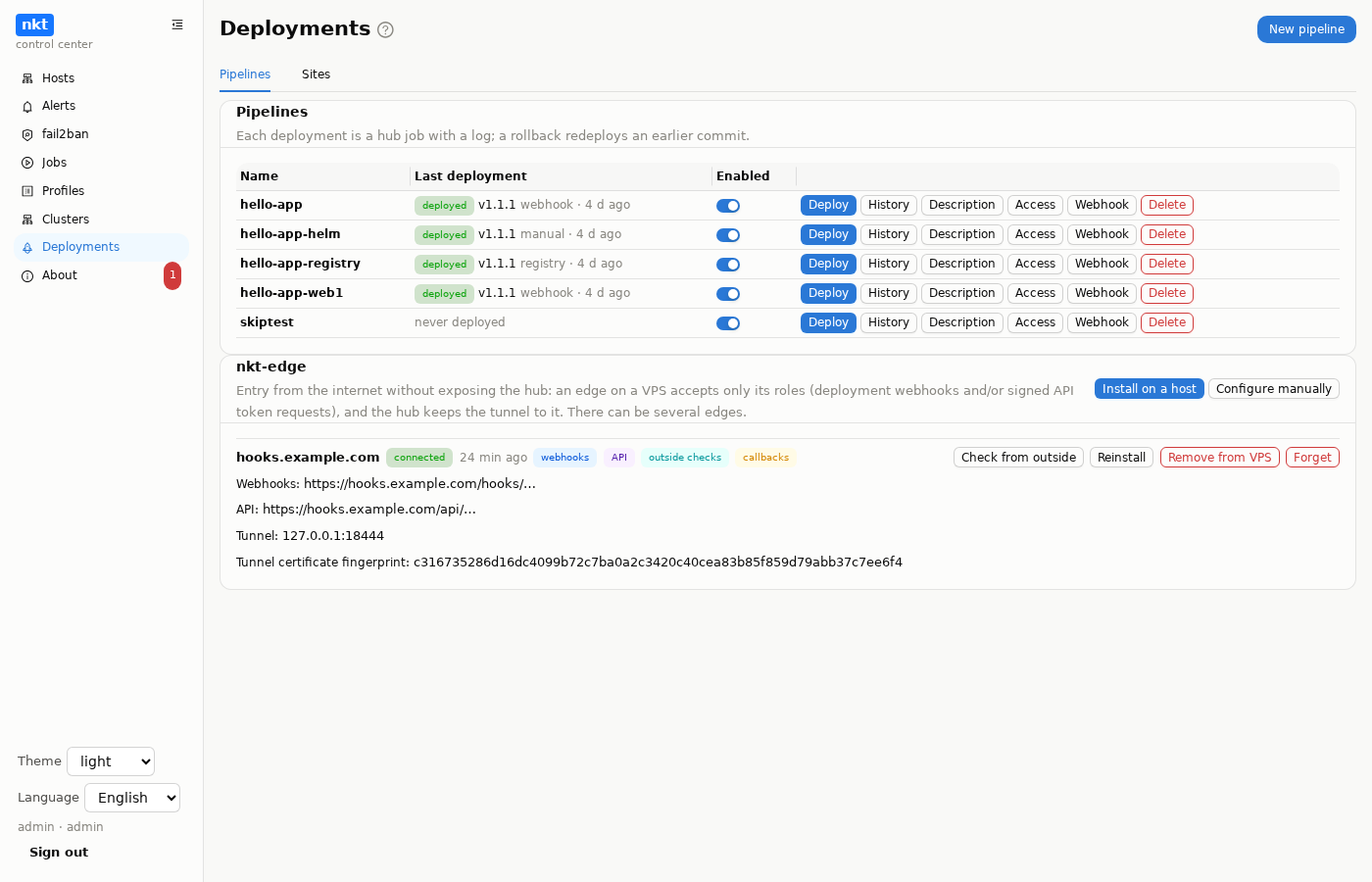
There can be several edges, each on its own VPS and name: for example, webhooks on hooks.example.com and the API on api.example.com on another VPS, to separate what is open from which address. The nkt-edge card lists them all, each with its state, roles, addresses and actions.
The API role passes only signed token requests (X-NKT-API-Key, -Timestamp, -Nonce, -Signature): the token secret never crosses the network or reaches the VPS, and each signature works once, so a compromised VPS gets nothing it could replay. The edge itself rejects Authorization: Bearer, cookies, websockets, password login and paths outside the token API, and the hub checks again. Only tokens with the "through nkt-edge" box are accepted via an edge; the token's address list is checked against the client address the edge passed on. The rate is EDGE_API_RATE (120 per minute per address).
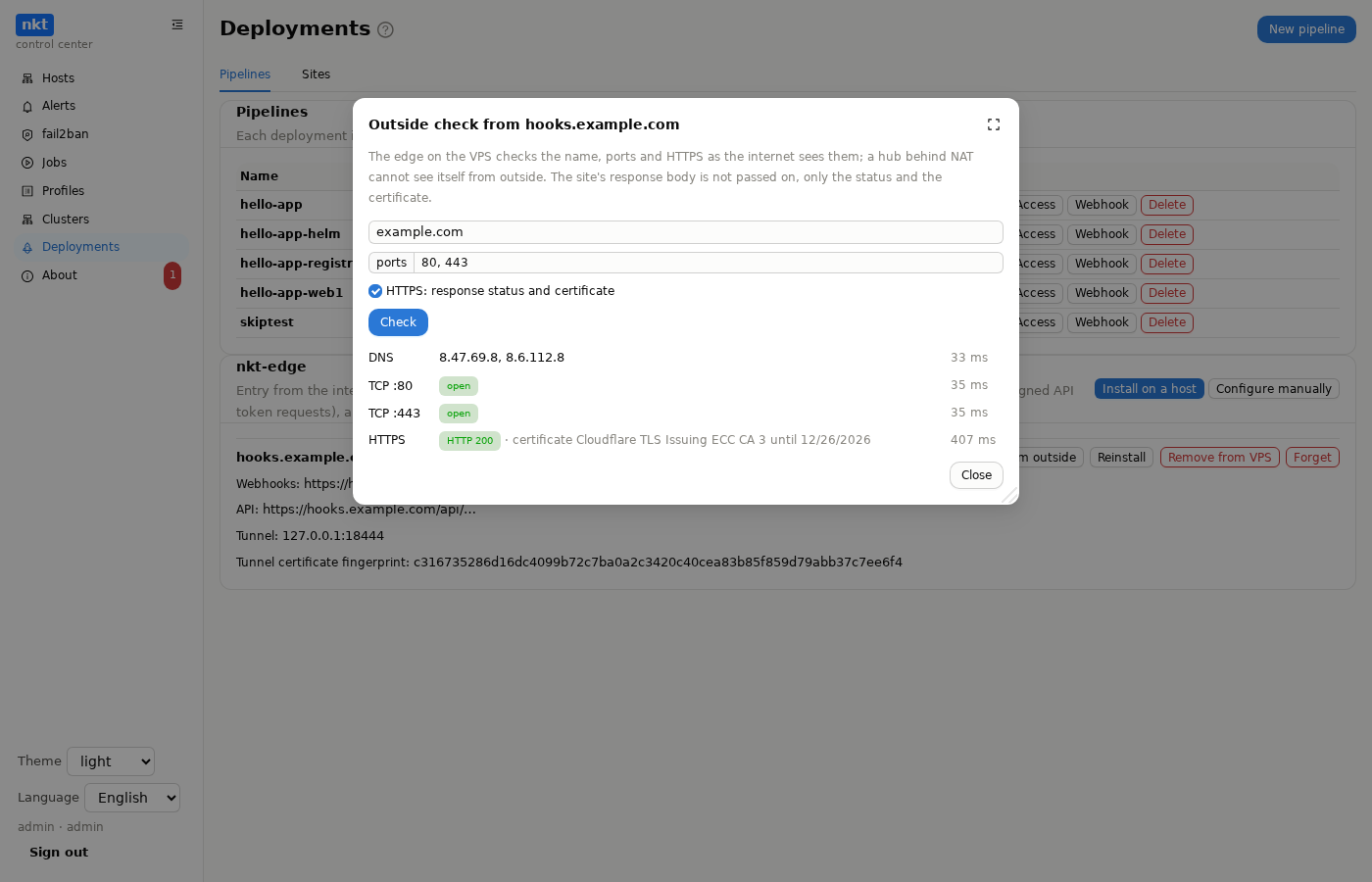
Outside checks. A hub behind NAT cannot see itself from outside: its check of port 80 or a site's HTTPS runs from inside the network and can be wrong either way. An edge with the probe role runs these checks from the VPS, as the internet does: where the name points (the VPS resolver), whether 80 and 443 are open, what HTTPS answers and with which certificate. The hub uses it by itself when such an edge is connected: in the "Sites" wizard, the site check and the dry run, marked "checked from outside via nkt-edge …"; without one, the check runs from the hub as before. The edge's "Check from outside" button does the same by hand for any name and ports. The edge does not pass on site response bodies, only the status and the certificate. Checks do not reach into the VPS's own network: loopback, private, link-local (cloud metadata) and CGNAT addresses get "blocked: not a public address".
Security model
- The edge holds nothing valuable: no database, no pipeline secrets, no host access. The hub verifies the webhook signature. A compromised VPS can only send requests the hub rejects without a valid signature.
- Filters on the edge: only
POSTto/hooks/{id}, a body up to 1 MB, a per-address rate limit (EDGE_RATE, 60 per minute), optionally GitHub addresses only (EDGE_GITHUB_ONLY, the list fromapi.github.com/meta).CookieandAuthorizationaren't passed to the hub; the sender's address goes inX-Forwarded-Forfor the hub's log. - The tunnel — TLS 1.3 with the edge's self-signed certificate (name
nkt-edge, created once and kept in/var/lib/nkt-edge/tunnel/). The hub uses exactly that certificate as the only verification root — the edge can't be impersonated on the way. Then a handshake with a token (at least 32 characters, compared in constant time), and a stream multiplexer on top. - The service on the VPS — a system user
nkt-edgewithout login, the only capability is binding 443,ProtectSystem=strict, a system call filter. It gets the certificate key only as a copy in/etc/nkt-edge/tls(groupnkt-edge, 0640). - The edge log — one line per request: address, method, path, status. Request values have no line breaks — neighboring entries can't be forged.
Requirements
- A VPS with a public address, Linux (Debian/Ubuntu — certbot is installed via apt), amd64/arm64/arm.
- A name (e.g.
hooks.example.comor the VPS's own name) with an A/AAAA record pointing to the VPS. - Open on the VPS: 80 (certbot issues and renews the certificate, HTTP-01), 443 (webhooks), 8444 (the tunnel from the hub; can be restricted to the hub's address if it is static).
Install from the hub
- Add the VPS to the hub as a regular host (installing nkt on it is not required — only SSH is).
- "Deployments" → the nkt-edge card → "Install on a host": host, name, roles (webhooks, API), e-mail for Let's Encrypt (optional), "GitHub addresses only". The name is taken from the host's address in the hub if it is a DNS name; the "check the name" button tells right away whether it points to this host.
- A hub job (log — like other jobs):
- SSH connection; name ↔ IP: the name is resolved and compared with the VPS addresses (the one the hub uses for SSH and the addresses on its interfaces) — on a mismatch the installation stops; ports: 8444 and 443 are free, and whoever holds 80 is noted;
- the
nkt-edgeprogram — built from the hub's source or downloaded from a release with a checksum check; - the
nkt-edgeuser,/usr/local/bin/nkt-edge,/etc/nkt-edge/edge.env(0600, with a generated token), the unit and the certbot deploy hook/etc/nkt-edge/certbot-deploy.sh; - certificate: certbot is installed if missing and issues the certificate in standalone mode — it brings up a temporary server on 80 itself, no nginx needed. If 80 is held by a systemd service (e.g. nginx), certbot stops it for a few seconds during issuance and starts it again — it remembers these hooks for renewals too. The deploy hook puts a copy for the service; the expiry date goes into the log;
- the service starts and is checked not to restart in a loop; if ufw is active, 80, 443 and 8444 are opened;
- the hub fetches the tunnel certificate over SSH, remembers it and connects;
- check
https://name/healthzfrom the hub — the way GitHub will come; if the hub has no internet access — from the VPS.
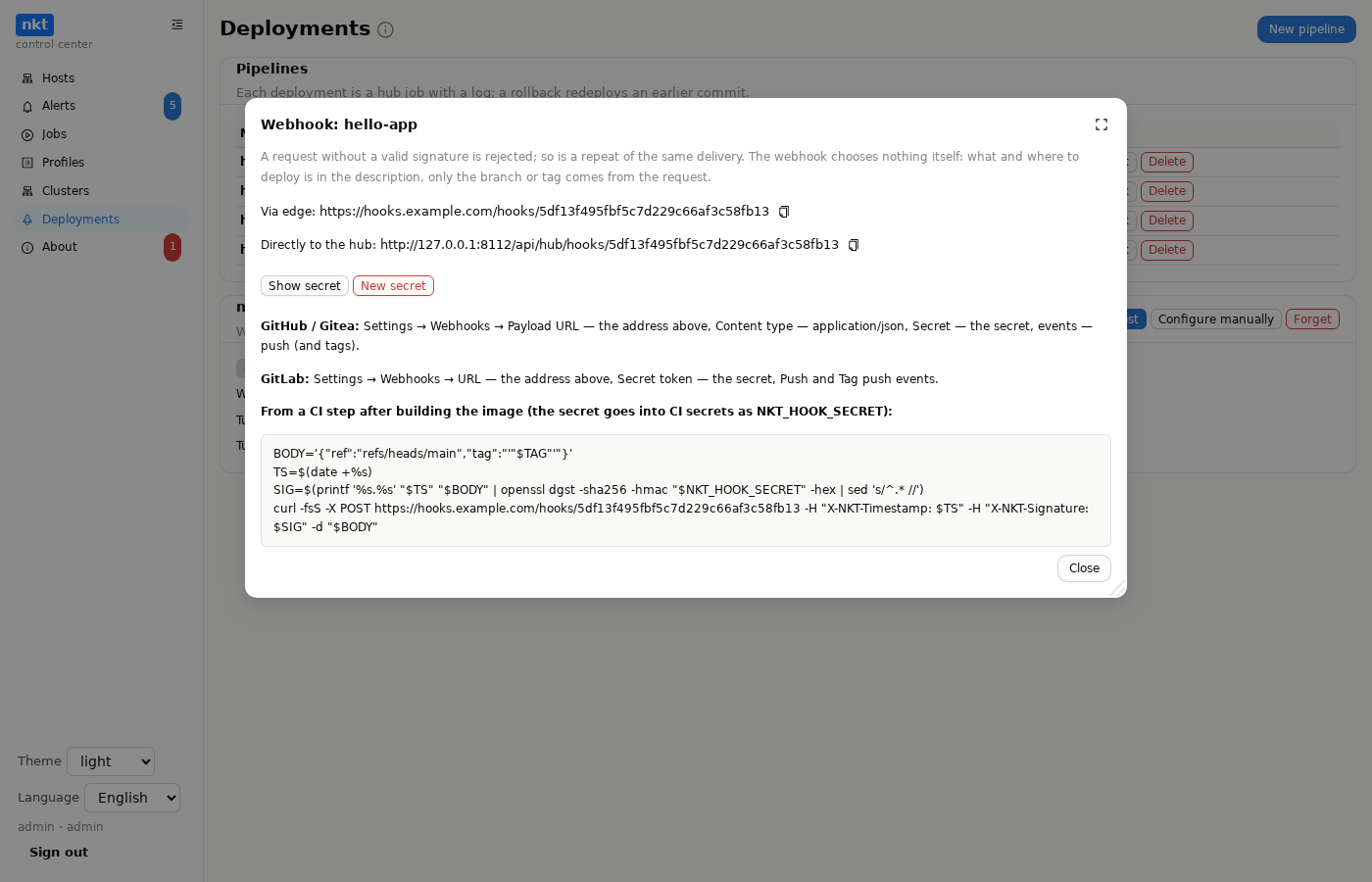
- The card shows "connected", the webhook address and the tunnel certificate fingerprint. Every pipeline's "Webhook" window gets a "Via edge" line with the address
https://hooks.example.com/hooks/…— next to "Directly to the hub".
Renewal — the certbot package's certbot.timer; after a renewal the deploy hook updates the copy, and edge re-reads the certificate itself, without a restart or a tunnel drop. If nkt runs on the host, the certificate is also visible on that host's "Certificates" page.
If 443 on the VPS is taken
The VPS already runs nginx, Caddy or another web server on 443 — then edge goes behind that server: it takes webhooks over HTTP on loopback only, and TLS stays with your server.
"Install on a host" → the "proxy port" field, e.g.
8445.edge.envgetsEDGE_PROXY_ADDR=127.0.0.1:8445; ufw opens only 8444. A certbot certificate for the name is still issued (/etc/letsencrypt/live/name/), and after a renewal the deploy hook reloads nginx.In your server, forward
/hooks/and/healthzof that name to the edge port (a snippet is in the install log; the hub doesn't edit someone else's web server):nginxserver { listen 443 ssl; server_name hooks.example.com; ssl_certificate /etc/letsencrypt/live/hooks.example.com/fullchain.pem; ssl_certificate_key /etc/letsencrypt/live/hooks.example.com/privkey.pem; location /hooks/ { proxy_pass http://127.0.0.1:8445; proxy_set_header X-Real-IP $remote_addr; client_max_body_size 1m; } location = /healthz { proxy_pass http://127.0.0.1:8445; } }hooks.example.com { handle /hooks/* { reverse_proxy 127.0.0.1:8445 } }
Edge takes the sender's address from X-Real-IP (or the last X-Forwarded-For address) — only when the request comes from loopback, so the rate limit and "GitHub addresses only" work behind a proxy too.
Manual install
If you'd rather not add the VPS to the hub:
V=$(curl -fsSL https://api.github.com/repos/piqab/nkt/releases/latest | sed -n 's/.*"tag_name": *"\(.*\)".*/\1/p')
curl -fsSLO https://github.com/piqab/nkt/releases/download/$V/nkt-edge-linux-amd64
curl -fsSLO https://github.com/piqab/nkt/releases/download/$V/SHA256SUMS
sha256sum -c SHA256SUMS --ignore-missing
sudo install -m 0755 nkt-edge-linux-amd64 /usr/local/bin/nkt-edge
sudo useradd --system --no-create-home --home-dir /nonexistent --shell /usr/sbin/nologin nkt-edge

sudo install -d -m 0750 -g nkt-edge /etc/nkt-edge /etc/nkt-edge/tls
curl -fsSL https://raw.githubusercontent.com/piqab/nkt/main/deploy/edge.env.example \
  | sudo install -m 0600 /dev/stdin /etc/nkt-edge/edge.env
curl -fsSL https://raw.githubusercontent.com/piqab/nkt/main/deploy/nkt-edge-certbot-hook.sh \
  | sudo install -m 0755 /dev/stdin /etc/nkt-edge/certbot-deploy.sh
curl -fsSL https://raw.githubusercontent.com/piqab/nkt/main/deploy/nkt-edge.service \
  | sudo install -m 0644 /dev/stdin /etc/systemd/system/nkt-edge.service
openssl rand -base64 33                   # token → EDGE_TOKEN
sudo $EDITOR /etc/nkt-edge/edge.env       # EDGE_DOMAIN, EDGE_TOKEN

sudo apt-get install -y certbot
sudo certbot certonly --standalone -d hooks.example.com --cert-name hooks.example.com \
  --deploy-hook /etc/nkt-edge/certbot-deploy.sh
sudo env RENEWED_LINEAGE=/etc/letsencrypt/live/hooks.example.com /etc/nkt-edge/certbot-deploy.sh

sudo systemctl daemon-reload
sudo systemctl enable --now nkt-edge
sudo cat /var/lib/nkt-edge/tunnel/tunnel.crt
If 80 is taken (say, by nginx), add --pre-hook "systemctl stop nginx" --post-hook "systemctl start nginx" to certbot.
Then in the hub, "Deployments" → nkt-edge → "Configure manually": the tunnel address vps.example.com:8444, the webhook name, the same EDGE_TOKEN and the tunnel certificate (the whole output of the last command, with BEGIN and END).
From source: make edge puts the binaries into dist/.
Edge settings
| Variable | Default | Meaning |
|---|---|---|
EDGE_DOMAIN | — | The webhook name (for the log and the deploy hook) |
EDGE_TOKEN | — | Shared secret with the hub, at least 32 characters |
EDGE_CERT_FILE, EDGE_KEY_FILE | /etc/nkt-edge/tls/fullchain.pem, …/privkey.pem | A copy of the certbot certificate; edge re-reads it after a renewal |
EDGE_DATA_DIR | /var/lib/nkt-edge | The tunnel certificate |
EDGE_HTTPS_ADDR | :443 | Webhooks |
EDGE_TUNNEL_ADDR | :8444 | Where the hub connects |
EDGE_RATE | 60 | Requests per minute from one address |
EDGE_GITHUB_ONLY | false | Accept webhooks from GitHub addresses only |
EDGE_SELF_SIGNED | false | No certbot, the tunnel certificate instead — for testing and internal networks |
EDGE_PROXY_ADDR | empty | Behind a reverse proxy: webhooks over HTTP on this loopback address (127.0.0.1:8445), 443 is not taken |
EDGE_ROLES | hooks | Comma-separated roles: hooks for webhooks, api for signed API token requests, probe for outside checks on the hub's request, callbacks for bot callbacks |
EDGE_API_RATE | 120 | API requests per minute per address |
Updating
- From the hub — "Install on a host" again on the same host: the program, unit and hook are replaced, the token and a valid certificate stay, the hub reconnects.
- By hand — a new binary over
/usr/local/bin/nkt-edgeandsudo systemctl restart nkt-edge. The tunnel certificate doesn't change, nothing to do in the hub.
Removal
"Remove from VPS" on the card (if the hub installed edge) — a hub job: stops and disables the service, deletes
/usr/local/bin/nkt-edge, the unit,/etc/nkt-edge, the data (/var/lib/nkt-edge), thenkt-edgeuser, the ufw rule for 8444 and the certbot certificate for the name (if edge issued it — its renewal config has edge's hook), then the hub forgets edge. The ufw rules for 80 and 443 stay — another server on the VPS may use them."Forget" only disconnects the hub from edge and erases its settings; the service on the VPS stays.
By hand:
bashsudo systemctl disable --now nkt-edge sudo certbot delete --cert-name hooks.example.com sudo rm -f /usr/local/bin/nkt-edge /etc/systemd/system/nkt-edge.service sudo rm -rf /etc/nkt-edge /var/lib/nkt-edge /var/lib/private/nkt-edge sudo systemctl daemon-reload sudo userdel nkt-edge sudo ufw delete allow 8444/tcpand "Forget" in the hub.
Log and checks
sudo journalctl -u nkt-edge -f
curl -s https://hooks.example.com/healthz     # {"ok":true,"hub":true,"version":"…"}
"hub": true — the hub is connected to the tunnel. On the hub every delivery is recorded in the audit log (pipeline.hook.*) with the sender's address and an (edge) mark.
If it doesn't work
| Symptom | Cause and fix |
|---|---|
The card says "disconnected", error x509: … | The hub doesn't trust the certificate: a wrong PEM pasted or the edge created a new one (an old-format certificate without the nkt-edge name is replaced automatically). Copy tunnel.crt into "Configure manually" again or reinstall from the hub |
"edge accepts the connection and closes it right away" (before — just EOF) | The service on the VPS is crashing and restarting: journalctl -u nkt-edge. If it says listen tcp :443: bind: address already in use, 443 is taken by another server — put edge behind it (section above) |
| Install: "port … is held by a stray nkt-edge process (pid …)" | Besides the service, another nkt-edge runs (started by hand or left from an earlier install) and holds the ports — the service crashes because of it. sudo kill <pid> and retry |
| "edge rejected the hub: ERR token" | The token in the hub and EDGE_TOKEN on the VPS differ |
| "disconnected", timeout | Port 8444 on the VPS is closed (ufw, the provider's security group) or the tunnel address is wrong |
The log shows TLS handshake error … missing server name or … not configured from unknown addresses | Internet scanners knocking by IP or other names — these are refusals, not a problem |
The webhook answers 503 hub not connected | The hub isn't holding the tunnel right now — see the card status and the hub log |
| 429 | EDGE_RATE exceeded from one address |
| 403 | EDGE_GITHUB_ONLY is on and the request isn't from GitHub addresses (e.g. from GitLab or curl) |
| 404 | Not a POST or the path isn't /hooks/<id> — check the address in the "Webhook" window |
| 401 from the hub | Wrong signature or secret, a replayed delivery, a stale timestamp (nkt signature) — see Deployments |
| Install: "the name … points to …, while the VPS has …" | The name's A record doesn't point to this VPS — fix it (or pick another name) and retry; "check the name" in the form shows the same in advance |
| Install: "certbot did not issue a certificate" | Port 80 is closed from outside (the provider's firewall), the A record hasn't propagated, a Let's Encrypt rate limit; the certbot output is in the message |
| Install: "port 80 is taken …, but it is not a systemd service" | 80 is held by a program started by hand or in a container — certbot standalone can't stop it; free 80 for the installation |
certificate: … no such file in the service log | No certificate copy in /etc/nkt-edge/tls — run the deploy hook ("Manual install") or reinstall from the hub |
| The service doesn't start | EDGE_TOKEN shorter than 32 characters, no certificate, port 443 or 8444 taken — the message is in the service log |
| 403 behind a proxy with "GitHub only" on | The proxy doesn't pass X-Real-IP — add proxy_set_header X-Real-IP $remote_addr; |