
Deployments: from Git to clusters and hosts
The hub's "Deployments" section deploys your applications from a Git repository: as a manifest to Kubernetes clusters, as a Helm release or with a hub script. Building images and running tests is up to your CI (GitHub Actions, GitLab CI, Gitea) or you — nkt takes the second half: "ready → deploy".
Why this way: keys to hosts and clusters stay on the hub. CI only gets the right to "poke" one pipeline's webhook, and what goes where is decided by the description on the hub — only the branch, commit and tag are taken from the request.
Experimental feature
A deployment changes stacks on hosts — starts, replaces and removes them, and removes the old stack when the host or the stack name changes. Run the “Dry run” first, try it on test hosts, check the job log. The same banner sits at the top of the “Deployments” section.
Pipeline
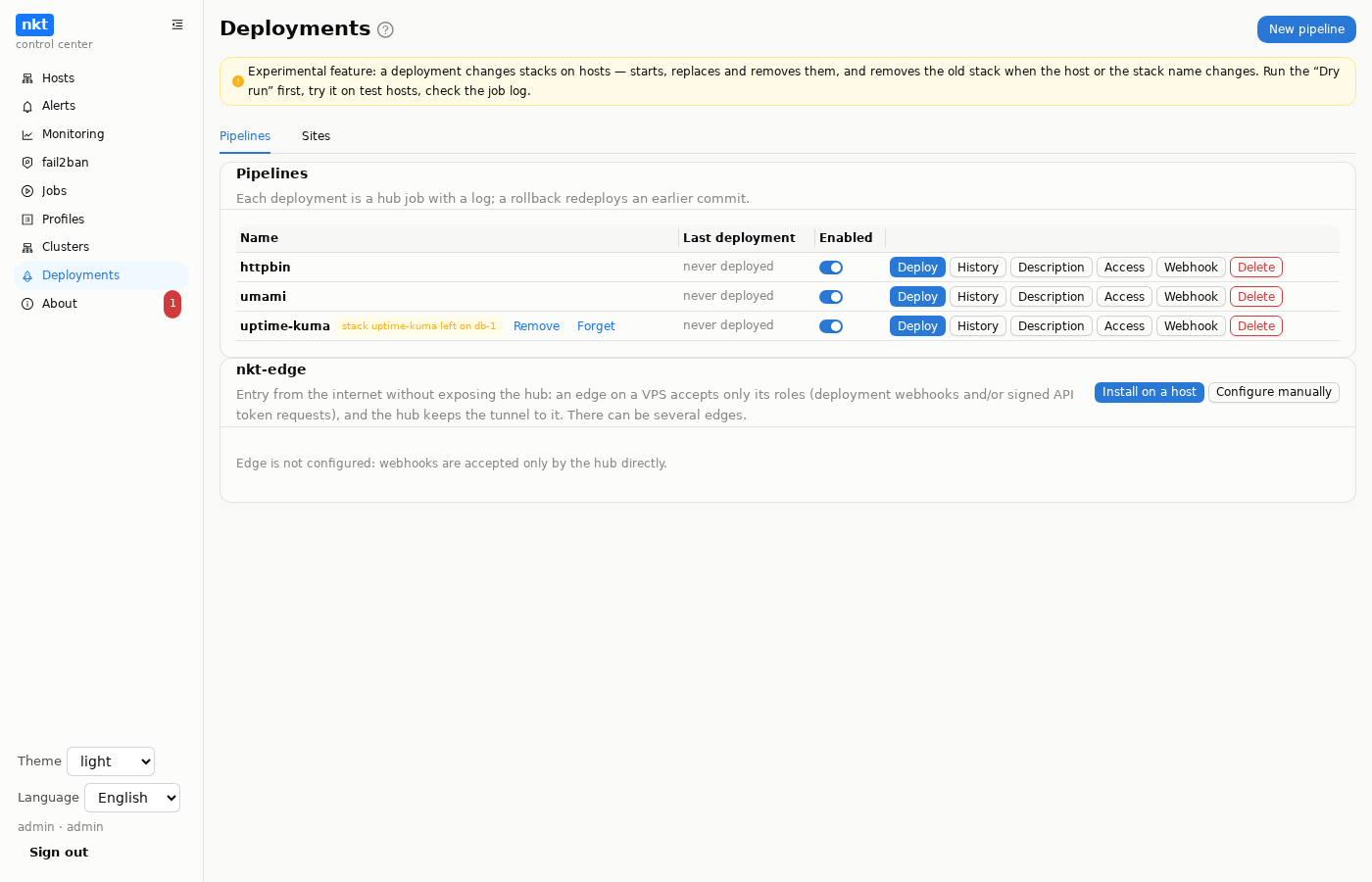
"New pipeline" → a name and a YAML description. Editing happens in a window with a diff, the description has a revision history with notes; it is validated before it is saved. There are no secrets in the description — they are in "Secrets".
repo: https://github.com/org/app.git
ref: main                 # a push to this branch — a deployment
tags: "v*"                # and/or repository tags matching a pattern

action: manifest          # manifest | helm | script
manifests: [deploy/k8s.yaml]
clusters: [prod]          # hub clusters
# group: prod             # or the clusters of a host group

# poll: 5m                # poll the repository
# registry: ghcr.io/org/app
# registry_tags: '^v?\d+\.\d+\.\d+$'
# registry_poll: 5m
All fields
| Field | For | Value |
|---|---|---|
repo | always | https://…, ssh://… or git@host:path. No login or password in the URL — a token or key goes into "Secrets" |
ref | branch | A push to it deploys its head. ref or tags is required |
tags | tags | A pattern (glob, v*): a repository tag matching it deploys that tag |
action | always | manifest, helm or script |
manifests | manifest | A list of files in the repository |
clusters | manifest, helm | Cluster names from the "Clusters" section |
group | manifest, helm | A host group: every cluster whose first control plane is in that group. Can be combined with clusters |
helm.repo_name, helm.repo_url | helm | The chart repository (helm repo add) or oci://… |
helm.chart, helm.version | helm | Chart and version (empty — latest) |
helm.release, helm.namespace | helm | Release name and namespace |
helm.values | helm | A values file in the repository |
helm.tag_key | helm | The values key to put the image tag into: image.tag |
script | script | A hub script in the repository (deploy/deploy.nkt) |
poll | trigger | Branch polling interval, at least 1m |
registry | trigger | An image whose tags to watch: ghcr.io/org/app, org/app (Docker Hub), registry.example.com:5000/app |
registry_tags | trigger | A regular expression for suitable tags; default ^v?\d+(\.\d+){1,2}$ |
registry_poll | trigger | Registry check interval, default 5m |
Every value is checked separately: branches, tags and paths against strict patterns, git is called with --, files are read only inside the checkout (escaping it, including via a symlink, is forbidden).
Substitutions
Manifests and values get:
| Substitution | Value |
|---|---|
{{nkt.tag}} | the tag from the request, button or registry; without a tag — the short commit (12 characters) |
{{nkt.commit}} | the full commit |
{{nkt.ref}} | the repository branch or tag |
A script gets the same values as the TAG, COMMIT, REF parameters (param TAG "image tag" at the start of the script).
Actions
- manifest — manifest files from the repository are joined, the substitutions applied, and
kubectl applyruns on the control plane of each cluster (through the node's API, over the same channel as other requests to the host). Every application lands in the hub's manifest library ("Clusters" → "Manifests") with the notepipeline <name> <commit>. - helm —
helm upgrade --installin each cluster: values from the file, the tag intotag_key. Helm is needed on the control plane — if it's missing, install it with the "Install Helm" button on the node's Kubernetes tab. - script — a hub script from the repository:
docker stack … up,git clone, a service restart,wait … http— anything the script language can do. No cluster needed.
Only clusters in the "ready" state are used. If the deployment fails in some clusters, the job ends with "failed in N of M", and the log shows where and why.
Compose stack
The compose action deploys a docker compose stack from the repository to hub hosts, one after another:
repo: https://codeberg.org/me/shop.git
ref: main
action: compose
compose:
  file: deploy/docker-compose.yml   # the compose file in the repository
  project: shop                     # the stack on the host: /srv/compose/shop
  hosts: [web1, web2]               # or group: prod; the hub machine is localhost
  files: [deploy/nginx.conf, deploy/conf/]  # what else the stack needs
  wait_timeout: 5m                  # wait for startup and healthchecks
  site: shop.example.com            # check over HTTPS after the deployment (or a block, see below)
Substitutions apply to the compose file and the files next to it:
image: ghcr.io/org/shop:{{nkt.tag}}.Files from
files(directories as a whole) must lie inside the compose file's directory: on the host the stack is that directory, and compose's relative references (./nginx.conf) must stay valid. Text files only; binaries belong in the image.On each host the files are written to
/srv/compose/<project>with a version history, thendocker compose configchecks the stack; if it is rejected, the files are put back. Then a host job runspullandup -d --remove-orphans --wait: the job waits until the containers are up and their healthchecks pass. One-shot services (restart: "no", such as creating the administrator in the Forgejo example) exit; if only they exited, with code 0, and everything else runs and is healthy, the deployment succeeds. The next host starts only after the previous one succeeded; the first failure stops the deployment.Without Docker, Podman (
podman compose) is used; the wait lasts until every container of the project runs and is healthy.Before the first host, the hub asks every host whether it has docker (or podman) and a working compose. If one does not, the deployment does not start and no host is touched; otherwise some hosts would be updated while the rest kept the old stack.
Ready images only: the hub rejects a service with
build:and noimage:before touching any host; building is CI's job. For someone else's compose file withbuild:(without a fork), useimages:in the pipeline description: the hub gives the service a ready image withpull_policy: always(an image from the description is always taken from the registry, even when the same tag is already on the host) and dropsbuild::yamlcompose: file: docker-compose.yml # from github.com/postmanlabs/httpbin images: httpbin: kennethreitz/httpbin # service: image ({{nkt.tag}} allowed) ports: httpbin: [] # drop the file's 80:80: the site proxy needs 80/443ports:replaces the service's publications entirely (["127.0.0.1:8080:80"]); an empty list removes them, in someone else's file without a fork.Image name —
address[:port]/path:tag, withouthttp://orhttps://: Docker talks to the registry over https itself. An image from a variable (image: ${APP_IMAGE:-ghcr.io/org/app:latest}) is expanded with the pipeline.env, and the hub picks the registry key from "Secrets" by the expanded name. A name with a scheme or without an address (/test/app:1— an empty variable before/) is rejected by the hub in the description and on the host before the pull, naming the service and what to fix.pull_policy. Withmissing(if_not_present) ornever,compose pulldoes not pull an image already on the host —latestwon't update and the old one starts. The deployment log names such services; to take the image from the registry, usepull_policy: always(in the compose file or a.envvariable) or set the image inimages:.upafter the pull. Images are pulled in a separate step (with the registry keys from "Secrets"), andupruns with--pull never: it takes what was just pulled and does not go to the registry again (withpull_policy: alwaysit would go there without a key). Withcompose.pull: falsethe flag is not set. If compose on the host has noup --pull(a very old docker compose, podman-compose), the flag is not set and the log warns. Ifupstill fails while pulling an image, the log names the cause and what is really on the host, by container IDs before and afterup: "the previous version is running", "the stack was not running before the deployment either", "recreated before the error" or "no containers".Ports on 127.0.0.1 only. A publication without an address (
8080:80) listens on all addresses, and docker opens it with its own iptables rules, bypassing ufw and firewalld. So the hub gives such publications thebind:address,127.0.0.1by default (8080:80→127.0.0.1:8080:80,443→127.0.0.1::443,host_ipin the long syntax): the stack reaches the outside through the site proxy. Publications that set an address are kept;bind_force: truereplaces them too. To open to the outside:bind: 0.0.0.0or an explicit address inports:("0.0.0.0:25:25"). An entry with a variable (${PORT}:80) cannot be parsed; the log warns. The deployment and dry run logs show what happened to each port.One host port, one publication.
0.0.0.0:8080already covers127.0.0.1:8080, so two such publications (in one service or in different ones, short or long syntax) do not start together: the second bind fails with “port is already allocated”. The hub checks this on the final compose file (afterports:andbind:): the dry run names the pair as a problem, and the deployment refuses before touching any host. Different specific addresses (127.0.0.1and192.168.1.5) and different protocols (53/tcpand53/udp) are not a conflict.The stack's
.envis set in the pipeline's "Secrets": stored on the hub encrypted, written to the host with 0600 permissions, never in the version history or logs. It reaches the hosts with the next deployment — press “Deploy” after saving (the webhook and repository polling do not react to a.envchange). If.envchanged since the last deployment, containers are force-recreated (--force-recreate, for docker and podman alike) to pick up the new values..envis not the container environment. docker compose uses it only to substitute${NAME}in the compose file itself. A variable reaches a container when the service references it (environment: X: ${X}), loadsenv_file: .env, or it is listed inenv_keys. The dry run names.envvariables that reach no container.Secrets written as values in someone else's compose file (
APP_SECRET: replace-me…) are not overridden by.env; useenv_keys:in the pipeline: the hub replaces those variables' values with${NAME}in the file copy, and the values come from the pipeline.env. If some are missing from.env, the deployment does not start, and the dry run names them.yamlcompose: env_keys: umami: [APP_SECRET, TWO_FACTOR_ENCRYPTION_KEY, DATABASE_URL] db: [POSTGRES_PASSWORD]
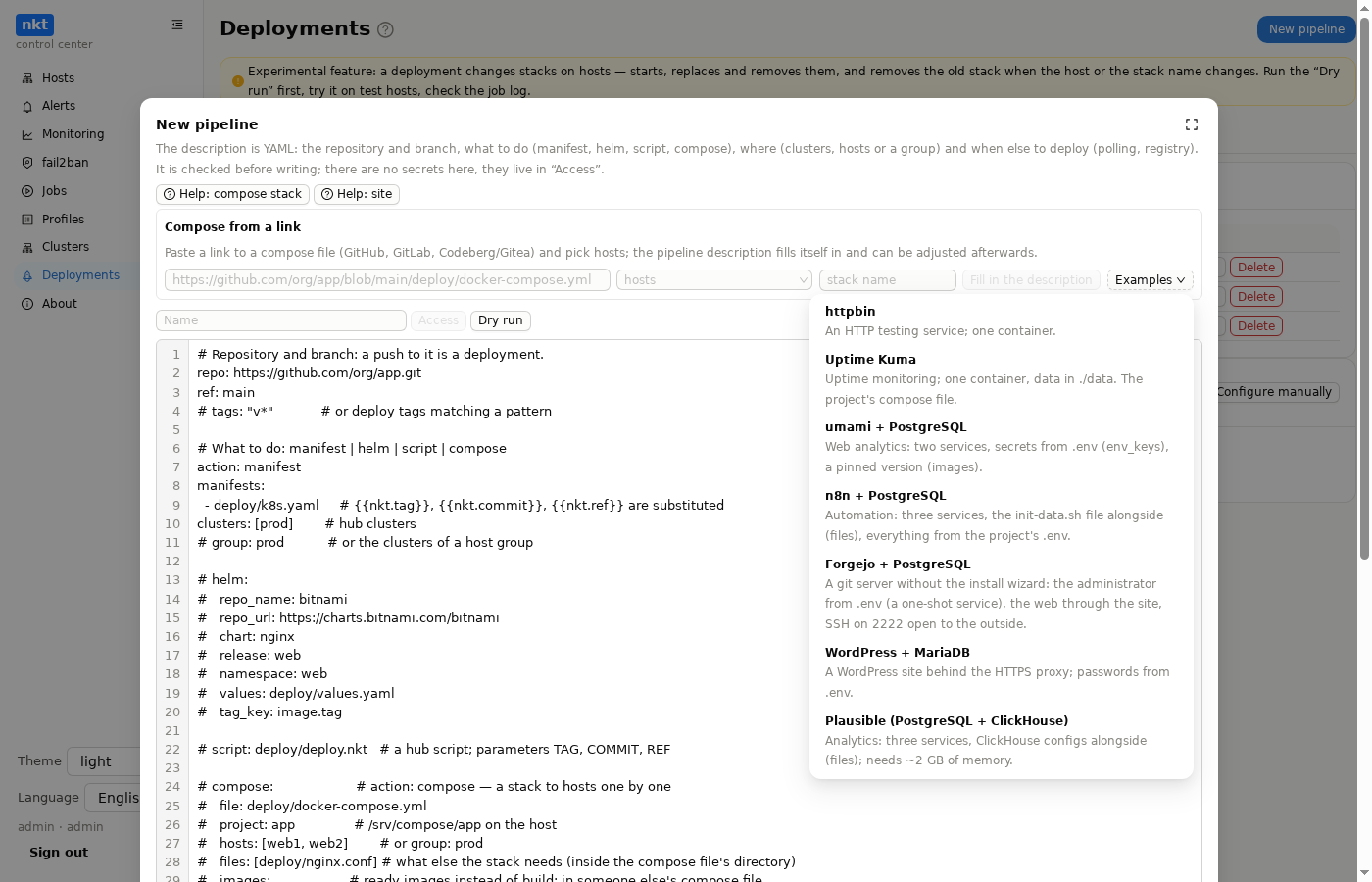
Compose from a link. In the new pipeline window, paste a link to a compose file (GitHub …/blob/<branch>/<path>, GitLab …/-/blob/…, Codeberg/Gitea/Forgejo …/src/branch/…, or their raw variants) and pick hosts; the description fills itself in: repository, branch, path, stack name. Then it is an ordinary edit with a diff. "Examples" are ready pipelines, each verified by a deployment; details and .env templates are in the repository's examples/. The chosen example is remembered: clicking "Fill in the description" again (say, after changing hosts) fills it in completely again.
For your own link the hub fetches the compose file itself (one commit, no history; a private repository with the pipeline's keys from "Secrets") and builds the description from it:
- the site: the web service found by image ports (
EXPOSEfrom the registry, or composeports/exposewithout it); databases, caches and queues (postgres, mysql, redis…) are skipped, and the port is the one inside the container. A "Site" choice appears next to the button: "auto", any service of the file, or "no site"; changing it rebuilds the description. Thesite:block stays commented out: put in the name and uncomment it; - files next to it: relative volumes (
./nginx.conf) →files:; - services built from source (
build:withoutimage:) →images:asking for a ready image; - unversioned images (
latest): a "pin a tag" comment; - publications to the outside (not on 127.0.0.1) of other services: a commented-out
ports:, since the defaultbindkeeps them on loopback; ${…}variables: a.envtemplate in a comment, defaults as they are, password- or key-like ones as<secret>,${X:?…}as "required".
The description window is the same for a new and a saved compose pipeline: for a saved one ("Description" in the list) the "from a link" block is already filled from the description, with the link (the # compose: … line that "Fill in the description" writes, or else built from repo:, ref: and compose.file), hosts, stack name and site service; "Fill in the description" rebuilds it from the file, and the difference is shown before saving. The pipeline name is read-only. Hosts and the stack name in this block edit the description right away — only the hosts: and project: lines, nothing else; and editing those lines in the text updates the fields. Before, a host picked there reached the description only through "Fill in the description", and "Save" kept the old one.
The stack name (compose.project) is the docker compose project name on the host: the directory /srv/compose/<name>/ (compose file, files next to it, .env), containers <name>-<service>-1, the network <name>_default, volumes <name>_<volume>. The deployment updates, and removal removes, exactly this stack; two pipelines on one host need different names. Empty means the repository name from the link.
Changing the host or the stack name. The hub remembers where and under which name the last successful deployment put the stack:
- A new stack name on the same host is a replacement: the previous stack stops before the new one starts (its ports and container names do not count as busy); if the new one fails, the previous starts again; if it succeeds, the previous is removed. Data is not carried over: the new stack has its own volumes and directory and starts empty; the previous directory (with
./data) moves to/srv/compose/.nkt-removed/, where you can take it from. - Another host: the deployment goes to the new one; the previous host is not needed for it. After success the stack is removed from the previous host; if that host is unreachable or deleted from the hub, the deployment still succeeds and the pipeline gets a “stack … left on …” mark with Remove (once the host is back) and Forget buttons. Data is not carried over to the new host either.
- The dry run says what happens to the old stack (removed, replaced, or left on an unreachable host) and warns about data; a
container_nametaken by a container of another project is a problem before the deployment rather than acompose uperror. - A host name in the description is compared case-insensitively and ignoring spaces; an unknown one comes with similar names. When the pipeline's site moves and the domain still points to the previous host, the dry run says “change the DNS record before deploying”.
- Deleting the pipeline removes the stack where this pipeline deployed it, as well as leftover old stacks on reachable hosts — see “Deleting a compose pipeline” below.
A private repository without keys: the window says "the repository is private: set the name and “Secrets”, then “Fill in the description” again", and for now the description comes from the link alone, with the placeholders <service from compose> and <container port> in site::
| Example | What it shows |
|---|---|
| httpbin | one container |
| Uptime Kuma | the project's compose file as is, data in ./data |
| umami + PostgreSQL | secrets from .env (env_keys), a pinned version (images) |
| n8n + PostgreSQL | three services, a file alongside (files), everything from the project's .env |
| Forgejo + PostgreSQL | no install wizard: the administrator comes from .env through a one-shot service; a second port to the outside, SSH 2222 (ports with 0.0.0.0) |
| WordPress + MariaDB | a site behind the HTTPS proxy (X-Forwarded-Proto) |
| Plausible | three services with ClickHouse, a config directory (files) |
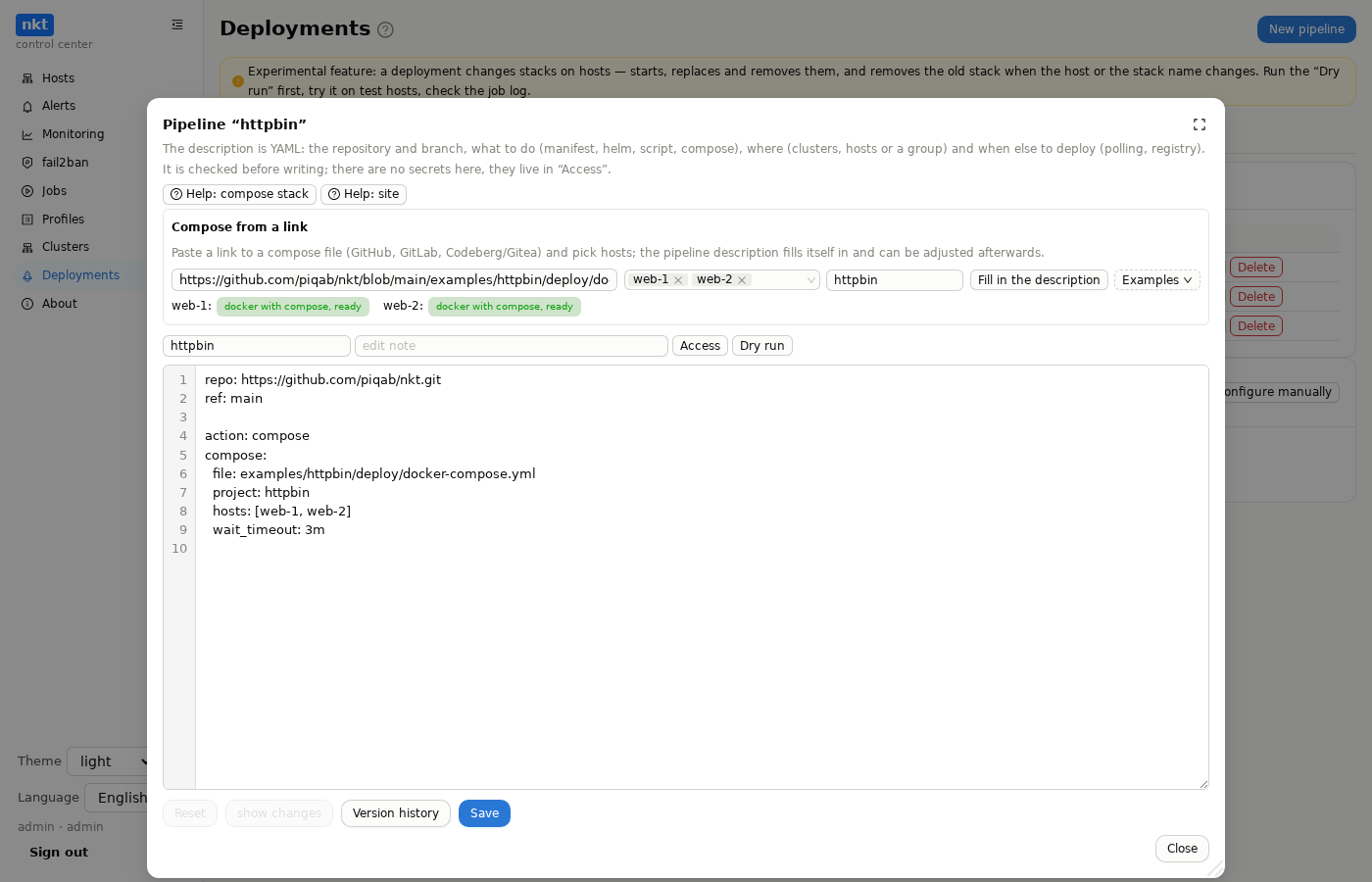
Hosts are checked as soon as they are picked: next to the name it says "docker with compose, ready", "no docker or podman" or "docker without compose". Where something is missing there is an "Install Docker" (or "Install compose") button: docker.io and the compose plugin from the distribution's repository, as a background host job in the standard job log window. An existing docker (including docker-ce from Docker's repository) is left alone; only compose is added. The "Sites" wizard runs the same check when the target is a stack service.
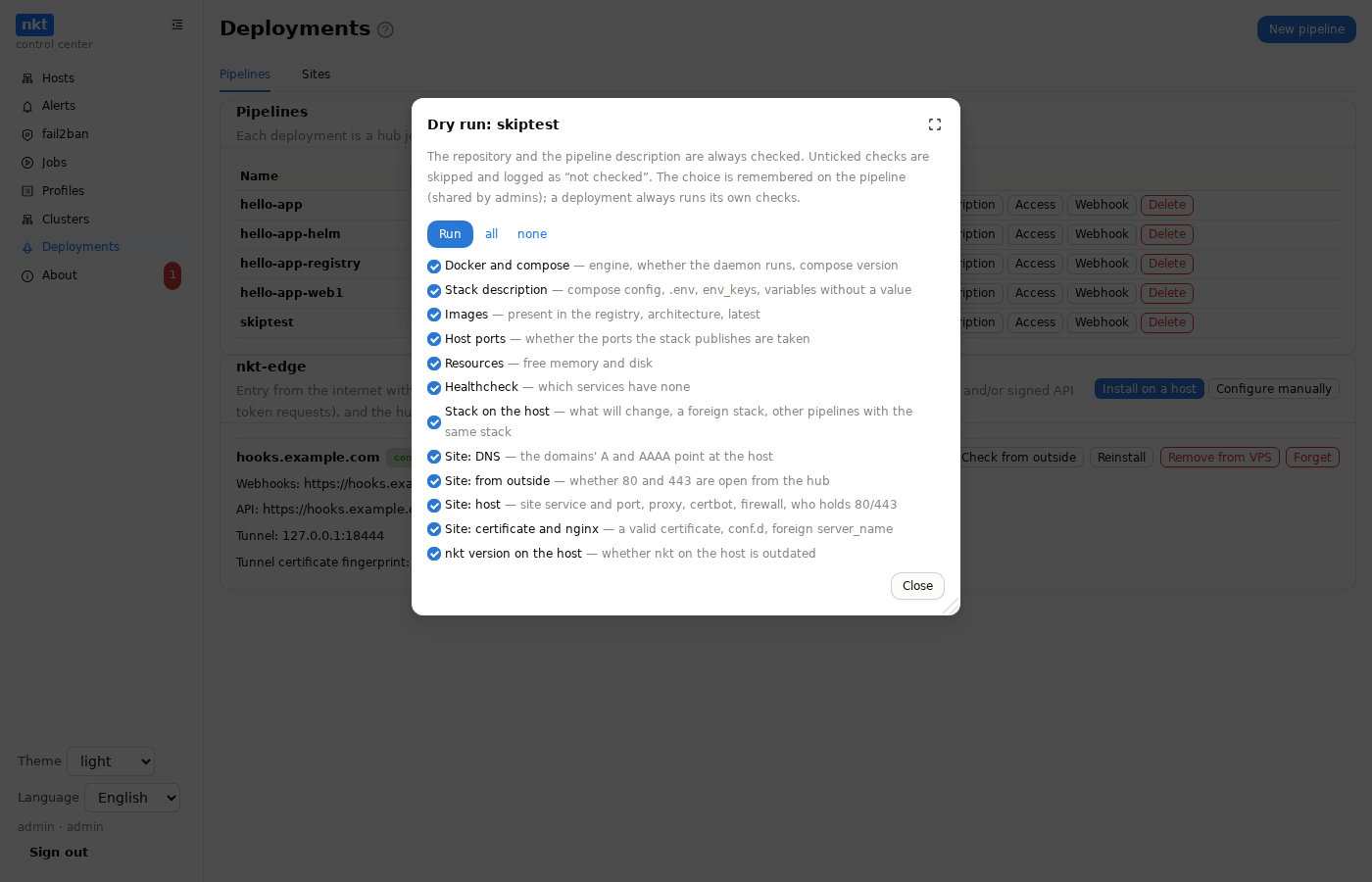
Dry run is a button in the "Deploy" window and in the pipeline editor (there it checks the current text, unsaved included). It does everything a deployment would do except the changes: it takes the repository, applies substitutions, collects the stack files and, on each host, checks:
- docker or podman and the compose version;
- whether the stack is new or exists: which files would appear, change or stay, and what happens to
.env; compose configon a copy of the stack in a temporary directory next to the stacks (the stack and containers are left alone; the copy is removed);- services and images: whether each image is in the registry (manifest only, no pull) and whether it is already pulled on the host. "Not in the registry" is an error; "could not check" (a private registry without a login, podman without skopeo) is a warning;
- host ports from the publications: one held by another process (not this stack) is a problem, since
upwould fail on it; - the image architecture against the host's (
uname -m): an amd64-only image on an arm64 host is a problem (exec format error). - image names after
.envsubstitution:http(s)://in the address or an empty address (/path) is a problem;pull_policyother thanalwayswith the image already on the host is a warning ("the old one will be deployed");pull_policy: neverwithout the image is a problem;build:from a directory that is not on the host (context: ../..) is a warning, withpull_policy: builda problem; - registry keys in "Secrets" that match no image of the stack (a typo in the key or image address) — a warning.
The dry run also checks. Problems (the deployment or the site would fail): a ${VAR} in compose with no value in .env (when the "variable" is really part of a value with a $ sign, such as a password hash $2y$10$…, the check names the file and line: in compose such a $ is doubled — $$, in .env the value goes in single quotes); the docker daemon not running; too little space for images or memory; who holds 80/443 on the host (not the site proxy: certbot and the proxy would not start); the name already in another nginx config and whether nginx reads conf.d; an AAAA record not pointing at the host; DNS not pointing at the host and port 80 closed from outside; nkt on the host older than the hub. Warnings: images without a pinned version (latest), services without a healthcheck (--wait waits only for them to start), the stack already on the host but not deployed by this pipeline, or deployed by another pipeline too. Info: free memory and space, a valid certificate (days left) or a new issuance.
If the stack does not come up in a real deployment, the host appends the container states (compose ps -a) and the last log lines of the failed services, and the error names the cause: "port 127.0.0.1:8080 is in use", "the image is not for this architecture", "container httpbin exited (code 1)", "failed its healthcheck".
The button opens a window with check boxes, all ticked by default: Docker and compose, stack description, images, host ports, resources, healthcheck, stack on the host, site (DNS, from outside, host, certificate and nginx), nkt version on the host. The repository and the description parsing are always checked. An unticked check is skipped (the host does not query the registry, look at ports and so on), and the log says "not checked: …". The choice is remembered on the pipeline on the hub and shared by admins; what is stored is the unticked checks, so a check added in a new version is on by itself. A real deployment ignores the boxes: its own checks (engine, daemon, .env) always run. An old nkt on the host does not know the boxes and checks everything; the hub leaves the extra lines out of the log.
The result is a hub job with a log: "the deployment would succeed" or the number of problems. In the deployment and dry run logs, problems (✗) are bold red and warnings (?, !) bold orange. Nothing is recorded in the deployment history.
Example: httpbin. The nkt repository has examples/httpbin: a go-httpbin stack on the ready image mccutchen/go-httpbin:2.25.0 and a pipeline for it. It deploys straight from the link https://github.com/piqab/nkt/blob/main/examples/httpbin/deploy/docker-compose.yml (stack name httpbin) or with "Examples" → "httpbin" in the new pipeline window: it fills in the link and the names, leaving you to pick a host. The site goes in the pipeline's site: block (commented out in the description) or by hand in "Sites": stack httpbin, service httpbin, port 8080. The original's compose file, postmanlabs/httpbin, builds the image from source (build: '.'); the hub rejects it with an explanation.
Sites
The "Sites" tab puts a domain on a host behind a proxy with a Let's Encrypt certificate:
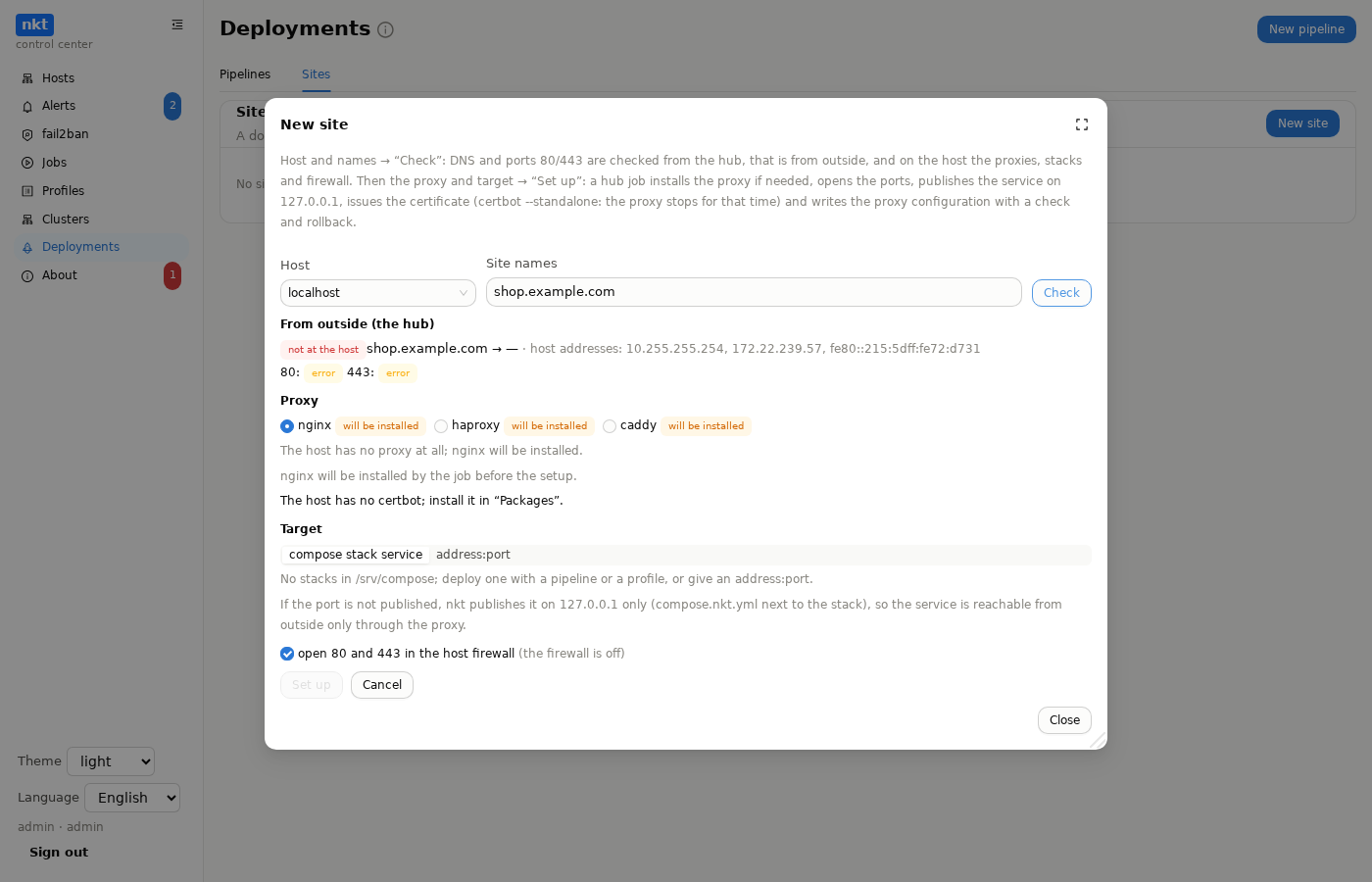
- Host and names → "Check". From outside: from an nkt-edge with the outside checks role if one is connected, otherwise from the hub: whether each name points at the host and whether ports 80 and 443 answer. "Free" (connection refused) means the path is open and certbot will bind the port itself; "no answer" means the port is most likely closed by the provider's firewall or NAT, and Let's Encrypt will not reach the host. A name pointing into a private network is marked: the hub sees the ports from inside. From the host: which proxies are installed and running, who holds 80/443, the stacks in
/srv/composewith their services and ports, the firewall. - Proxy: nginx, HAProxy or Caddy, showing what is installed and what runs. If nothing is installed, nginx is installed. If 80/443 are held by a container (Traefik, a Caddy of your own), there is a warning: nkt does not configure such a proxy.
- Target: a compose stack service (stack, service, container port) or
address:port(an app outside compose). An unpublished service port is published by nkt on 127.0.0.1 only, through acompose.nkt.ymlfile next to the stack (deployments and profiles take it into account), so the service is reachable from outside only through the proxy. A port already published on all addresses is used as is, with a warning. - "Set up" is a hub job: DNS and ports, the proxy (installed if needed), then a host job: open 80/443 in ufw/firewalld (if ticked), publish the service, the certificate (one valid for more than 20 days is reused, otherwise
certbot certonly --standalone: the proxy stops for the issuance and starts again; nkt renews the same way), and the proxy configuration through "Configs" with a check (nginx -t,haproxy -c,caddy validate), rollback on error and a version history:- nginx:
conf.d/nkt-<domain>.confwith 80 → HTTPS redirect, 443 with HTTP/2, WebSocket andX-Forwarded-*headers; - HAProxy: an
nkt-sitesblock inhaproxy.cfg(all nkt sites of the host: frontends 80/443 with SNI and a backend per site), the certificate as a combined PEM in/etc/haproxy/nkt-certs; if another frontend already listens on 80/443, it refuses with an explanation; - Caddy:
/etc/caddy/nkt/<domain>.caddyimported from the Caddyfile; Caddy obtains and renews the certificate itself (it runs as a non-root user and cannot read certbot's keys).
- nginx:
- HTTPS check from outside: the response code and the certificate's expiry; "Check" in the site row repeats it at any time.
"Delete" is a hub job: on the host the proxy configuration is removed (with a history record), the service's 127.0.0.1 publication is removed (the service is recreated without it) and, if ticked, the certificate is deleted (unless another site needs it); then the site is removed from the hub. If it fails, the site stays marked "deletion unfinished" with a "Retry deletion" button. A site from a pipeline comes back with the next deployment unless the site: block is removed.
A site in the pipeline
A site can be described right in an action: compose pipeline, with a site: block instead of a string:
compose:
  file: deploy/docker-compose.yml
  project: shop
  hosts: [web1]                  # a site needs exactly one host
  site:
    domains: [shop.example.com, www.shop.example.com]
    service: web                 # the stack service
    port: 80                     # the container port
    proxy: nginx                 # optional: otherwise whichever the host has, with none — nginx
    firewall: true               # open 80/443 (yes by default)
cert: manual # certificate: manual (default), auto or /path to your own file- First deployment: the stack, then the site, the same way as "Set up" in the wizard (DNS and ports from outside, proxy, publishing on 127.0.0.1, certificate, config, HTTPS). The site shows up in the "Sites" tab marked "pipeline …".
- Later deployments: if the site is set up and nothing in
site:changed, only an HTTPS check runs and no new certificate is issued. If the names, service, port, proxy or host changed, the site is set up again (the proxy config is removed from the old host). - If the site fails (DNS does not point at the host yet, port 80 is closed), the deployment still succeeds: the stack is updated. The reason is in the deployment log and on the site in the "Sites" tab.
portis the port inside the container, the one the image listens on, not the host port: in"127.0.0.1:8080:80"it is the last number,80(port: 8080there is an error with a hint).port: autoor noporttakes the port from the image if it declares exactly one. Ifports:already publishes it (127.0.0.1:8080:80), the proxy uses that (127.0.0.1:8080) and no second publication appears; otherwise nkt publishes it on 127.0.0.1 itself. Before installing the proxy and issuing the certificate, the hub checks it against the ports the image declares (EXPOSE): a wrong port is a site error with a hint ("image kennethreitz/httpbin declares only port 80"), and no certificate is spent. If the image is not pulled on the host yet, the dry run reads itsEXPOSEfrom the registry without pulling (the manifest for the host's architecture and the image config; public Docker Hub, ghcr.io and quay.io need no login), and the log says "ports of image … from the registry". If the registry does not answer, the ports are only known from composeports/expose, which proves nothing, so it is a warning ("the site is checked after the deployment") rather than an error. If the image declares no ports there is nothing to check; if the site answers 502, the log suggests checking the port. Other publications of the site service (Forgejo's SSH2222:2222incompose.ports) do not get in the site's way; the log just notes they go separately.- What the host lacks is installed: the proxy and
certbot(to issue and renew the certificate; not needed with Caddy), as distribution packages, by background host jobs, logged in the site log. A host withoutapt-getgets an error asking to install by hand. Docker and compose are checked before deploying ("Install Docker"), git on the hub has its "Install git" banner. - A dry run shows what would happen to the site: the proxy (or that it will be installed), certbot, the host firewall (off, 80/443 already open, will be opened, or the rule cannot be written, so open it by hand), DNS and ports from outside, whether the stack has that service and whether the port is declared; a port mismatch counts as a problem.
- The certificate is manual by default (
cert: manualor nocert). The deployment does not run certbot and does not stop the proxy: it takes a ready valid Let's Encrypt certificate for all the names from/etc/letsencrypt/live— issued in "Certificates", by hand or earlier. If there is none or it expired, the site is not set up ("issue it in "Certificates" or setcert: auto"), the stack is still deployed; under 30 days left — a line in the log. Renewal is nkt's automatic renewal or "Certificates".cert: auto— as before: a good certificate (over 20 days) is taken, otherwisecertbot --standaloneissues one and the proxy (nginx, HAProxy) is stopped for the check — the sites on it are down for those seconds.cert: /etc/ssl/app.pem— your own file: a certificate for all the names (*.domainfits too), the key in the same file or separately —cert_key: /etc/ssl/app.key. For HAProxy nkt builds one PEM from them.- The dry run says which certificate will be taken and how long it has left, or that there is none (a problem).
- The proxy is configured by hand. If HAProxy on the host has its own frontend on 80/443 or the name is already in someone else's nginx
server, nkt leaves that configuration alone: the site gets the "proxy by hand" state (the reason is in a tooltip on the "Sites" tab), and later deployments only check HTTPS — no setup, no certbot, no proxy stop. To keep nkt from trying at all, writesite:as a string. To leave this state, change the site insite:or press "Set up" on the "Sites" tab. - A
site: namestring still means only an HTTPS check after the deployment. - Editing such a site in the wizard works, but the next deployment restores the settings from
site:if they differ.
When to deploy
- The "Deploy" button — the head of the branch from the description; you can specify another branch or repository tag and an image tag.
- Webhook — a push to the
refbranch or a tag matchingtags; a request from CI with an image tag (see below). - Polling (
poll) — the hub notices a new commit in the branch. - Registry (
registry) — the hub notices a new image tag newer than the previous one (compared by numbers:v1.10.0is newer thanv1.9.3) and deploys therefbranch with that tag.
The "Enabled" switch in the pipeline list is only about automatic deployments (webhook, polling, registry); a disabled pipeline is marked "manual only", and the "Deploy" button always works.
Polling and registry start working after the first deployment with the button — a freshly saved pipeline deploys nothing by itself. A disabled pipeline ("Enabled" unchecked) reacts to nothing but the button. While a pipeline's deployment is running, polling doesn't start another. A failed deployment is not retried by polling or the registry: the hub remembers the failed commit (or tag) and waits for a new one; the pipeline row shows "waits for a new commit", and the failed job's log says so. The "Deploy" button still runs it at any time.
Webhook
A pipeline's "Webhook" window: the address (direct to the hub — https://hub/api/hub/hooks/<id>, and via nkt-edge if configured), "Show secret" (recorded in the audit log), "New secret" and ready instructions for GitHub, GitLab and a CI step.
A signature is required; supported:
| Sender | Headers | Check |
|---|---|---|
| GitHub | X-Hub-Signature-256: sha256=…, X-GitHub-Delivery | HMAC-SHA256 of the body |
| Gitea, Forgejo | X-Gitea-Signature / X-Forgejo-Signature | HMAC-SHA256 of the body |
| GitLab | X-Gitlab-Token | the secret as is |
| CI step (nkt) | X-NKT-Timestamp, X-NKT-Signature | HMAC-SHA256 of <timestamp>.<body>, the timestamp no older than 5 minutes |
- A replayed delivery is rejected: the hub remembers delivery IDs (for the nkt signature — the signature itself).
- Responses are terse: an unknown address and a wrong signature both give
401, so the real one can't be guessed. The body is up to 1 MB. - A GitHub
pinganswerspong. - Only
ref(refs/heads/…orrefs/tags/…), the commit (after,checkout_shaorcommit) andtagare taken from the body. A deleted branch or tag, another branch, a tag not matching the pattern —200withignoredand the reason.
The nkt signature from a CI step — when the image is already built and the branch should be deployed with its tag:
BODY=$(printf '{"ref":"refs/heads/main","commit":"%s","tag":"%s"}' "$SHA" "$TAG")
TS=$(date +%s)
SIG=$(printf '%s.%s' "$TS" "$BODY" | openssl dgst -sha256 -hmac "$NKT_HOOK_SECRET" -hex | sed 's/^.* //')
curl -fsS -X POST "$NKT_HOOK_URL" \
  -H "Content-Type: application/json" \
  -H "X-NKT-Timestamp: $TS" -H "X-NKT-Signature: $SIG" \
  -d "$BODY"
Without ref (just {"tag":"v1.2.3"}) the hub deploys the branch from the description with that tag. The response is 202 — {"status":"deploying","deployment_id":…}.
Ready CI pipelines — on the CI/CD examples page.
Secrets
The "Secrets" window opens from the pipeline's button in the list and from the "Secrets" button in the description window. For a new pipeline that button first saves it under the entered name, or without one under the name from the description's project: or the compose link; the window then edits the saved pipeline. The window has three tabs: "Repositories", "Registries" and ".env". On opening and after a key is saved, the "Repositories" tab checks access with the saved keys right away: git ls-remote on repo: gives "access granted, branch found", "no access" with the reason (Permission denied, a wrong token) or "no such branch"; if the description has registry:, it also logs in to the registry and counts the tags. "Check again" repeats it.
If a compose link is already pasted in the description window but "Fill in the description" has not been clicked, "Secrets" first fills the description from the link, so the link's repository is checked rather than the template placeholder (github.com/org/app; if the description is still the template, the check says so directly). Refusals are explained in words (the raw git output is in the tooltip):
| Reason | Meaning |
|---|---|
| private or missing | no keys, and the server asks to sign in; it answers that way for both private and nonexistent repositories |
| token rejected | wrong, expired or without read access: Forgejo/Gitea repository: Read, GitHub Contents: Read, GitLab read_repository |
| ssh key does not fit | not added to the repository's deploy keys |
| keys accepted, no repository | a typo in the address |
| server unreachable | the name does not resolve, no connection, or the certificate is not accepted |
The token is entered as is or as login:token. The hub signs in the way ordinary git does: the server answers "sign in needed" and git hands over the login and token (no header sent in advance, which some proxies in front of the server drop). Without a login in the field, GitLab gets oauth2, and for the others (GitHub, Forgejo, Gitea, Codeberg) the login does not matter. The hub's git does not use the system's saved passwords (credential.helper), only the pipeline's access. The check shows the last four characters of the saved token: compare them with the token on the server. After the keys are saved, the "repository is private" note in the description window disappears, and "Fill in the description" notes that the file was fetched with the pipeline's keys.
The "Secrets" tabs:
- Repositories — the key of the main repository (
repo:): a token (forhttps://, e.g. a GitHub fine-grained token with Contents: read) or a private deploy key (forssh/git@). Below it are keys for other repositories, matched by the start of the address:github.com/vendor/covers every vendor repository,git.example.com/team/libjust one. They are for submodules: when the repository has.gitmodules, the hub fetches them itself (git submodule update --init --recursive, first only the latest commit), and each submodule gets the key for its own address — a token or an ssh key, different for different servers; relative submodule addresses (../lib.git) resolve againstrepo:. The longest matching start wins; the main key applies torepo:only. "Replace" sets a new key, "Delete" removes it. - Registries — a list of registry keys: the address (
harbor.example.com,ghcr.io,registry.example.com:5000), login, token and, if needed, its own CA (PEM as text or from a file) — for a registry whose certificate is not from a public authority. Any number of keys; each image of the stack uses its own: the dry run checks a private image from the hub with its registry's key ("in the registry, checked with the pipeline key"), and the deployment pulls images on the host with the keys of all the stack's registries — the host gets them only for the pull: Docker in a temporary config (docker --config), Podman in a temporary--authfile; a 0600 file in nkt's data directory, deleted right after, so the host needs nodocker login/podman loginof its own. Images from public registries (postgres,redis) need no key. The hub watches tags (registry:) with the same key. The "Login check" column tries each registry with its key; "Edit" changes the address, login or CA (an empty token keeps the current one), "Delete" removes the key. The hub uses the CA when checking; on deployment the host puts it into its engine'scerts.d—/etc/docker/certs.d/<registry>/ca.crtor/etc/containers/certs.d/<registry>/ca.crt(only if the file differs); the host's system-wide trust is not changed. An older single key (login:tokenwithout an address) shows as "registry not set" and applies, as before, to the registry inregistry:, or without it to the stack's only registry besides Docker Hub; "Edit" binds it to an address. - .env — for
action: compose: the stack's environment variables (KEY=valueper line). The order of lines only matters when a value refers to another variable (FORGEJO_ROOT_URL=https://${FORGEJO_DOMAIN}/): docker compose only substitutes what is set above in.env, so such a variable must come after the one it refers to; otherwise the dry run names the line and says what to move up.
They are stored on the hub encrypted and never get into the description, logs or command lines (git gets them through the environment); they can't be shown — only replaced or removed. The hub needs the git program (the hub image has it); without it, the "Pipelines" tab shows a banner and an "Install git" button (the package from the distribution's repository, as a background job on the hub machine).
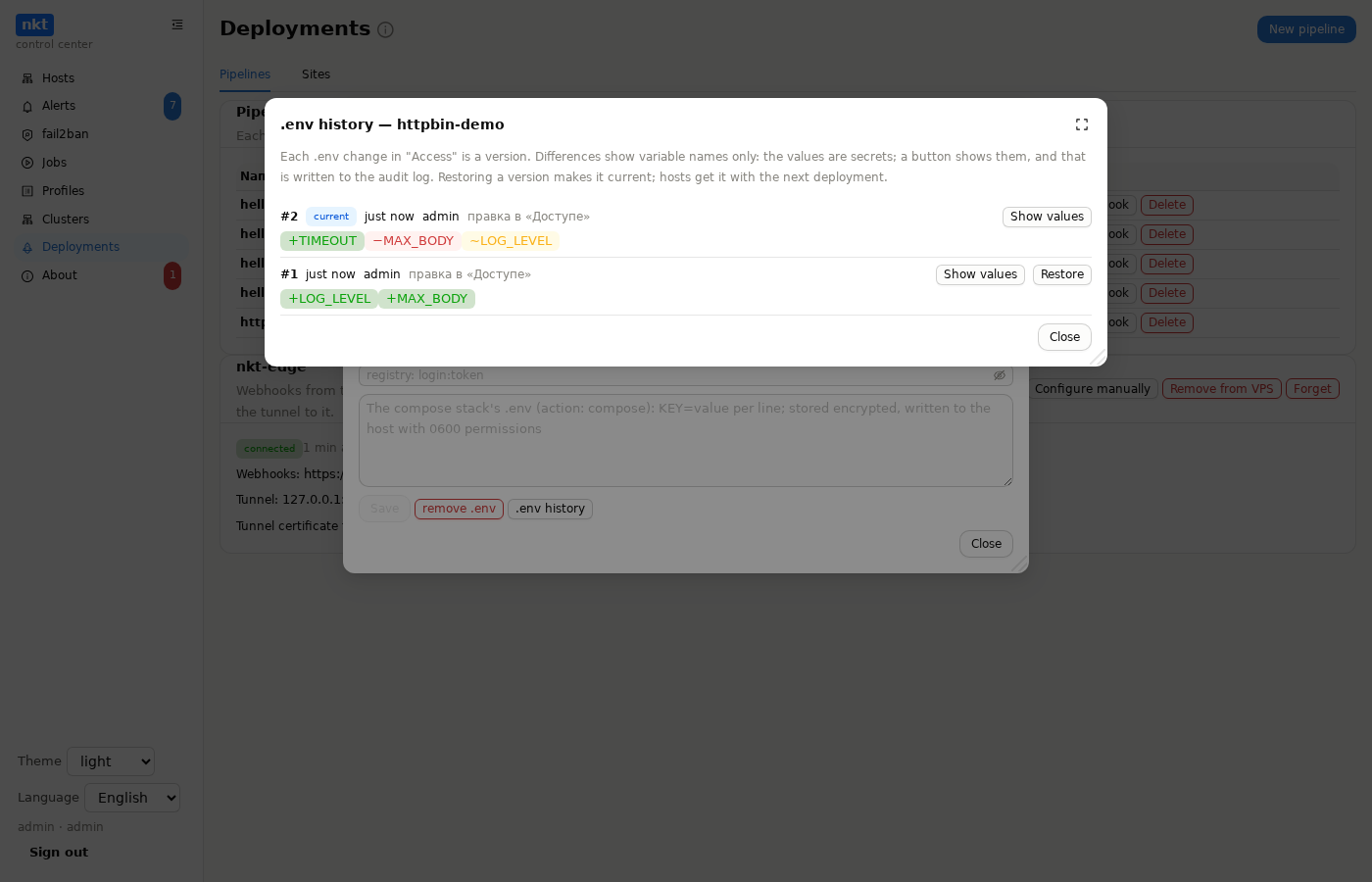
Stack .env. Each deployment writes it to /srv/compose/<stack>/.env (0600) and replaces what is on the host; a pipeline without .env leaves the host's file alone. "Edit .env" in "Secrets" opens the current .env in an editor (the values are secrets: shown after a confirmation and written to the audit log); before saving — the difference by keys: added, changed, removed (values are not shown). Pasting a whole new .env first shows which variable names appear and disappear. ".env history" in "Secrets": every change is a version (encrypted); differences show names only (+ added, − removed, ~ changed value); "Show values" is for administrators and is written to the audit log; "Restore" makes a version current (hosts get it with the next deployment). If the .env on a host was edited by hand since the last deployment, the deployment log and the dry run say so: the hub compares the file with a hash of what it wrote last.
History and rollback
Every deployment is a hub job with a log: what (commit, branch, tag), who started it (button, webhook, polling, registry, rollback), when and how it ended. "Roll back" on an earlier successful deployment deploys its commit and tag again — the image is already in the registry, no rebuild. The "also restore that deployment's .env" tick brings back the .env version that deployment used; without it .env stays current.
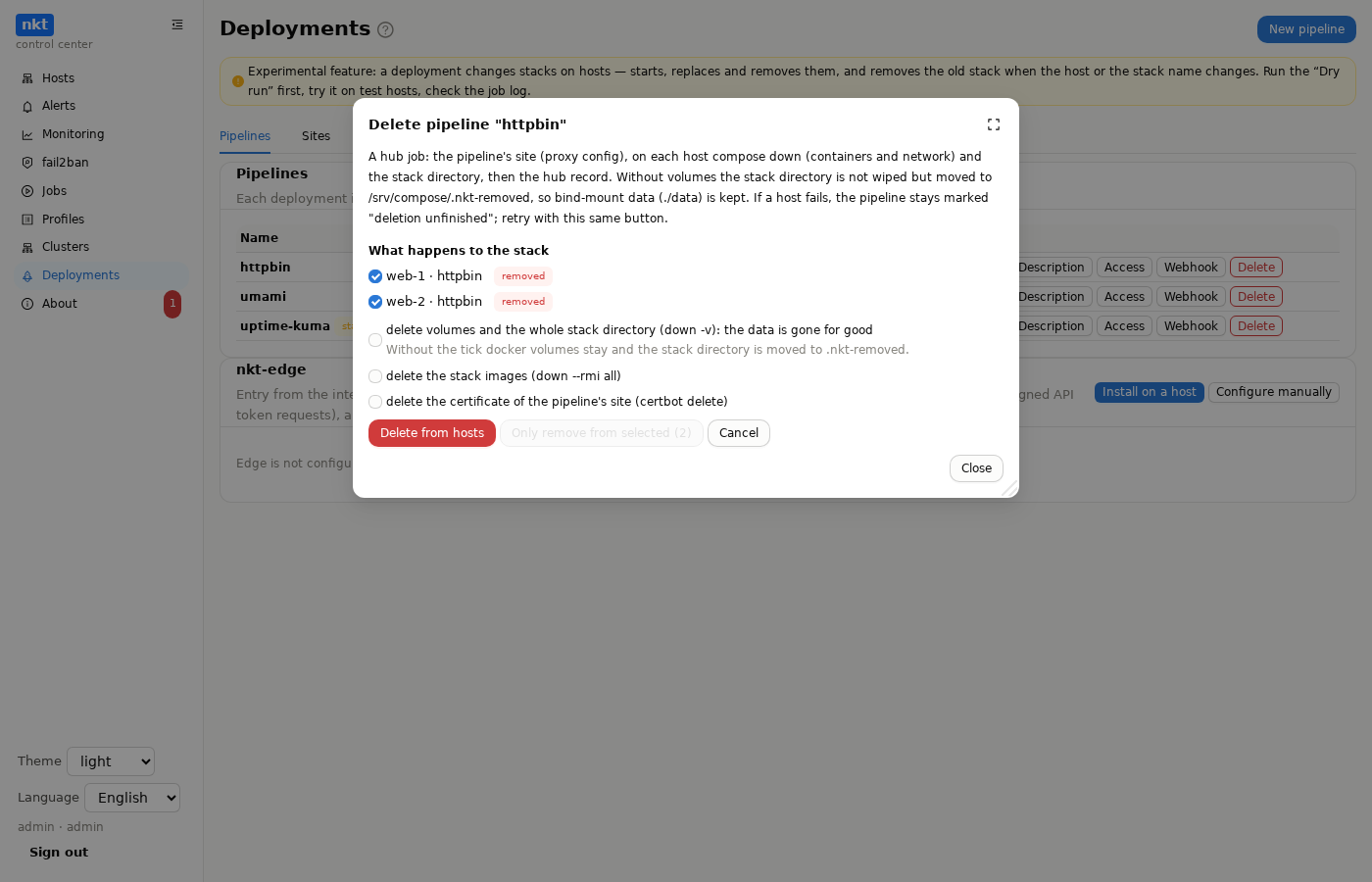
Deleting a compose pipeline is a hub job: the pipeline's site, then on each host compose down (containers and network) and the stack directory, then the hub record with its history. Without the "volumes" tick the stack directory is not wiped but moved to /srv/compose/.nkt-removed/<stack>-<time>, so bind-mount data (./data) and docker volumes are kept; with it, down -v runs and the directory is deleted entirely. Images and the certificate are also behind ticks.
What is removed where. The deletion window shows a plan for every host where this pipeline's stack is actually deployed (by the remembered placement and leftover old stacks; for a pipeline deployed before v1.11.139, by its description):
- “removed”, ticked; untick it and the stack stays on that host (the window warns that nothing will manage it any more);
- “kept — the same stack belongs to pipeline …”: a stack with the same name on the same host is also another pipeline's — it is one directory
/srv/compose/<name>, and deleting one pipeline does not wipe the other's deployment; - “host unreachable — stays” and “host not on the hub”.
Hosts from the description or group where this pipeline never deployed are not touched. Deletion without a choice (through the API) behaves as before: a host that is not running is an error, the pipeline stays marked "deletion unfinished" (and disabled), and "Retry deletion" repeats it with the same ticks.
“Only remove from selected” removes the stack from the ticked hosts while the pipeline stays and runs on the rest: the ticked hosts leave the hosts: of its description (a new version in the history). Not available when the stack is chosen by a group (group:) or no host would remain — then delete the pipeline.
manifest, helm and script pipelines are deleted from the hub only; what was deployed to clusters stays.
Example
A ready example — examples/hello-app: a Python application, a Dockerfile, CI for GitHub Actions, GitLab CI and Gitea Actions and three deployment variants — manifest, Helm, a host with Docker Compose. Step by step — CI/CD examples.
Hub not reachable from the internet
- Turn on repository polling or registry watching — nothing to expose.
- Or install nkt-edge on a VPS — a small program with a Let's Encrypt certificate that accepts only webhooks and passes them to the hub over a tunnel the hub keeps to it.
If nothing deploys
| Symptom | Cause and fix |
|---|---|
Webhook 401 | Wrong secret or signature; a replayed delivery ("Redeliver" in GitHub sends the same ID); for the nkt signature — CI and hub clocks differ by more than 5 minutes. The reason is in the hub's audit log (pipeline.hook.rejected) |
200 ignored: another branch | The push wasn't to ref; the tag doesn't match tags |
no cluster matches | Names in clusters don't match the "Clusters" section, the group has no clusters or the cluster isn't "ready" |
unknown field "site_port" / "an old nkt version does not know the fields" | nkt on the host is older than the hub: the hub repeats the request without the new fields (the site port is not checked, hand edits of .env are not tracked); update nkt on the host |
pipeline description, line N "…": … | A YAML error: the description line, its text and an explanation: broken indentation, a key with both a value and a block (site: name and lines below), an unknown key (with the allowed ones), a tab, a wrong value type |
| site — "wrong certificate" | The proxy answers with another site's certificate: this site's configuration is not in effect (it was not set up, see the log, or another server overrides it) |
ufw … '/etc/ufw/user.rules' is not writable | The nkt service runs in a systemd sandbox without /etc/ufw open: since 1.11.64 the ufw rule is added outside the sandbox (and new installs open /etc/ufw in the service). The site setup no longer stops on it; the ports can be opened by hand: ufw allow 80,443/tcp |
git is not installed on the hub | The "Install git" button on the "Pipelines" tab, or apt install git on the hub machine |
the repository has no branch or tag … | A typo in ref, the tag isn't pushed yet (git push origin v1.0.0) |
git …: Authentication failed / Permission denied (publickey) | A private repository without a key in "Secrets", the token can't read, the key isn't added as a deploy key |
the repository has no file … | Paths in manifests, helm.values or script are from the repository root |
Helm is not installed on the host | Install Helm on the control plane: the node's Kubernetes tab → Helm → "Install Helm" |
Pods in ImagePullBackOff | The image is private: make the package public or add an imagePullSecret to the cluster; the image tag doesn't match what CI built |
| Polling or registry stay silent | No first deployment with the button yet; the pipeline is disabled; registry_tags filters the tags out (by default — only versions like 1.2.3) |
a deployment of this pipeline is already running | Wait for the current one — its log is in "History" |