
Packages, disks and files, hardware, system
Packages
- apt package search ranked by match, installing several in one transaction; the package description on hover.
- Installed packages as a grid with search and removal.
- Available updates and
apt-get upgradein a live terminal window — deliberately without-y, with a confirmation. - snap and flatpak packages: list, update, remove.
Disks and files
- Filesystems with usage (pseudo-filesystems hidden), swap, physical disks and partitions.
- What takes the space: subdirectory sizes on click, level by level.
- Files — a browser over the allowed roots, showing only the ones that exist (
/home,/srv,/opt,/tmp,/var/www; configurable withNKT_FILES_ROOTS): folders, rename, delete, download; upload of files and whole folders via a dialog or drag and drop with overall progress (the "skip hidden" checkbox, on by default, skips hidden entries —.git,.env— and whatever the uploaded folder's.gitignorelists; a failed file is retried up to three times, the rest with the "retry failed" button); unpacking zip/tar in place;git cloneas a job, private repositories included (a token over HTTPS or the host's deploy key over SSH). - Upload with a plan. Before writing — a "What will change" window: which files are new, which replace existing ones (text files get a "on the host → uploaded" diff), which are identical (not uploaded), which are protected. Every file has a checkbox. An upload deletes nothing on the host.
- A folder's protected files — patterns an upload doesn't overwrite by default:
.env,.env.*,*.local.*,local_settings.*,wp-config.php,config.local.*, foldersuploads/,storage/,media/,data/. The list is edited with the "Protected" button (with a diff and history); a protected file can be overwritten only with an explicit checkbox in the plan. - Upload history. Every upload is a record: who, when, where, a comment, which files were added and replaced. Previous versions of replaced files are kept; "Roll back" restores them as a job and removes what was added (files changed after the upload are left alone). Any file has a "Version history" with a diff and rollback.
- History storage — usage and limits: 200 MB of large files per upload (text files are always kept), 1 GB total, 30 days; beyond that the oldest is evicted. Versions are deleted by hand: one at a time, a file's whole history, an upload as a whole, everything older than a chosen age. From 80% full — a finding in "Findings" and a hub alert.
- Editing text files — as in "Configs": line numbers, an edit comment, a "on disk → draft" diff before writing, protection against overwriting someone else's change and a "Version history" tab — who changed what, when and why, a diff of any version against the current file, rollback (also as a version). If the file is a configuration of a known service (say, a compose file in
/srv), it is written with the service's check and a rollback on error, and the history is shared with "Configs".
Hardware
Machine, CPU, memory, batteries, temperatures (lm-sensors), PCI and USB devices.
UPS
An uninterruptible power supply — via NUT (Network UPS Tools): nkt installs and configures it itself and reads the state through upsc. The NUT server (upsd) listens on 127.0.0.1 only — no port is opened to the outside; the hub learns about the UPS from the regular host poll.
The "UPS" card at the top of the section: state (on mains / on battery / battery low / no link), charge, load, runtime on battery, model, driver, input and output voltage, NUT flags and a 24-hour chart (charge, load, input voltage).
"Find UPS" — a check without changes:
- a UPS on USB by vendor and product codes (Megatec/Cypress
0665:5161— Ippon, SVEN, Powercom and other UPSes UPSilon 2000 works with; APC, Eaton, CyberPower and others — theusbhid-upsdriver), COM ports; - USB-COM adapters (Prolific PL2303, CH340, FTDI, CP210x) and the port the kernel gave them (
/dev/ttyUSB0): a UPS with a COM port is often connected through one; - UPSilon 2000: running processes (
rupsd,upsilon) with PIDs, its directory (/etc/upsilon), the port from its settings, autostart — a systemd service,init.d, a line inrc.localor cron. It holds the UPS port, and the NUT driver won't work next to it; - what to connect with: the port from UPSilon's settings, otherwise the adapter's port, otherwise a UPS on USB, otherwise a COM port;
- whether NUT is installed and has a UPS described.
"Connect UPS" (admin) — the driver and port are preselected from what was found; for usbhid-ups the port field is disabled — that driver is only for UPSes seen as USB HID, while a UPS on COM or through an adapter needs nutdrv_qx or blazer_ser. As a background job with a log: stops the UPSilon processes and disables its autostart (a service — systemctl disable, a line in rc.local or cron — commented out, the file copied to the backup), installs the nut package, upsd on 127.0.0.1 only, and tries in turn: the chosen driver on the chosen port → the same port with the other Megatec driver (nutdrv_qx / blazer_ser) → nutdrv_qx over USB, up to 40 s each. A variant that doesn't answer logs what the driver said. If none works, everything is put back: the previous /etc/nut from the backup (/var/lib/netknownsthat/nut-backup-…), the UPSilon autostart, and UPSilon itself is started with the same command it ran with. The "Shut this host down when the battery runs low" box enables upsmon; without it — monitoring and alerts only.
NUT files (ups.conf, upsd.conf, upsmon.conf, nut.conf) are edited in "Configs" — with a diff and history; upsd.users (it holds a password) is not.
Findings and alerts. A UPS on battery is a "power lost" finding; on battery with the charge below the threshold or less time left — a critical "battery low"; no link to the UPS, overload, "replace battery" are findings too. "Alert thresholds" — charge (30% by default) and runtime (5 min), edited with a diff and history. The hub records "power lost", "power restored", "UPS battery low", "no link to UPS" events and sends them to Telegram, Slack and webhooks; in the hub host list a host with a UPS has a lightning icon: green — on mains, orange — on battery, red — low or no link.
System settings
- Hostname, time zone (with search), NTP, the state of automatic security updates.
- Locales: every locale the system knows, with search; generate the selected ones, set the default.
- Time sync: which service is installed (systemd-timesyncd, chrony, ntpsec), what it syncs with, stratum and offset; NTP server selection; “sync now”; installing the service if there is none.
- NetworkManager: connections, devices, Wi-Fi networks, connecting with a password.
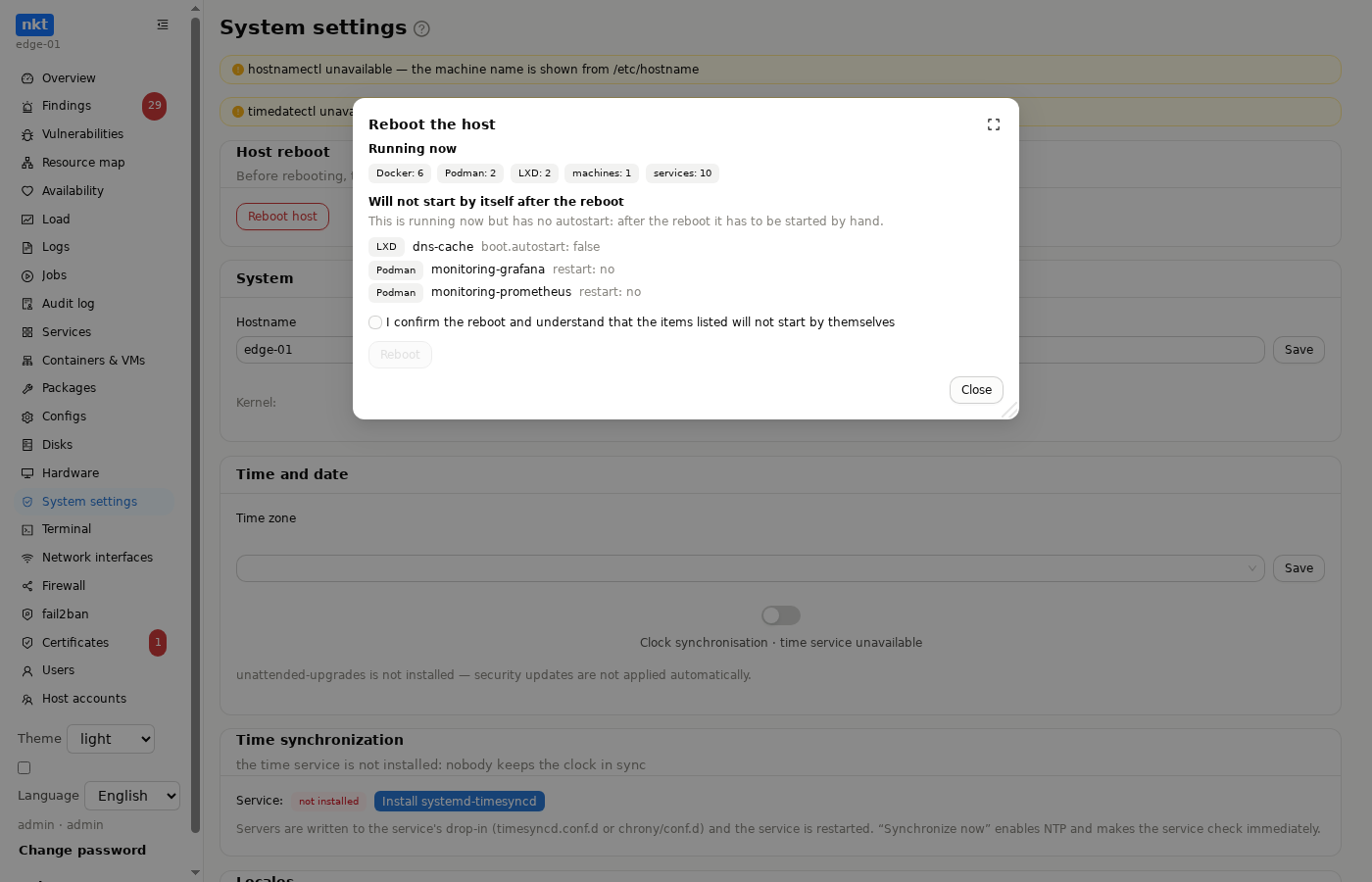
- Host reboot: the card is always here (highlighted when a reboot is required, for example after a kernel update); the same button is in the "Reboot required" bar on "Overview" and in "Packages". Before rebooting, the window shows how much is running now (Docker and Podman containers, LXD instances, machines, services) and a list of what will not come back by itself: containers without an
alwaysorunless-stoppedrestart policy, machines without autostart, LXD instances withoutboot.autostart, and services that are running but not enabled for autostart. "Reboot" becomes available only after the confirmation checkbox; the reboot starts in a few seconds (so the reply gets through, including via the hub) and goes to the audit log. On the hub, the host turns "unreachable" for a while, then "rebooted" arrives.
Terminal
A full shell on the host in the browser (NKT_TERMINAL_ENABLED=true, off by default — this is direct shell access). tmux sessions survive a closed tab; detach into a separate window; a toolbar: copy, clear, font size, search. tmux and dbus helpers install with a button if missing.