
Plugin hosts: MikroTik and other devices
Not everything you need to manage is Linux with the nkt agent. A MikroTik router, a Windows server, a cloud VM: they have no agent, but they do have an API or SSH. A plugin host is such a device in nkt's host list: a plugin reads and manages it, and the hub gives everything else — groups, token limits, alerts, Monitoring, scripts, MCP, export.
Plugins: MikroTik (RouterOS 7) — README; connector — devices by profiles without code of your own (macOS, FreeBSD, OpenWrt, agentless Linux, Keenetic, printers and switches over SNMP) — below; Windows — via the built-in OpenSSH and PowerShell, no WinRM: findings (updates, Defender, firewall, RDP without NLA, SMBv1, BitLocker), services, update installation, PowerShell commands — README; Yandex Cloud VMs — the Yandex Cloud plugin; Home Assistant — as one device through the REST API: unavailable devices, low batteries, updates, backups, scripts and service calls — README.
Add a device
- Install the plugin: About → Plugins → Install on a host → MikroTik — on the hub machine or any host the devices are reachable from.
- Hosts → Add a device → type → fields (address, user, password…) → Check → Add. The name can be left empty — it's taken from the device.
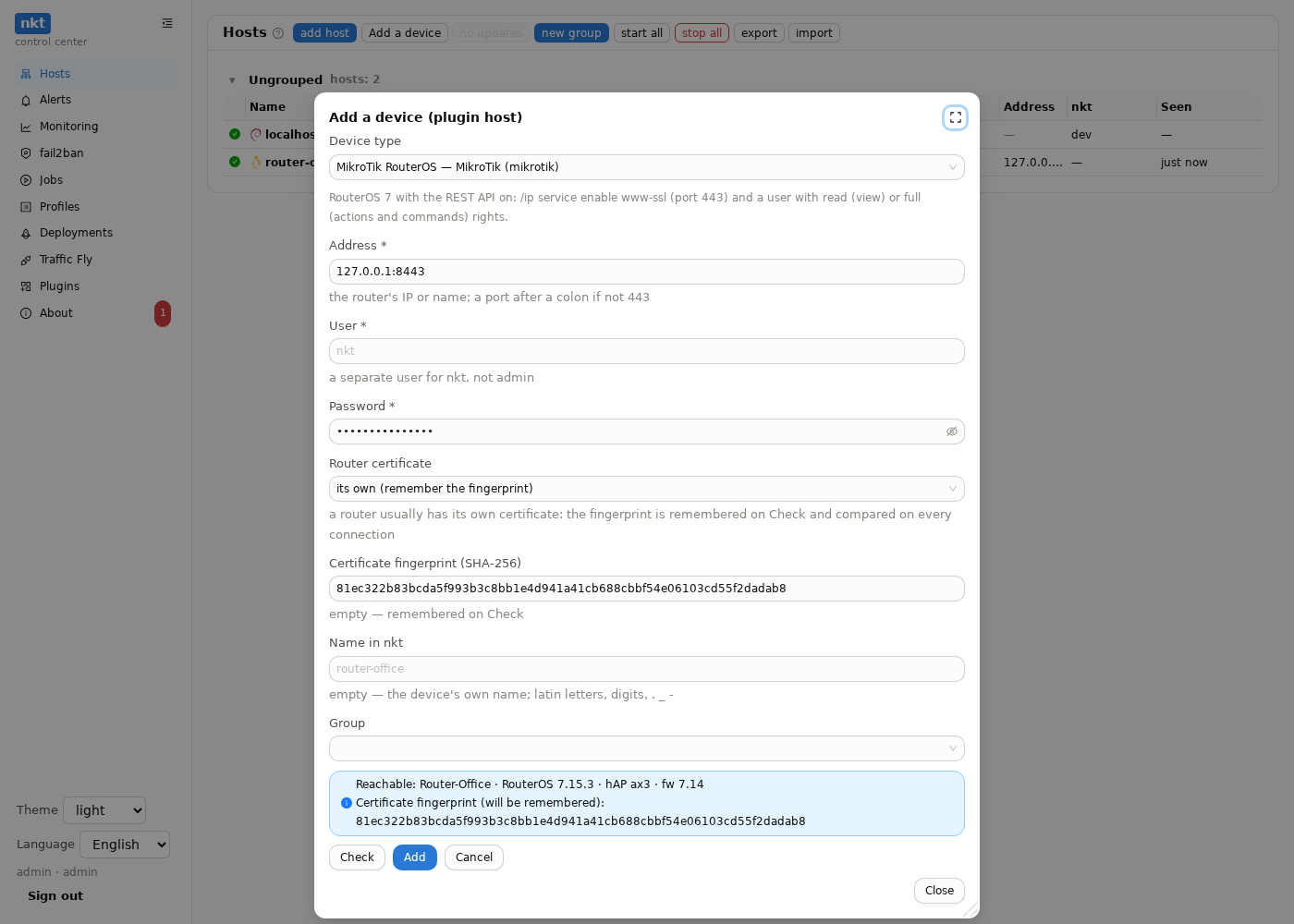
- The hub keeps the login, encrypted with the master key like the hosts' SSH keys, and passes it to the plugin in each call. The password is shown to no one — the card only says “set”; it reaches neither the action log nor job parameters.
- The device's own certificate (usual for routers): the fingerprint is remembered on Check and compared on every connection — like a host's SSH key.
What you see and can do
The row in the host list is like any other: state, findings, address, “seen”. Open — the device panel with the sections its type has:
| Section | What |
|---|---|
| Inventory | model, version, interfaces and addresses, service ports and where they're open from, network neighbors, the type's tables (MikroTik — routes, firewall, DHCP) |
| Metrics | now; the hub polls the device every minute — the history is in Monitoring alongside the other hosts |
| Findings | what's wrong (updates, services open to the outside…) with a hint how to fix; critical ones go to alerts, as with agent hosts |
| Configuration | the hub reads it every hour and keeps 30 versions: changed on the device — a new version and a diff, whoever changed it |
| Actions | reboot, update and whatever else the type declares; with a confirmation and a dry run |
| Commands | a command in the device's language (RouterOS, PowerShell) — with a confirmation, into the action log |
| Login | change the login and password (empty keeps the current one), with Check and a diff |
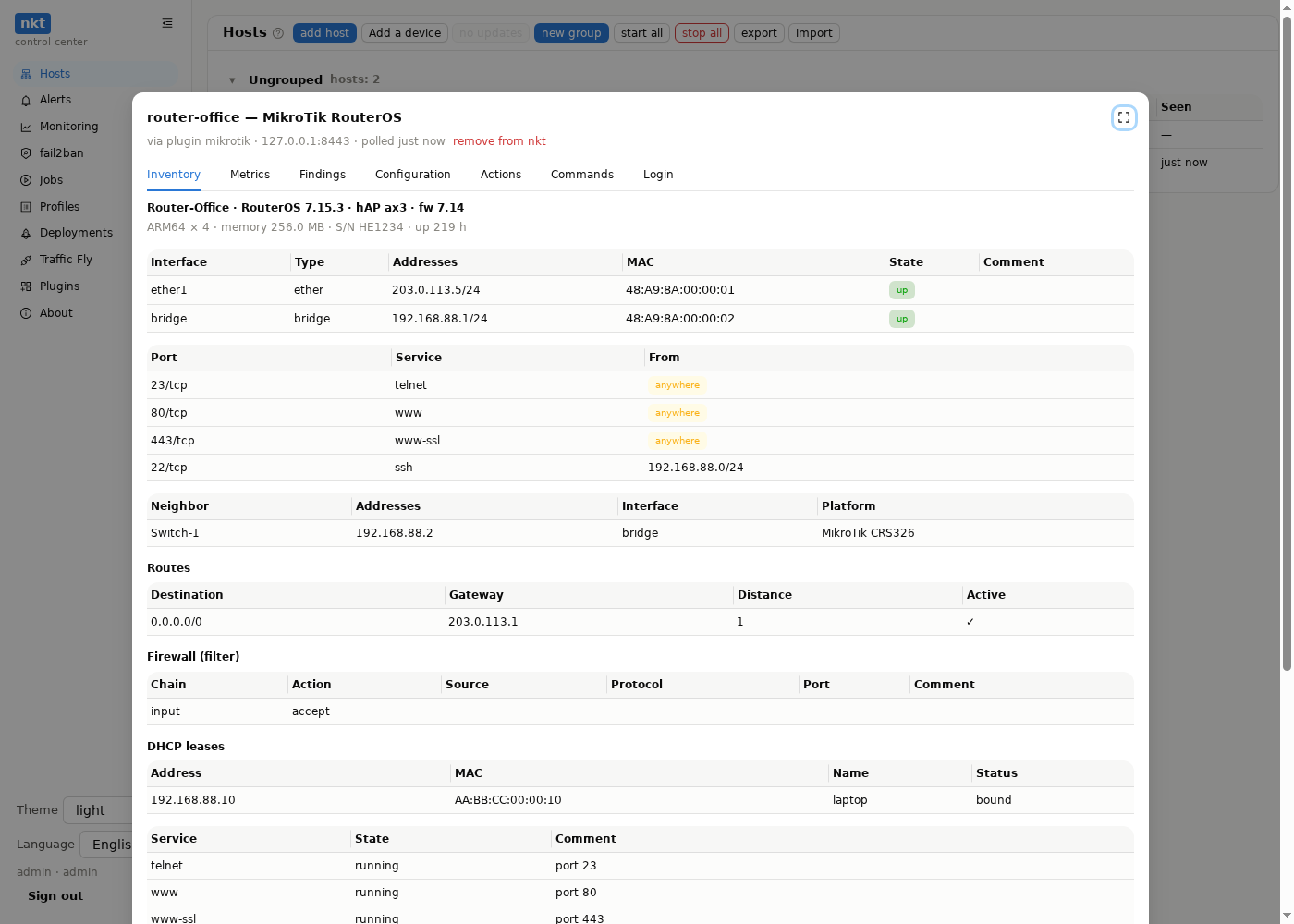
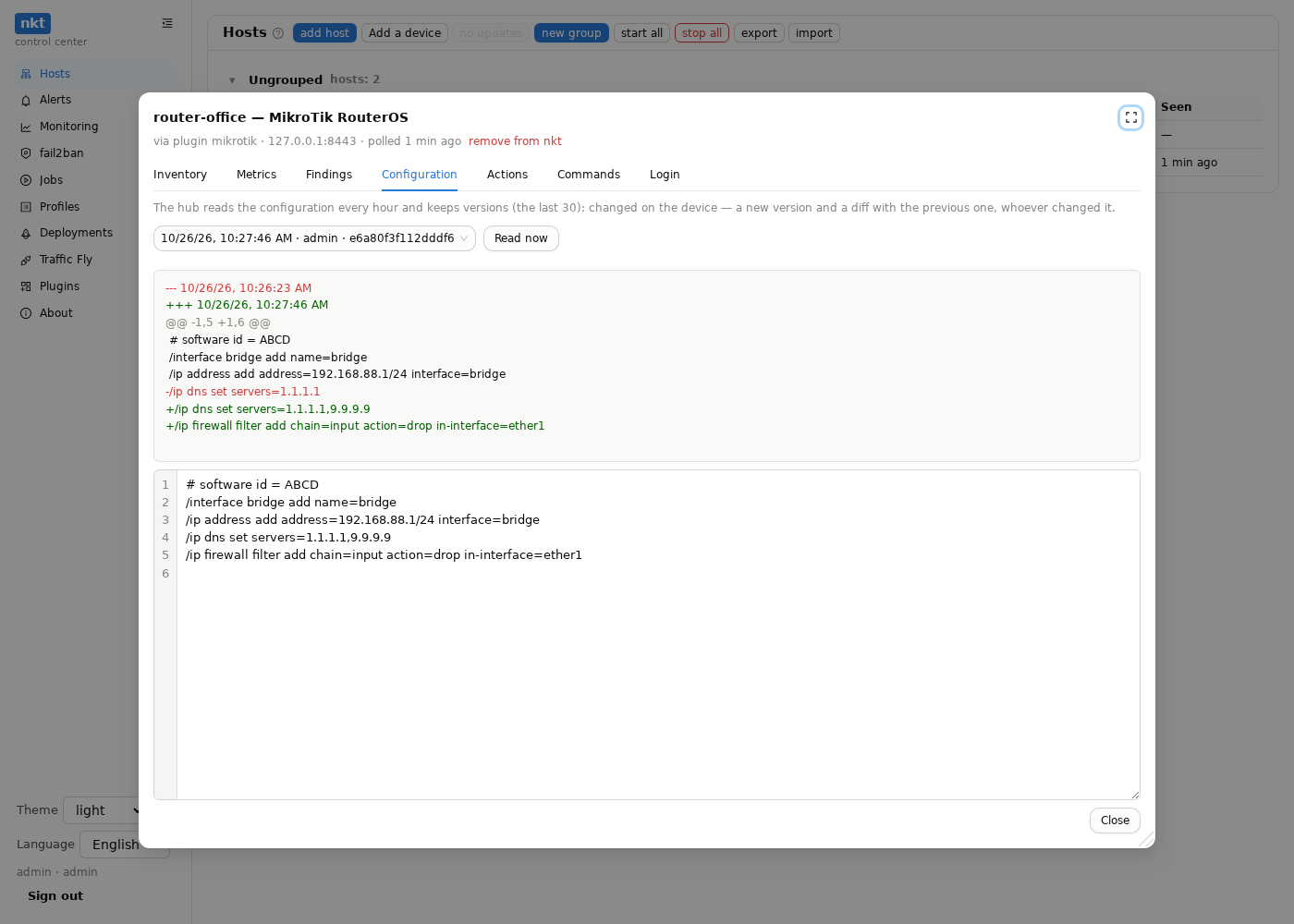
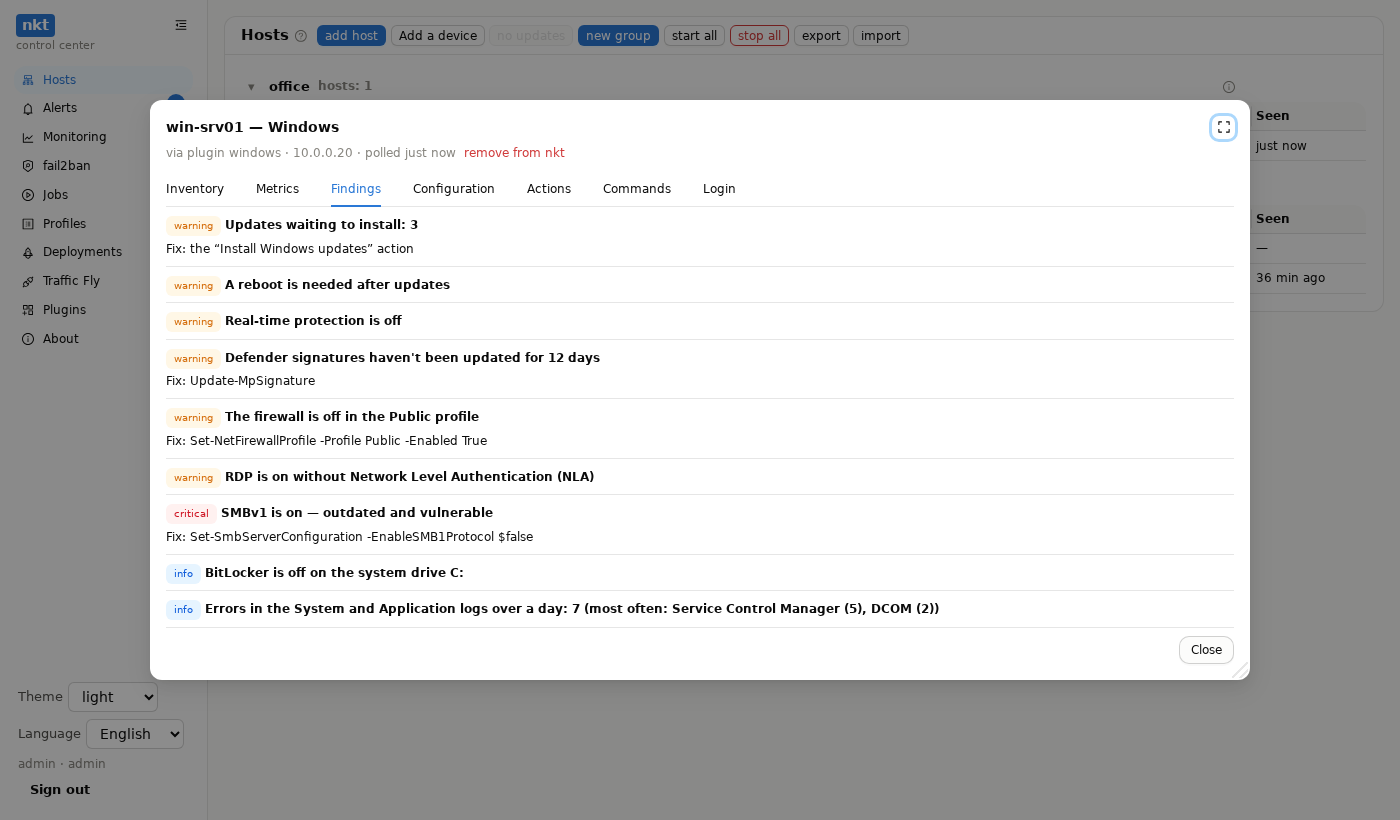
Anyone who sees the host can view (and a read token within its hosts); actions, commands and the login — an admin or a by-permission token with the “plugin NAME” action. Removing a device from nkt changes nothing on the device itself.
Windows: login, firewall, virtual machines
User. The local name — what follows “\” in whoami. For a Microsoft account (name@outlook.com) the field also takes the local name, not the email (usually the same as the folder in C:\Users), and the password is the account's, not the Windows Hello PIN. If Windows only allows Windows Hello sign-in, a password login over SSH may fail — use a key then:
Add-Content C:\ProgramData\ssh\administrators_authorized_keys "ssh-ed25519 AAAA… nkt"
icacls C:\ProgramData\ssh\administrators_authorized_keys /inheritance:r /grant "*S-1-5-32-544:F" /grant "*S-1-5-18:F"
Without icacls sshd silently ignores the file; SIDs instead of group names, because localized Windows names the groups differently. The private key goes into “SSH private key”, the password stays empty. (RDP, by contrast, takes a Microsoft account by its email.)
Firewall. A VM network or a new Windows network is usually “Public”, while the SSH rule may be enabled for private networks only:
Set-NetFirewallRule -Name OpenSSH-Server-In-TCP -Enabled True -Profile AnyCheck reachability by the port (nc -zv -w 5 ADDRESS 22), not ping: Windows does not answer ping by default.
Windows in a virtual machine. The plugin goes on a host that can reach the Windows address — not always the host running the VM. The VM network type: virsh domiflist VM (the Type column).
| VM network | Who reaches Windows | Where to install the plugin |
|---|---|---|
macvtap (direct) | the whole network except the KVM host itself | the hub or any other host on that network, not the KVM host |
Linux bridge (bridge, br0) | everyone, the KVM host too | the KVM host or any host on the network |
NAT default or isolated (network) | only the KVM host | only the KVM host |
| VirtualBox NAT with a port forward | the VM's host | the VM's host, address 127.0.0.1:PORT |
macvtap is a Linux limitation, not a setting: the host exchanges no packets with its own macvtap VMs, and the firewall has nothing to do with it. A wireless adapter usually cannot be bridged — the access point drops foreign MACs.
Scripts and MCP
The script command on HOST run "COMMAND" — or a block up to end:
on router-office run "/ip dns cache flush"
on router-office run
/ip firewall address-list add list=blocked address=198.51.100.7
/ip firewall address-list print where list=blocked
end
Check hands the command to the plugin to parse; a dry run — the plugin says what it would run. A plugin host takes only run (it has no nkt agent); an agent host can't take run.
MCP: list_hosts shows plugin hosts too (kind: plugin), and device_snapshot, device_findings, device_config (read), device_action and device_exec (admin) — their sections.
Connector: devices by profiles
The connector plugin — device types without code of your own: each type is a JSON profile. Built-in: agentless Linux, macOS, FreeBSD, OpenWrt (SSH), Keenetic (HTTP), a printer and a switch (SNMP v2c), UPSes (SNMP — UPS-MIB and APC PowerNet; NUT), IP cameras and NVRs (ONVIF; Hikvision and Dahua NVR disks) — README.
OpenWrt (since connector 1.1.0): Wi-Fi — networks and encryption, clients with signal strength; DHCP — leases and static leases; firewall zones and port forwards; packages with updates (opkg, on OpenWrt 24+ — apk); temperature. Findings: the wan zone accepts everything, SSH or the web UI open from wan, an open network, WEP, WPA1 or mixed mode, TKIP, WPS, port forwards, root without a password, SSH with passwords, /overlay full, a release older than 23.05. Actions: reboot, Wi-Fi, a service, a package upgrade (in the background), a backup on the router. Wi-Fi, WireGuard and other secrets in uci export become ***: the hub's configuration history doesn't keep them. Versions saved before 1.1.0 still contain the keys — to drop them, remove the device from the hub and add it again (its history goes with it). Your own — the plugin's Profiles section (edited with a diff and history on the hub).
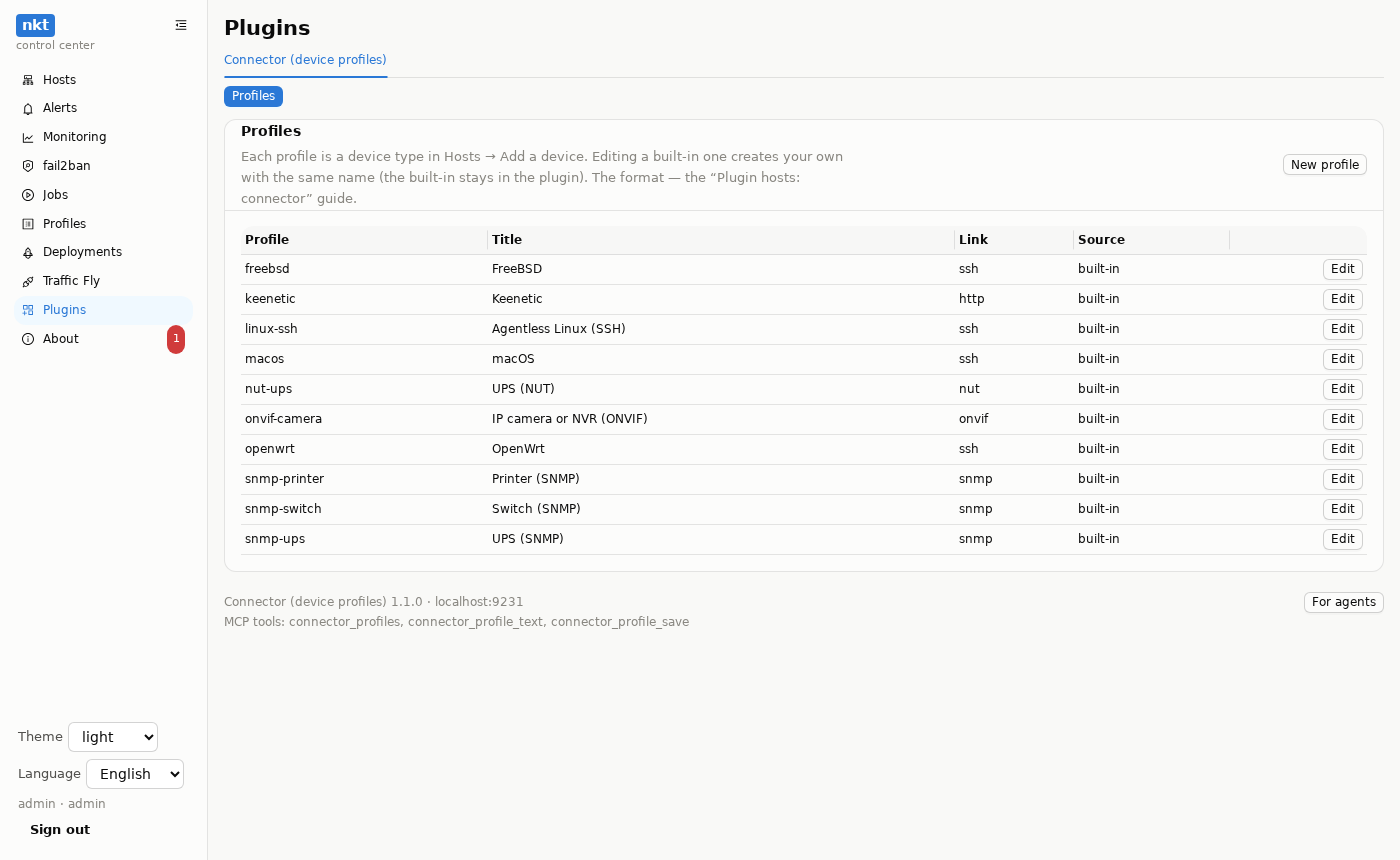
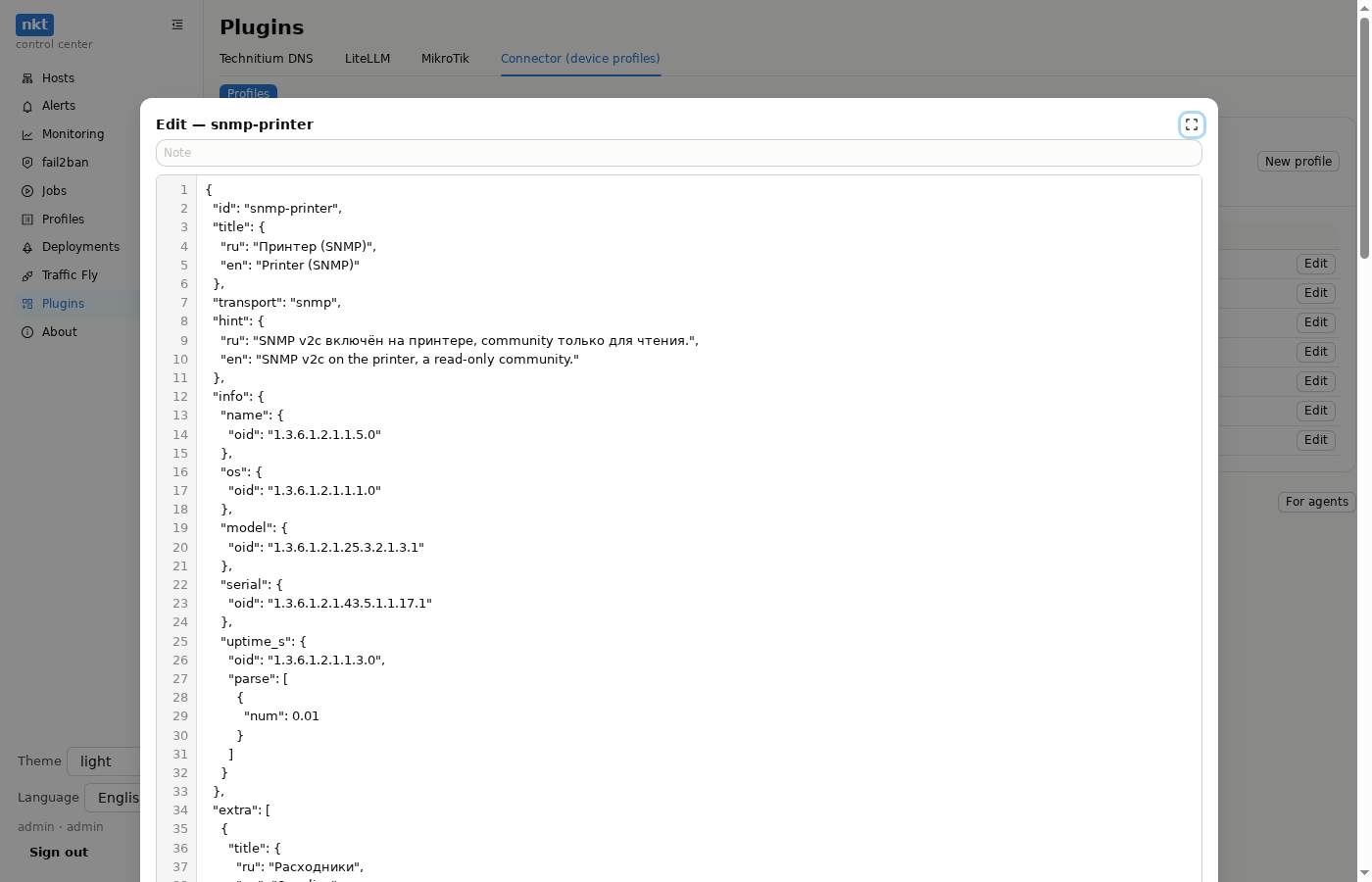
A profile:
{"id": "my-nas", "title": {"ru": "Мой NAS", "en": "My NAS"}, "transport": "ssh",
 "hint": "what to turn on on the device",
 "info": {"name": {"cmd": "hostname", "parse": [{"trim": 1}]},
          "version": {"cmd": "cat /etc/os-release", "parse": [{"kv": "="}, {"key": "VERSION_ID"}]}},
 "snapshot": {"packages": {"cmd": "opkg list-installed", "parse": [{"each": "^(?P<name>\\S+) - (?P<version>\\S+)"}]}},
 "metrics": {"cpu_pct": {"cmd": "top -bn1", "parse": [{"regex": "(\\d+)% idle"}, {"rev": 100}]}},
 "findings": [{"id": "disk", "severity": "warning", "title": "The disk is {value}% full",
               "value": {"cmd": "df -P / | awk 'NR==2{print $5+0}'", "parse": [{"num": 1}]}, "if": {"gt": 90}}],
 "config": {"cmd": "uci export"},
"actions": [{"op": "reboot", "title": "Reboot", "cmd": "reboot", "danger": true, "disconnects": true}]}- Link (
transport):ssh— the source{"cmd": "…"}(a command on the device; it can compute too — awk, sed);http—{"get": "/path"}(auth:basic,bearer,keenetic,digest);snmp—{"oid": "…"}and{"table": {"column": "OID"}}(a walk, rows by index);nut—{"nut": "vars"}(all UPS variables, the form's “UPS name” field);onvif—{"onvif": "info" | "time" | "streams" | "config"}(the password goes as a WS-Security digest) and{"get": …}with HTTP digest for the vendor API. Also{"const": value},{"conn": "login field"},{"any": [source, …]}(the first non-empty one: UPS-MIB or APC),{"fields": [[title, source], …]}(a “parameter — value” table)."optional": trueon a source — an API the device may lack: no answer leaves the field empty instead of failing the call. - Parsing (
parse, in order):json(patha.b.0,a[].b),kv(key=valuelines),key,regex(first match; named groups — an object),each(a regex per line → row objects),lines(skip N lines),cols(whitespace columns),num(number × factor),rev(X − number),pick(rename row fields),items(object → rows),filter(the field is ana.bpath),pct,join,count,first,trim,mask(a regex with avgroup — replaced with***),xml(XML → an object, attributes as@name, a path as withjson),list(one value → a list),map(replace values by a table),dahua(the Dahua disk CGI answer). - Where:
info(name, os, version, model, serial, arch, firmware, uptime_s),snapshot(mem_total, cpu, interfaces, services, packages, ports, users, neighbors, disks — rows with the common model's fields),extra(your own tables),metrics(cpu_pct, mem_used, mem_total, disk_used, disk_size, temp_c, uptime_s, net — rows name/rx/tx),findings(if:gt,lt,ge,le,eq,ne,contains,empty,nonempty,prefix,in,nin,word— a whole word, likeOBin a NUT status; for rows —field),config,actions(cmd,post,instcmd— a NUT command,onvif—SystemReboot; form fields are quoted in),exec(for ssh —shcommands),icon— the type's icon in the host list (ups,camera…; see below).
A field that fails to parse stays empty instead of an error: one profile fits different versions of a device.
Your own device type (for plugin authors)
The plugin declares provides: ["hosts"] and host_types in its manifest:
{"provides": ["hosts"],
 "host_types": [{
   "id": "routeros", "title": "MikroTik RouterOS", "hint": "what to turn on on the device",
   "fields": [{"name": "address", "title": "Address", "required": true},
              {"name": "password", "title": "Password", "type": "password", "required": true},
              {"name": "fingerprint", "title": "Fingerprint"}],
   "sections": ["overview", "metrics", "findings", "config", "actions", "exec"],
   "actions": [{"title": "Reboot", "op": "reboot", "confirm": "Sure?", "danger": true}],
   "exec": "routeros"}]}
The address field is required; type: password is a secret (the hub doesn't show it); the hub fills the fingerprint field with what the check returned. icon (since nkt 1.16.1, optional) is the type's icon in the host list: mikrotik, openwrt, macos, windows, keenetic, yandexcloud, homeassistant, printer, switch, ups, camera, device or an OS icon (debian, freebsd…); one the hub doesn't know becomes the generic device icon. The hub calls service operations with args: {type, conn, …} (conn — the form fields):
| Operation | Answer |
|---|---|
_host_check | result: name, os, version, model, serial, firmware, uptime_s, fingerprint |
_host_snapshot | result: info, cpu, mem_total, disks, interfaces, services, packages, ports, users, neighbors, extra (table views) |
_host_metrics | result: cpu_pct, mem_used, mem_total, disk_used, disk_size, temp_c, uptime_s, net ({interface: {rx, tx}} — bytes since start) |
_host_findings | result.findings: id, severity (critical / warning / info), title, detail, fix |
_host_action | action, args, dry_run → text |
_host_config | result.text (without changing lines — the export time) |
_host_exec | command, check (only parse), dry_run → text |
The sample is examples/mikrotik/deploy/nkt-plugin.py and its test on a fake device.
Export and import
Plugin hosts travel with the hub export along with their group, plugin and type; the logins are re-encrypted with the receiving hub's key. Configuration versions don't travel — the new hub collects them by polling.