
Moving a stack with Traffic Fly
Step by step: how to move a compose stack from one host to another so that users keep coming in at the same address — using Forgejo (a git server with PostgreSQL) as the example, with its web UI and git over SSH going through Traffic Fly.
Why Traffic Fly: the git.example.com A record points not at the host but at the VPS gateway. On a move the hub just switches the route's target to the new host — DNS, certificates and client settings stay the same.
There is downtime
The stack on the old host stops while the data is copied — the service is down until it arrives. Traffic Fly does not remove this downtime; it saves you from changing DNS and certificates afterwards. Move at a quiet time; the plan window shows in advance how much data will travel.
0. What you need first
A hub with the "Hosts map". The map is an experimental feature: "About" → "Experimental features" → "Edit" → "Hosts map".
Two hosts in the hub, both online, nkt 1.13.62 or newer on both (on Ubuntu 26.04 older versions cannot bring up the Traffic Fly tunnel, see nkt-edge). Docker is installed on the new host. The tunnel on the new host needs no separate setup — the hub brings it up when it adds a route target there.
A Traffic Fly gateway — a VPS with nkt-edge in the fly role, "Gateways" on the Traffic Fly page.
Forgejo deployed through Traffic Fly. No Forgejo yet? "Deployments" → "New pipeline" → the text of
examples/forgejo/pipeline.fly.yaml: instead of a proxy on the host it has two routes:yamlfly: - route: forgejo-web # web: https://git.example.com kind: https names: [git.example.com] tls: gateway # the gateway issues and renews the certificate service: forgejo target_port: 3000 check: http check_path: /api/healthz - route: forgejo-ssh # git over SSH: ssh://git@git.example.com:2222/… kind: tcp port: 2222 service: forgejo target_port: 2222The
git.example.comA record points at the gateway's address. Adjust the name, the host (hosts: [web1]) and the administrator's email, "Save" → "Deploy". Forgejo already deployed from the regular example (site:and SSH on the host's 2222)? Replacesite:and theports:line in its description with thefly:block above, deploy and move the A record to the gateway.The host in the pipeline by name (
hosts: [web1]), not a group: otherwise the move cannot switch the pipeline and the next deployment would bring the stack up on the old host again.
Check before the move: https://git.example.com opens, and in Traffic Fly both routes have their target on the old host active and alive.
1. Start the move
- "Hosts" → the "Map" switch on the right.
- The "Move" button above the map — tile dragging mode.
- Drag the
forgejo-forgejo-1tile onto the new host's block. The whole stack (forgejoanddb) is framed together and moves as a whole.
The "Apply immediately" switch next to "Move": off — the move first goes into a plan and starts with "Apply moves (N)"; on — it starts right from the plan window (and with no obstacles or warnings even without the window).
2. The plan window
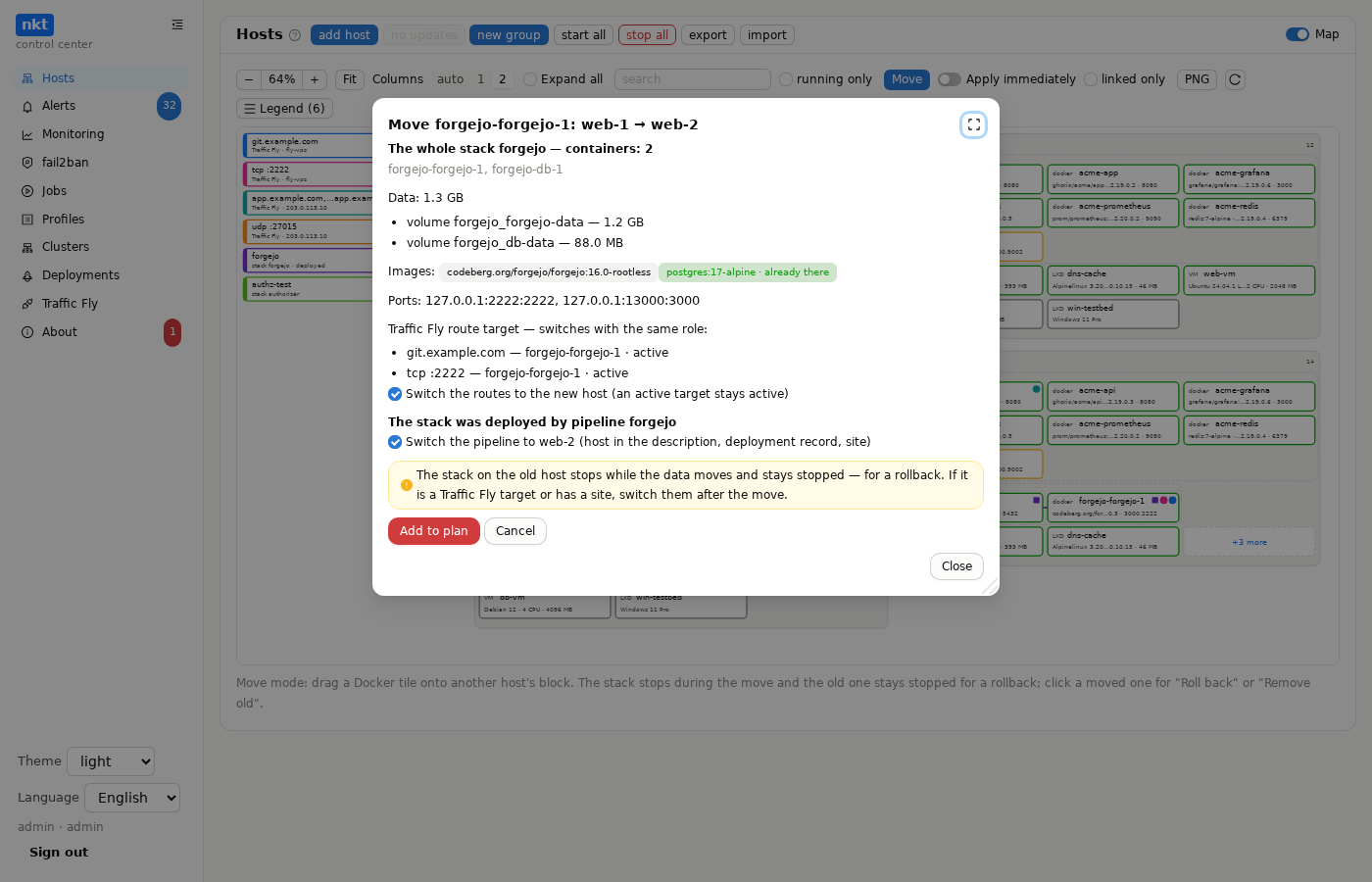
What to check:
- The whole stack — both containers.
- Data — the
forgejo-datavolume (repositories, attachments, the SSH server key) anddb-data(the database) with sizes: that much will travel, that long the downtime lasts. - Images — "already there" for those already pulled on the new host; the rest travel with the data.
- Obstacles (red) — not enough space, a taken port, a missing external network; while there are any, the move is not possible.
- Traffic Fly route target — both routes,
active. The "Switch the routes to the new host" checkbox is on: the active target becomes active on the new host. - The stack is deployed by the forgejo pipeline — the "Switch the pipeline to the new host" checkbox is on: the host in the pipeline's description and the deployment record move with the stack.
"Add to plan" → "Apply moves (1)" (or "Move" with "Apply immediately"). The job log opens.
3. The move
The job runs in steps, and the map shows them live:
Plan — both hosts are checked once more.
Packing — the stack on the old host stops (the service is down from here on), volumes and images are packed.
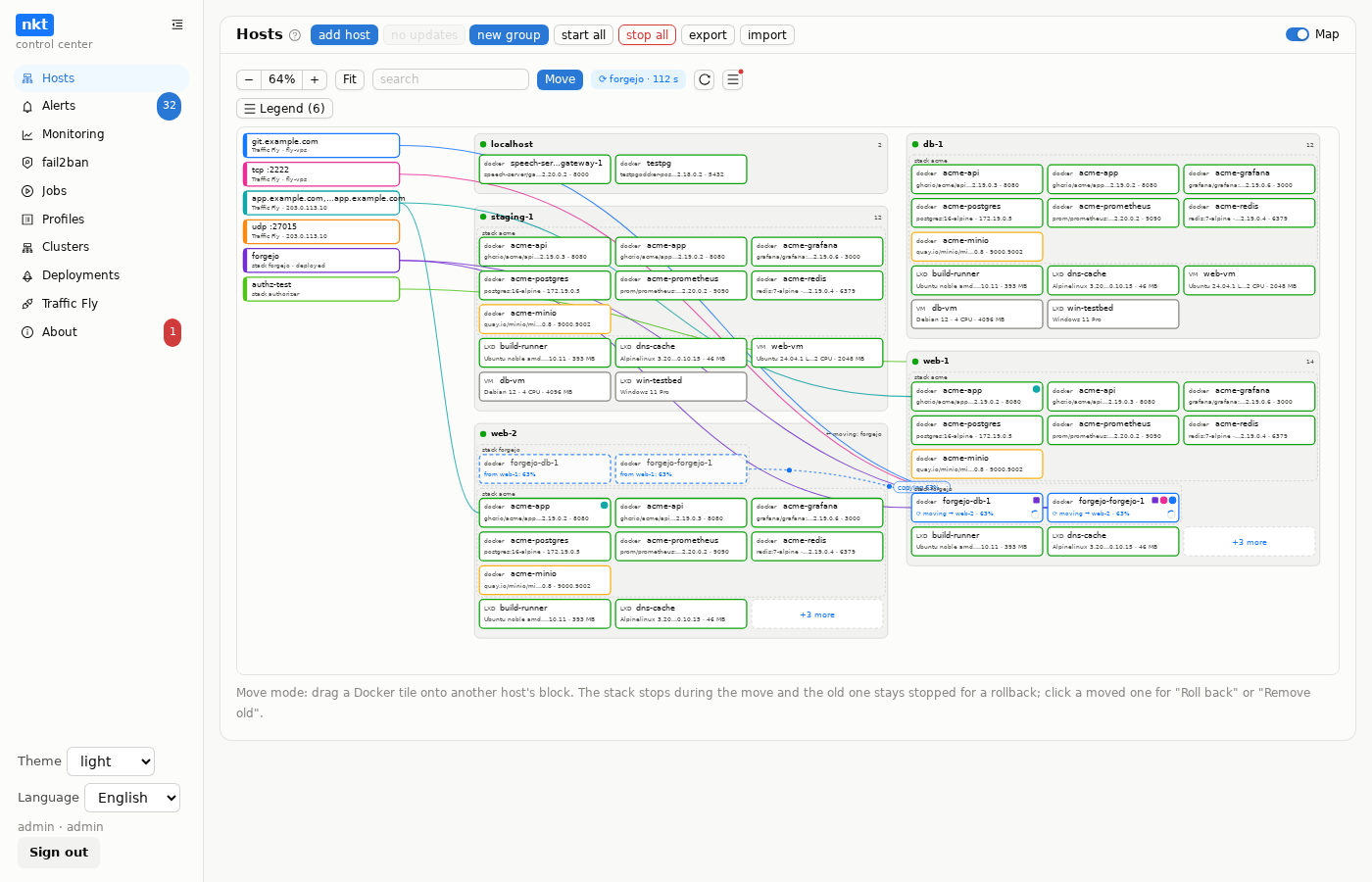
Transfer — the data goes through the hub to the new host. The map shows a ghost tile on the new host and dots running to it with a percentage.
Unpacking — volumes and images on the new host, the stack starts.
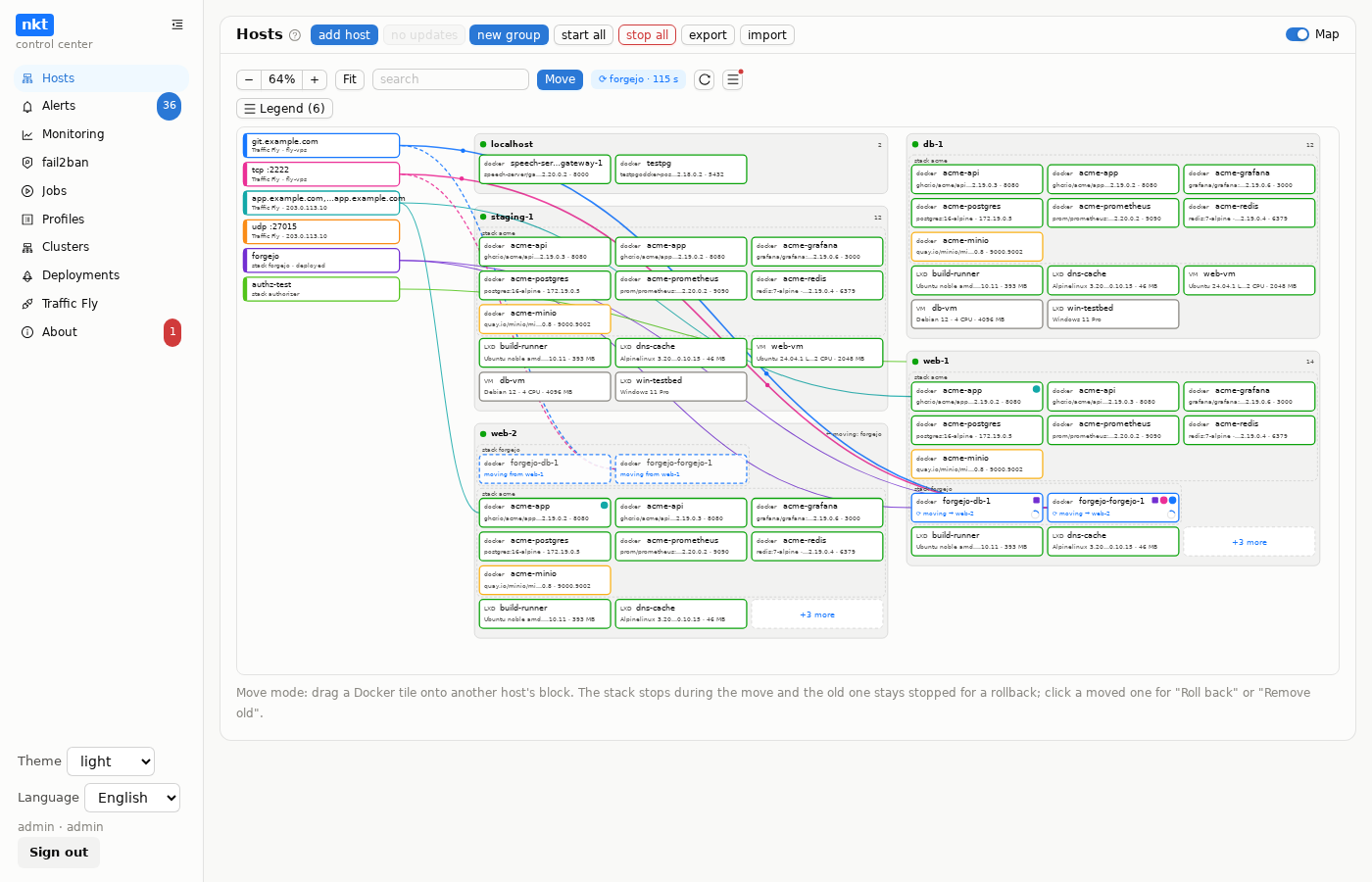
Traffic Fly — a target on the new host is added to both routes as a reserve; the hub waits up to 90 seconds for the gateway to see it alive, then swaps: the new one becomes active, the old one a reserve. On the map the route's line to the new tile is drawn, a running dash while the gateway checks it, then the traffic dots move to the new line.
Pipeline — the host in the description (a new version noted "stack move") and the deployment record move to the new host.
Done — a move record: the old stack stays stopped on the old host for a rollback.
An error at any step after the stop rolls the job back by itself: what was unpacked on the new host is removed and the stack starts again on the old one.
4. Check
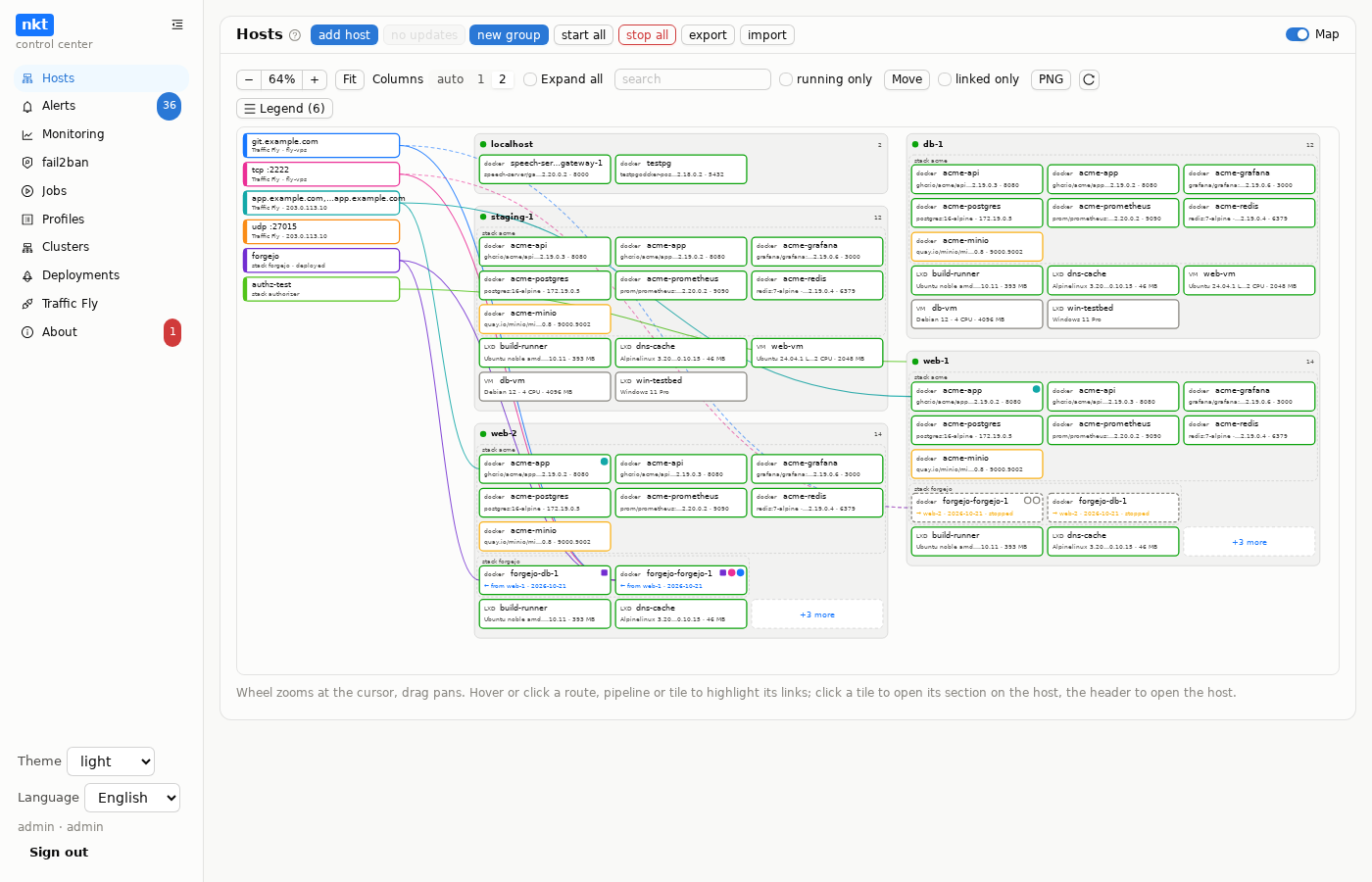
- Map: Forgejo runs on the new host ("← from web-1"), the old host has grey tiles "→ web-2 · stopped"; the route marks on the old tile are hollow circles (reserve).
- Traffic Fly:
forgejo-webandforgejo-sshhave the active target on the new host and alive, the old one is a reserve. - Forgejo itself: open
https://git.example.com, sign in, open a repository and its issues — the data is there. - git:
git clone https://git.example.com/<owner>/<repo>.gitandgit clone ssh://git@git.example.com:2222/<owner>/<repo>.git. The SSH server key lives in the Forgejo volume and moved with it — clients see no host key change warning. - The forgejo pipeline in "Deployments": its description has the new host.
5. If something is wrong
- "Roll back" — click the grey tile on the old host: the stack on the new host stops, the old one starts, the routes (the old target active again) and the pipeline come back. The data is what the old host had at the move: changes made on the new host after the move do not travel back.
- The new host does not answer (powered off, network) — "Roll back without the new host" in the same menu: the stack runs on the old host again, the routes and the pipeline are back. A second copy may still be running on the new host — when it returns, the map marks it "second copy", click it → "Stop the second copy".
- "Not alive within 90 s" in the log — the gateway did not see the new target alive, but the swap is done anyway (the old one is already stopped). The causes are in Traffic Fly under the gateway and at the route: the new host's tunnel did not come up ("Apply" log), Forgejo is still starting (the check recovers by itself), a wrong port.
- The next pipeline deployment reconciles the route targets with the host from the description and removes the old reserve target — after it a rollback no longer brings the routes back. Roll back before the next deployment.
6. Remove the old copy
When everything is checked (a day or two on the new host) — click the grey tile → "Remove old": the stopped containers leave the old host and the old target leaves the routes. The "and data" checkbox also deletes the volumes on the old host; without it they stay — moving the stack back there will then require cleaning up these leftovers (the move window offers it). A week after the move the hub reminds you of a copy left behind in "Alerts".
The same as a script
Everything from the deployment to the check after the move — as one hub script "Forgejo behind Traffic Fly: deploy and move" (also examples/scripts/forgejo-fly.nkt, needs hub 1.13.67+).
How to run it: "Profiles" → the "Scripts" tab → "New script", in the editor window — "Ready-made scripts ▾" → "Forgejo behind Traffic Fly: deploy and move"; enter a name → "Save" → "Check" → "Dry run" → "Run" (the parameters are asked at start, the progress is in the job log). The ready-made scripts are also on the scripts page's "Reference" tab ("Into editor" button).
At start it asks for the host to deploy on, the host to move to and the name; "Dry run" shows the pipeline's dry run, and the move plan comes at run time (before the deployment the stack is not on the host yet).
# Forgejo за Traffic Fly: выкладка и перенос на другой хост
param FROM "хост, где Forgejo будет выложен сначала"
param TO "хост, куда его перенести"
param DOMAIN "имя Forgejo — A-запись на адрес шлюза Traffic Fly"

# Веб и git по SSH — через шлюз; сертификат выпускает шлюз
pipeline forgejo
repo: https://github.com/piqab/nkt.git
ref: main
action: compose
compose:
  file: examples/forgejo/deploy/docker-compose.yml
  project: forgejo
  hosts: [${FROM}]
  wait_timeout: 5m
  env_keys:
    forgejo-admin: [FORGEJO_ADMIN_USER, FORGEJO_ADMIN_PASSWORD, FORGEJO_ADMIN_EMAIL]
  env:
    POSTGRES_PASSWORD: generate:password
    FORGEJO_DOMAIN: ${DOMAIN}
    FORGEJO_ROOT_URL: https://${DOMAIN}/
    FORGEJO_ADMIN_USER: gitadmin
    FORGEJO_ADMIN_PASSWORD: generate:password
    FORGEJO_ADMIN_EMAIL: admin@example.com
  fly:
    - route: forgejo-web
      kind: https
      names: [${DOMAIN}]
      tls: gateway
      service: forgejo
      target_port: 3000
      check: http
      check_path: /api/healthz
    - route: forgejo-ssh
      kind: tcp
      port: 2222
      service: forgejo
      target_port: 2222
end
deploy forgejo 20m

# Проверка снаружи — через DNS и шлюз, как зайдёт пользователь
wait url https://${DOMAIN}/api/healthz 200 10m

# Перенос: маршруты Traffic Fly и конвейер переключаются на новый хост
migrate ${FROM} forgejo-forgejo-1 to ${TO} switch-fly switch-pipeline
wait url https://${DOMAIN}/api/healthz 200 5m
The script's comments are in Russian; the commands are the same in any language.
pipeline forgejo … end— the pipeline, like "Save" in the window: the hub creates the passwords, the values go to "Secrets".deploy forgejo 20m— the deployment with waiting; theforgejo-webandforgejo-sshroutes are created by the pipeline itself (thefly:block).wait url …— an outside check from the hub to the real name: DNS, gateway and certificate as for a user.migrate … switch-fly switch-pipeline— the move, like from the map: with obstacles the script stops before the stack stops, a failed move rolls back by itself.
The script is one-off: running it again saves the pipeline with host FROM again, and the next deployment would bring the stack back there. Roll back and remove the old copy from the map (steps 5 and 6).
Through the API and n8n
A move also runs without the map: with an admin API token — the plan POST /api/hub/migrate/preview, the move POST /api/hub/migrate (switch_fly, switch_pipeline), rollback and cleanup — POST /api/hub/migrations/{id}/rollback|remove; in n8n — Migration → Preview / Move Stack. Details — Hub API.
See also
- Hosts map — the move in detail: what travels, obstacles, shared networks.
- Traffic Fly — routes, targets, gateways.
- Deployments — the
fly:block in a pipeline.