
Traffic Fly: inbound traffic through a VPS
The service lives at home or in an office behind NAT, but users need an internet address. Traffic Fly receives traffic on a cheap VPS with a public address and passes it through a WireGuard tunnel to your hosts — into a container, a virtual machine, an LXD instance or a service on the host itself. Targets see the client under its real IP, TCP and UDP both work, and a single port can carry a pool of targets with load balancing and health checks.
The hub configures it all — in the Traffic Fly menu section — but the gateway and hosts work without the hub: tunnels, rules and the router come back on their own after a reboot.
Layout
clients ──80/443 by name, TCP/UDP ports──▶ VPS: nkt-edge (fly role)
                                              │  WireGuard 51820/udp
                                              ▼
                               host: tunnel nkt-flyN → DNAT → container,
VM, LXD, host service, address on its network- Gateway — a VPS running nkt-edge in the
flyrole. A separatenkt-flyservice (root) runs there: thenkt-flyWireGuard interface, nftables rules and the name router. The edge itself stays unprivileged and only relays the hub's commands to it. - Host — each host has a tunnel to each gateway (
nkt-flyN,wg-quick@nkt-flyN). Private keys are created on their own machine and never leave it; the hub sees only public keys. - Target replies go back into the same tunnel by connection mark — the host's default route is left alone.
Routes
| Kind | What | Client IP |
|---|---|---|
| HTTPS by name | port 443, chosen by SNI; TLS is not decrypted — the certificate lives on the target | PROXY protocol v2 |
| HTTPS by name, certificate on the gateway | port 443; the gateway terminates TLS, the target gets plain HTTP (see below) | X-Forwarded-For, X-Real-IP |
| HTTP by name | port 80, chosen by the Host header | PROXY protocol v2 |
| TCP port, UDP port, TCP+UDP | the whole port goes to a pool | real, no target changes |
- 80 and 443 are split by name:
app.example.com,*.example.com; an exact name beats a wildcard. One name, one route. - Port range (the “to port” field, TCP/UDP): ports are kept end to end, one target serves — the first live one; for coturn relay ports and the like (see the example).
- Other ports: one gateway port, one pool. A second pool on the same port needs another port or a second gateway (a VPS with another address).
- A route by name passes the client IP via PROXY protocol v2: the target must accept it (nginx
listen 443 proxy_protocol, Caddy, HAProxy, Traefik). Without the checkbox the target sees the gateway's tunnel address. - A route by port goes through the kernel (DNAT without source rewrite): the target sees the real client address by itself.
DNS through the plugin
With a DNS plugin connected, a named route gets a DNS through the plugin box: on Apply the hub sets A records of the route's names to the gateway address itself. One name in routes with different gateways — a Failover record: DNS answers only with live gateways. In a script — fly route … dns plugin, in a pipeline — dns: plugin in the fly: block. The Apply dry run shows which records change.
Certificate on the gateway
If the target serves plain HTTP (an application container without its own certificate), check Certificate on the gateway on the HTTPS by name route. Without it the gateway does not decrypt TLS, and browsers show ERR_SSL_PROTOCOL_ERROR.
- The gateway obtains and renews a Let's Encrypt certificate for the route's names itself. The check goes over its port 80, so the names' DNS must point to the gateway, and the gateway's port 80 must be free or used by HTTP by name routes. Exact names are needed:
*.domaincannot be issued this way. - The ports belong to the gateway, not the host: nothing needs opening on the host. nkt sets up the VPS's own ufw when installing the edge, but in the provider's firewall (security group, the “firewall” in the hosting panel) allow 80 and 443 and the ports of port routes (say, 2222 for git over SSH) — nkt can't reach that.
http://nameis redirected tohttps://.- The target gets HTTP with the client address in
X-Forwarded-ForandX-Real-IP, the scheme inX-Forwarded-Proto: https;Hostis the client's. PROXY protocol is not needed. - Certificates and keys stay on the gateway (
/etc/nkt-edge/fly/certs, root only) and never go to the hub; renewal works without the hub too. - The route window shows for each name: “certificate until …” or why it was not issued.
- Dry run and Apply check in advance: the gateway is at least 1.13.25 (otherwise a refusal — Reinstall the gateway), the name's DNS points to the gateway and its port 80 answers from outside (otherwise a warning in the job log, since the hub may have no internet access). The gateway version is shown in Gateways.
Access from listed addresses only
A route can have allowed client addresses — IPv4 addresses and networks (203.0.113.7, 198.51.100.0/24, up to 200). The gateway cuts everyone else itself: the kernel for routes by port (their packets never reach the targets), the router for routes by name, before the target. The route window shows how many connections were denied. Let's Encrypt checks for a gateway certificate always pass.
Use it for what the whole internet should not see: VM consoles, service ports, admin panels. In a pipeline — the allow: field of a fly: block.
Per-client limits
A route has two optional fields:
- connections per address, at most — concurrent;
- new per second per address, at most — the rate of new connections (with a burst of the same size).
The gateway drops extra connections itself: the kernel for routes by port (before DNAT, the target never sees them), the router for routes by name. The route window shows how many were denied. Empty means no limit. Change them in the route editor at any time; in a pipeline — max_conns: and rate: in a fly: block.
Performance and security
Performance. Measured on the development machine (16 cores, loopback and veth in namespaces), not on a VPS — the upper bound of Traffic Fly itself, not of your link:
| Path | Result |
|---|---|
| route by port (kernel: gateway DNAT → tunnel → host DNAT) | ~17 Gbit/s single stream, ~50 Gbit/s with four |
| route by name without decryption (the router copies bytes) | ~23 Gbit/s, ~9,000 new connections/s on 4 cores |
| route by name with a gateway certificate | ~7.9 Gbit/s, ~2,300 new connections/s on 4 cores (client included) |
On a VPS the limit comes earlier from WireGuard encryption (roughly from a few hundred Mbit/s on 1 vCPU to a gigabit or more per core) and the provider's network. Latency adds the gateway ↔ host path. The measurements are reproducible: go test ./internal/fly -run x -bench Router and NKT_FLY_BENCH=1 go test ./internal/fly -run DataPathThroughput -v.
Security.
- Private WireGuard and certificate keys never leave their machines; the hub sees only public keys.
nkt-edgeruns unprivileged,nkt-flyas root (it needs the network) and takes commands only on loopback with a token. - The router is written in Go and reads at most 16 KB of a connection's start within 10 seconds.
- A host accepts from the tunnel only what arrived at route service ports, replies and ICMP: a compromised gateway cannot reach the host's other services or container networks.
- An allowlist and per-client limits on every route.
- TCP segment size in the tunnel is clamped to its MTU (MSS), so large packets do not stall even where ICMP is filtered.
- With a gateway certificate the gateway decrypts TLS, so a compromised gateway sees that traffic. Keep the certificate at the target for sensitive traffic.
- Traffic Fly has not had an external audit.
Pools and balancing
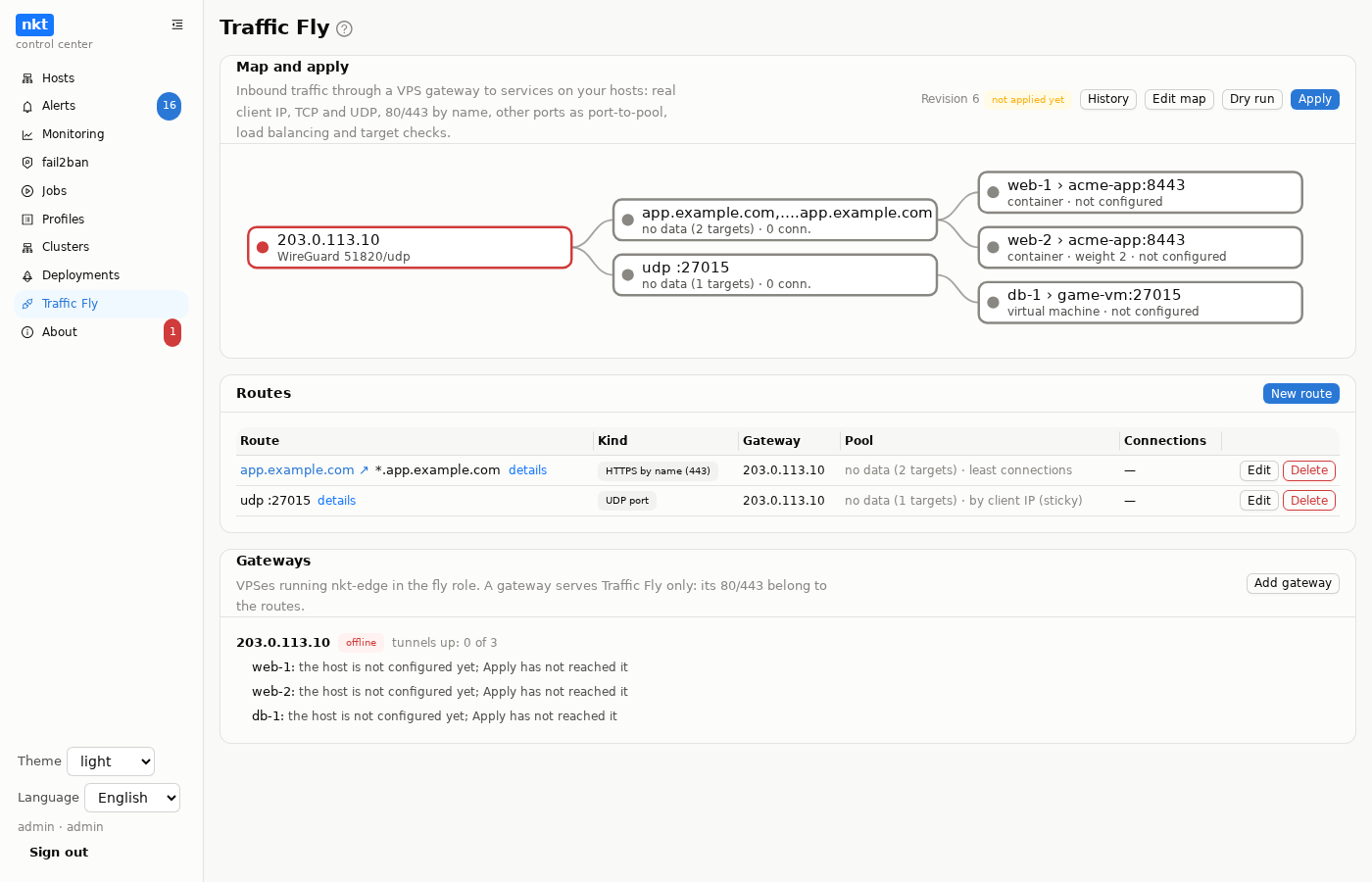
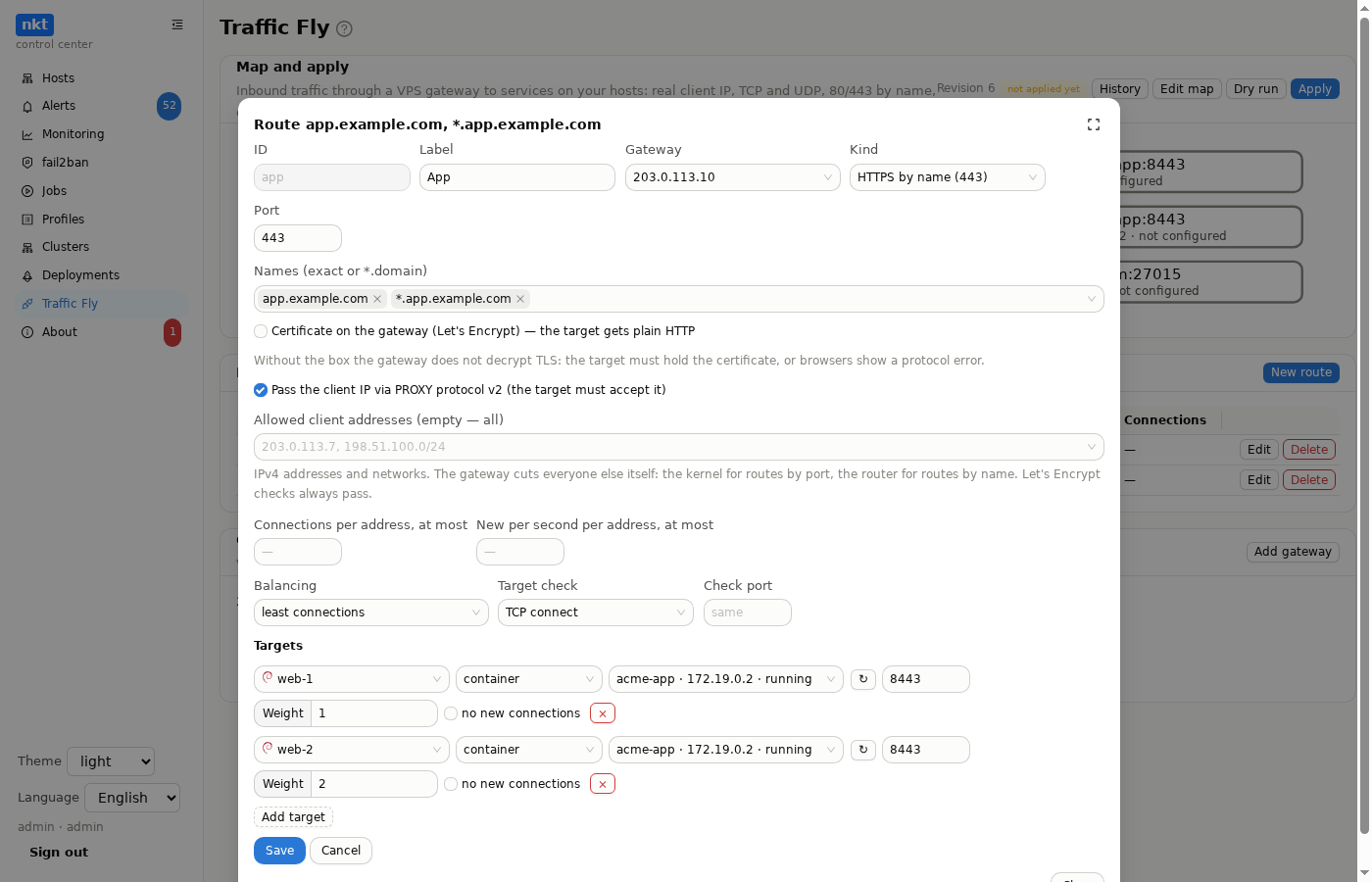
A route has one or more targets: a host and what runs on it (container, VM, LXD instance, the host itself or an address on the host's network) and a port. The hub looks up the container or VM address when applying.
| Balancing | Where |
|---|---|
| least connections | routes by name |
| round robin | everywhere |
| by client IP (sticky) | everywhere; a client sticks to one target |
- Weight — the target's share of traffic relative to the others.
- Drain — the target gets no new connections, current ones finish; this is how a target goes into maintenance.
- Check: TCP connect, HTTP request (path and status code) or none; a separate check port can be set. A target is down after 3 failures in a row and alive again after 2 successes; checks run every 5 s. A down target leaves the pool at once, for routes by port too. A UDP route needs a TCP check port or no check.
Map and summary
At the top of the tab is the map: gateways → routes → targets; the host is written before the target name (web-1 › acme-app:8443), long names are shortened in the middle with the full name in a tooltip. The state of the tunnel to the host shows as the target's border color and caption (“UDP blocked”, “not configured”). Color shows state (green — all alive, yellow — some, red — none), link thickness — active connections; the map refreshes every 5 s. Click a route for details: targets with check, latency and connections, traffic and client count. Admins see client addresses while there are at most 30 of them; beyond that, only the count. Viewers see the map and the client count, not addresses.
Editing on the map
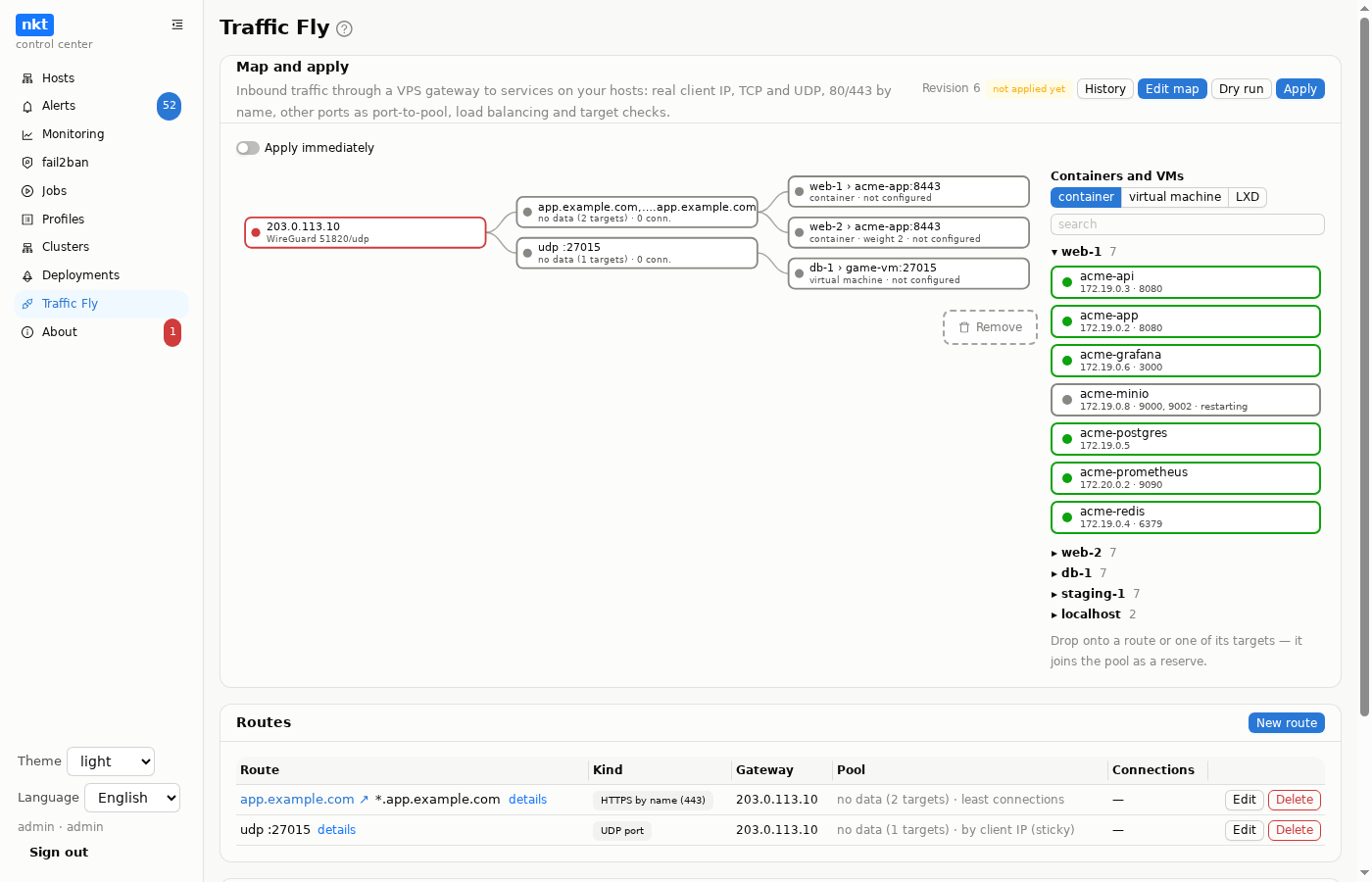
The Edit map button (admins) turns on editing: on the right, as a fourth column, a Containers and VMs panel by host, with search; the candidates are drawn as the same blocks as targets (green border — running, grey — stopped; address and ports below). Next to a host name is the number of targets of that kind; hosts without any, or offline, are hidden ("hosts without targets hidden: N — show"). Below the map is the trash.
Everything is done with the mouse (or a finger on a phone):
- A container from the panel onto a route or any of its targets joins the pool as a reserve: it is checked but gets no traffic until you switch to it. The port is the one the container declares or that of the route's first target; if unknown, the map asks.
- Drag a target onto another route to move it there as a reserve; into the trash to remove it from the pool.
- Swap: a route's active targets are drawn on top with the reserves below. Drag a reserve onto an active target (or an active one onto a reserve) of the same route and those two trade places: the reserve goes into service, the active one into reserve, the rest of the pool stays as is. While dragging, the spot is highlighted green "↑ switch here" or red "target down": only a target that passes its check goes into service, and only after the same "Switch traffic from A to B?" question.
- Mouse wheel over a target changes its weight by ±1.
- Clicking a target opens a menu: “Switch traffic here”, “Activate”, “To reserve”, “Edit” (port, weight), “Move to another route”, “Remove from pool”, “Add a container as reserve…” (pick by click — for phones), “details”.
A reserve target is drawn dashed — both border and link — with a “reserve” caption; its dot color follows the check, so you can see whether it is safe to switch to. Switch traffic here is available only on a reserve target that passes its check; after a short “Switch traffic from A to B?” confirmation that target goes into service and the others into reserve: no new connections, open ones finish. The usual order is to add as a reserve, wait for the green dot, then switch.
Guards: the route's last active target cannot be moved to reserve, moved to another route or removed, and only a reserve target can be removed — the map explains why.
Draft (default): actions pile up on the map — new targets are marked “+ new”, changed ones “→ active”, “→ reserve”, “edited”, removed ones stay faded and struck through. Above the map are Apply changes (N) (route diff and a note for the revision; one new revision and one job), Undo and Discard draft (N) — which asks “Discard map changes?” (“Discard” / “Keep editing”); the same question comes up when leaving editing with a non-empty draft.
Apply immediately (a switch above the map, off by default): every action goes to the Traffic Fly queue as a job right away; wheel steps are collected and sent as one job once the wheel stops.
While a job runs, the affected routes and targets show a spinner with a countdown, and a job tag sits above the map (click — log); a failed job leaves a red tag linking to its log. Operations are applied to the revision current at run time, so queued jobs don't get in each other's way.
Editing, history and applying
A new route's identifier fills in by itself: from the first name (
git.example.com→git-example-com), otherwise from the label (Cyrillic transliterated), otherwise from the kind and port (tcp-2222); if taken — with a-2suffix. You can type your own: invalid characters are fixed as you type (upper case to lower, space,_,.to-), and the hint under the field says what's allowed. If “Save” is disabled, the reason is written next to it.Routes are changed by admins; saving goes through a diff window with a note, and each save is a new version. Two simultaneous edits don't overwrite each other: the second is refused.
History — the difference between versions and restoring any of them.
Dry run — a job builds the gateway and host configurations, checks keys and target addresses, but writes nothing.
Apply — a job in steps: gateway keys → host keys and target addresses → hosts (tunnels, DNAT) → gateways (tunnels, rules, router). Hosts go before gateways so traffic flows only once tunnels are ready. A host or gateway with nothing left to do removes its tunnels and rules.
A node that already has the same configuration (and confirms it) is not pushed again: the log says “configuration already in place”, and for certificates “valid until …, not reissued” or “being issued”.
Hosts get
wireguard-toolsandnftablesinstalled if missing; the gateway gets them with the edge install.
Gateway
Add gateway opens the nkt-edge install with the fly role: no name or certificate is needed, the gateway's 80/443 belong to the routes. That is why fly can't be combined with webhooks, API or callbacks — those need a separate edge; outside checks (probe) can be combined. If ufw is enabled on the VPS, the gateway opens 51820/udp and the ports of routes by name itself.
Events
Once a minute the hub compares the gateway summaries and writes to alerts: target down / back up, no live targets in pool, tunnel down / up. Telegram, Slack, outgoing webhooks and the n8n node get them like any other event.
Examples
A container site with a certificate on the gateway
Container shop-web-1 on host web1 serves HTTP on port 8080.
| Field | Value |
|---|---|
| Kind | HTTPS by name (443) |
| Names | shop.example.com |
| Certificate on the gateway | yes |
| Targets | web1 → container shop-web-1, port 8080 |
| Check | HTTP request, path /healthz |
DNS shop.example.com → the gateway address; ports 80 and 443/tcp open at the VPS provider. After Apply the gateway obtains the certificate, http:// goes to https://, and the application sees the client address in X-Forwarded-For.
MQTT
| Broker | Route |
|---|---|
| no TLS | “TCP port” 1883 → the broker container, port 1883 |
| TLS at the broker | “TCP port” 8883 → the broker, port 8883 (certificate at the broker) |
| several brokers on one 8883 | “HTTPS by name”, port 8883, names mqtt1.example.com, mqtt2.example.com — the gateway picks the broker by name (SNI) without decrypting TLS; the client address only via PROXY protocol (EMQX and HiveMQ support it, mosquitto does not) |
| MQTT over WebSocket | “HTTPS by name” to the broker's path, optionally with a gateway certificate |
By port, the broker sees the real client IP with no setup.
STUN
“TCP+UDP port” 3478 → the STUN server, port 3478. The gateway does not rewrite the client address, so STUN answers the client with its real external address, as it should.
coturn (TURN)
TURN hands clients relay ports from a range, and each port must reach the coturn instance that allocated it. So relay goes as a port range (the “to port” field): ports are kept end to end, and one target serves — the first live one, the others are standby.
| Route | Kind | Ports | Target |
|---|---|---|---|
turn | TCP+UDP port | 3478 | coturn, 3478 |
turns | TCP port | 5349 | coturn, 5349 (TLS at coturn) |
turn-relay | UDP port, range | 49152–65535 | coturn (same host), no check |
In turnserver.conf coturn must announce the gateway address and the same range to clients:
listening-port=3478
tls-listening-port=5349
min-port=49152
max-port=65535
# gateway address outside / coturn address on its own network (container, VM)
external-ip=203.0.113.10/172.18.0.5
realm=turn.example.com
At the VPS provider open 3478/tcp+udp, 5349/tcp and 49152–65535/udp. Keep the coturn container in network_mode: host or with a fixed address on its network: the address in external-ip must match where the gateway sends traffic.
In a pipeline
A route can be managed right from a compose pipeline with a fly: block (all fields are in Deployments):
action: compose
compose:
  file: deploy/docker-compose.yml
  project: shop
  hosts: [web1, web2]
  fly:
    - route: shop               # the Traffic Fly route
      gateway: fly-vps          # the gateway; may be omitted if there is one
      kind: https
      names: [shop.example.com]
      tls: gateway              # certificate on the gateway
      dns: plugin               # A record of the names at the gateway — through the hub DNS plugin
      service: web              # the compose service
      target_port: 8080         # its port in the container
      check: http
      check_path: /healthz
    - route: shop-mqtt
      kind: tcp
      port: 1883
      service: broker
      target_port: 1883
After a successful deployment the hub:
- finds the service container on every deployment host (by compose labels, with a fresh host scan);
- no route yet — creates it with these targets and applies;
- the route exists with the same targets — pushes nothing, only checks that targets are alive and the certificate is valid (a container recreated with another address — the host rewrote its rule in that same scan);
- targets changed — adds the new ones and drains the previous ones (no new connections, open ones finish), waits for the new ones to pass checks (up to 90 s), and only then removes the previous ones; if they do not come alive, the previous ones stay in service with a warning in the log;
- does not overwrite the kind, names, ports or certificate of an existing route: a difference from the description is a warning in the log.
The gateway certificate is not reissued either: the gateway uses the saved one and goes to Let's Encrypt only when fewer than 30 days remain. The deployment Dry run shows whether a route will be created or reconciled.
Moving a stack between hosts
A stack that routes lead to can be moved to another host from the hosts map — the routes switch to the new host by themselves, A records and certificates stay the same. Step by step with Forgejo as the example: Moving a stack with Traffic Fly.
Access to a Kubernetes cluster
A route target can also be a cluster node machine: an https route to the Ingress controller port of all nodes gives access to the cluster with the certificate on the gateway and balancing across nodes — Cluster: from zero to the first pod.
Without the hub
The hub is needed for changes, the map and alerts. Traffic itself flows without it: the hub can be off, unreachable or removed.
- Gateway: the
nkt-flyservice keeps the last configuration in/etc/nkt-edge/fly/fly.jsonand brings the tunnel, rules and router back from it after a reboot; target checks, balancing, gateway certificates and their renewal run there too. Once a minute the gateway checks the WireGuard key on its interface by itself. - Host: tunnels come up via
wg-quick@nkt-flyNfrom/etc/wireguard/nkt-flyN.conf. Every 30 seconds nkt on the host compares container, VM and LXD target addresses with its inventory: if a container was recreated with another IP, the rule is rewritten by itself. - Not available without the hub: route edits and Apply, the map and summaries, alerts.
If the hub is gone for good, change things by hand: on the gateway /etc/nkt-edge/fly/fly.json and sudo systemctl restart nkt-fly, on a host /etc/wireguard/nkt-flyN.conf and sudo systemctl restart wg-quick@nkt-flyN. To remove: on the gateway sudo systemctl disable --now nkt-fly wg-quick@nkt-fly, on a host sudo systemctl disable --now wg-quick@nkt-flyN.
If it doesn't work
| Symptom | What to check |
|---|---|
| Gateway “offline” | is the edge connected to the hub? systemctl status nkt-edge nkt-fly on the VPS |
"Apply": the gateway or a host answered with a wg-quick error | the message carries its log lines and a hint: AppArmor kept it from reading the key (update the gateway and hosts to 1.13.58) or kept sysctl and nft from running under wg-quick (before 1.13.62), a kernel without WireGuard (container VPS — you need KVM), a taken port |
| Target "no such container on the host" | the container was deleted bypassing the hub — "remove the target" in the route window. When you delete a container in the host's "Containers", the hub offers to remove its targets itself (checkbox on) |
| Dry run: "the kernel does not support WireGuard" on a host | the host is a container (openvz, lxc) or lacks the module; the tunnel to it won't come up |
| Tunnel doesn't come up | the reason is shown under the gateway in Gateways: “not configured yet” — Apply has not reached the host; “gateway rejects” — the host sends, the gateway does not accept: run sudo tcpdump -ni any udp port 51820 on the gateway — nothing: 51820/udp is closed at the VPS provider or outbound UDP on the host; packets visible: the gateway firewall, or the interface has no key (sudo wg show nkt-fly public-key → (none); gateways on 1.13.22+ restore it themselves); “keys do not match” — Apply again; “tunnel is not up on the host” — systemctl status wg-quick@nkt-flyN on the host |
| “Host did not answer within 20 s” | does the host page open in the hub; systemctl status netknownsthat on the host |
| “nkt cannot do Traffic Fly” | update nkt on the host (1.13.12 or newer) |
| Target “down” | target and check ports; the container listens on its own address, not only 127.0.0.1 |
| Target sees 10.77.x.1 | route by name without PROXY protocol — enable it and configure the target |
| Name doesn't open | the name's DNS points to the gateway address; nothing else on 443 |