
A Kubernetes cluster: from zero to the first pod
Step by step: a kubeadm cluster of three machines on two hosts (WireGuard network between them), Cilium as the pod network, and a test pod reachable from outside at https://hello.example.com through an Ingress and a Traffic Fly gateway. For reference on clusters see Kubernetes clusters.
How outside access works: the Cilium Ingress controller listens on port 8080 on every node, a Traffic Fly route leads from the VPS gateway to node:8080 on all three machines, and the gateway issues the hello.example.com certificate. No host 80/443 forwarding is needed, and the gateway takes a failed node out of the route by itself.
client ─https─▶ Traffic Fly gateway ─WireGuard─▶ host 1 ─▶ cp-1:8080, w-1:8080
  (certificate,                                ─▶ host 2 ─▶ w-2:8080
   target checks)                  Cilium Ingress ─▶ whoami pod (any node)
Experimental feature
The cluster is built from real machines and has no rollback. Try it on test hosts first; "Dry run" before creating, the job log after.
0. What you need first
A hub with "Kubernetes clusters" turned on: "About" → "Experimental features" → "Edit" → "Kubernetes clusters".
Two virtualization hosts (KVM and libvirtd) in the hub, nkt 1.13.62 or newer on both. Room for the machines (default size — 2 CPU, 4096 MB, 30 GB per machine):
Host Machines Free at least host 1 control plane + worker 4 cores, 9 GB memory, 60 GB disk host 2 worker 2 cores, 5 GB memory, 30 GB disk UDP 51820 between the hosts — for the cluster's WireGuard. Hosts in different networks: open it in the outside firewalls; if the hub reaches a host at an address the other host cannot see, enter another one in "Host addresses for peers" (shown in the form with the WireGuard network).
Internet on the hosts — for the machine image, Kubernetes packages and container images. Without it — the hub package cache ("About" → "Use the hub package cache" and the checkbox at the host): files and the registry also go through the hub (Hub cache).
A Traffic Fly gateway — a VPS with nkt-edge in the fly role: "Traffic Fly" → "Gateways" → "Add gateway" (nkt-edge).
A domain: the
hello.example.comA record points at the gateway.
1. New cluster
"Clusters" → "New cluster" — "New Kubernetes cluster across several hosts".
| Field | Value | Why |
|---|---|---|
| Cluster name | lab | machine and card names |
| Flavor | kubeadm | standard Kubernetes |
| Kubernetes version | current stable | one for all nodes; old branches (v1.31) do not install on Debian 13 |
| Network between hosts | WireGuard between hosts | hosts in different networks; in one L2 segment — "bridge" |
| Placement, row 1 | host 1 · virtual machines · control plane · 1 | the first node with the API |
| Placement, row 2 | host 1 · virtual machines · worker · 1 | |
| Placement, row 3 | host 2 · virtual machines · worker · 1 | "add row" |
| Image | a cloud image from the host's catalog | for example Debian 13; "will be downloaded" if it is not there yet |
| Cilium | on | the pod network instead of flannel |
| replace kube-proxy with Cilium | on | required: Cilium Ingress does not work without it |
| Expose outside | API (6443) only, HTTP and HTTPS — 0 | the API — for kubectl from your machine; 80/443 are not needed, access goes through the gateway |
Machine sizes — the defaults (2 CPU, 4096 MB, 30 GB); kubeadm does not install a control plane with less than 2 CPUs.
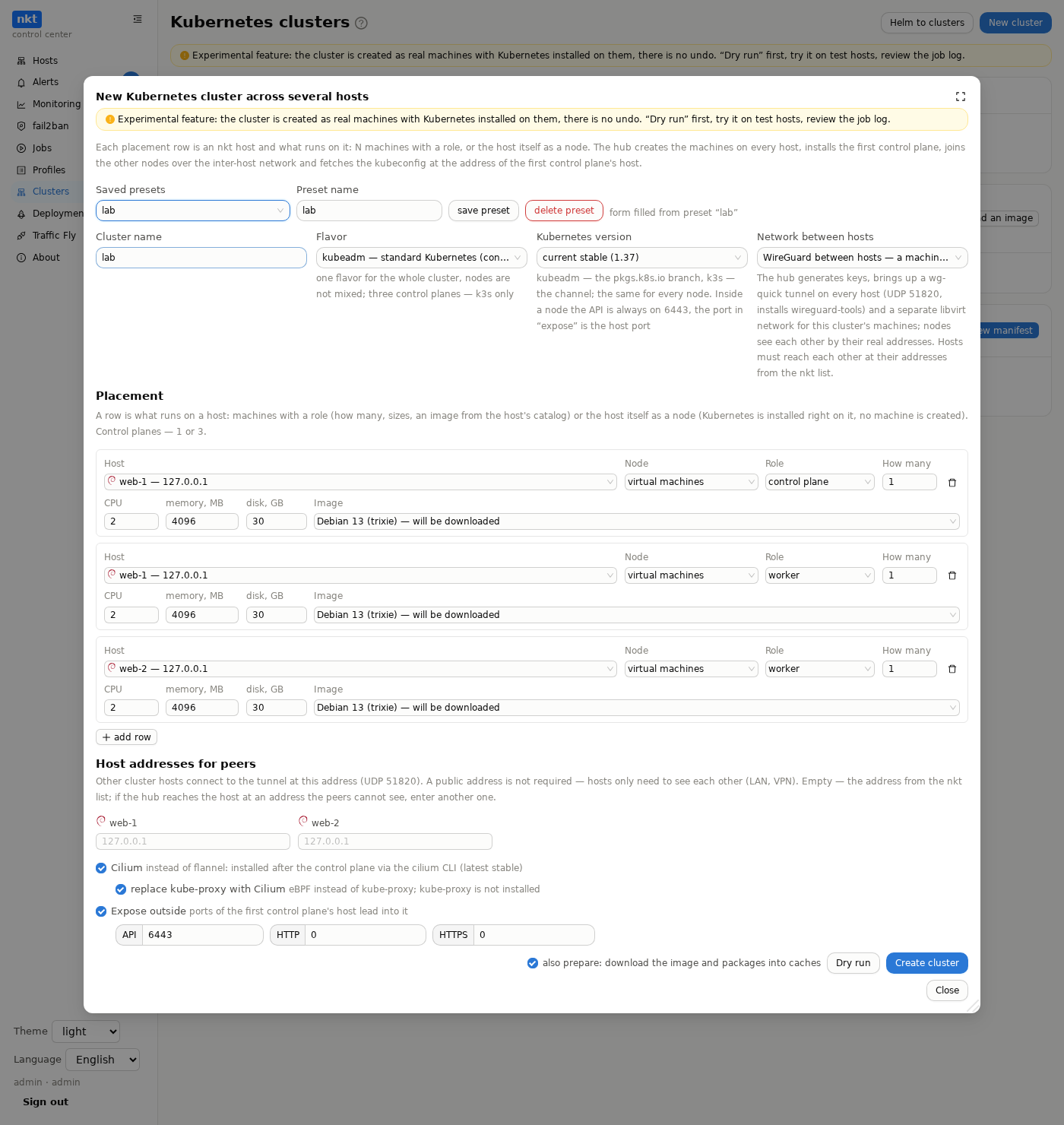
"save preset" helps: the next such cluster fills in by picking the preset.
2. Dry run
"Dry run" checks every host and writes a checklist into the log over the form (the settings stay): ✓ — fine, ! — a warning, ✗ — creation will fail.
| ✗ in the checklist | What to do |
|---|---|
| no KVM / libvirtd not running | turn on virtualization in the BIOS or at the provider (you need KVM, not a container), systemctl enable --now libvirtd |
| not enough memory or disk | smaller machines or free some space |
| no connection between hosts (ping, WireGuard address) | open UDP 51820, enter an address in "Host addresses for peers" |
| image or package unavailable | internet on the host or the hub package cache |
| machine name taken | another cluster name |
The "also prepare" checkbox downloads the image and packages into caches and brings up the libvirt network right away — creation goes faster after.
3. Creation
"Create cluster" — a hub job, the log opens at once. Steps:
- Checks before creation — the same as the dry run.
- WireGuard tunnel between hosts — keys,
wg-quick@nktwg<N>and a machine network per host; a handshake check for every pair of hosts. - Machines — one per placement row: cloud image, cloud-init, nkt inside.
- Control plane — containerd, Kubernetes packages,
kubeadm init, Cilium (cilium installreplacing kube-proxy, waiting until ready). - Joining nodes —
kubeadm joinfor both workers. - Waiting for Ready, port forward, kubeconfig — all nodes
Ready, the API forwarded, the kubeconfig into the cluster card.
The time mostly depends on downloads: the machine image, Kubernetes packages, Cilium images; with "also prepare" and the hub cache further clusters are created noticeably faster. Failed? Fix the cause from the log and press "continue" at the cluster: created machines and installed roles are not redone.
4. Check the cluster
A ready cluster has a "kubectl" button: a terminal on the first control plane with kubectl set up (completion, the k alias).
kubectl get nodes -o wide        # three nodes, all Ready
cilium status --wait             # Cilium: OK, kube-proxy replaced
kubectl get pods -A              # system pods Running
"kubeconfig" in the card is the administrator file for kubectl on your machine; its API address is the first control plane's host and the port from "Expose outside".
5. Turn on Ingress in Cilium
In the same terminal — the Cilium Ingress controller in host network mode: it listens on port 8080 right on every node, no LoadBalancer needed.
# The running Cilium version: without --version "cilium upgrade" would also
# upgrade Cilium itself — to the version built into the CLI.
V=$(kubectl -n kube-system get ds cilium \
  -o jsonpath='{.spec.template.spec.containers[0].image}' | sed -E 's/.*:(v[0-9.]+).*/\1/')
echo "$V"

cilium upgrade --version "$V" --reuse-values \
  --set ingressController.enabled=true \
  --set ingressController.default=true \
  --set ingressController.loadbalancerMode=shared \
  --set ingressController.hostNetwork.enabled=true

kubectl -n kube-system rollout restart deployment/cilium-operator
kubectl -n kube-system rollout restart ds/cilium
kubectl -n kube-system rollout status ds/cilium
Check:
kubectl get ingressclass                  # cilium (default)
ss -ltn | grep ':8080 '                   # Envoy listens on 8080 on the node
The setting lives in Cilium's own Helm values — it survives node reboots and new nodes. The port can be changed (--set ingressController.hostNetwork.sharedListenerPort=…), then use the same one in the route below.
6. Test pod
traefik/whoami answers with text: the pod name and the request headers — you see right away which pod answered and the client's address.
kubectl apply -f - <<'EOF'
apiVersion: apps/v1
kind: Deployment
metadata:
  name: hello
spec:
  replicas: 2
  selector:
    matchLabels: {app: hello}
  template:
    metadata:
      labels: {app: hello}
    spec:
      containers:
        - name: whoami
          image: traefik/whoami:v1.12.0
          ports: [{containerPort: 80}]
---
apiVersion: v1
kind: Service
metadata:
  name: hello
spec:
  selector: {app: hello}
  ports: [{port: 80, targetPort: 80}]
---
apiVersion: networking.k8s.io/v1
kind: Ingress
metadata:
  name: hello
spec:
  ingressClassName: cilium
  rules:
    - host: hello.example.com
      http:
        paths:
          - path: /
            pathType: Prefix
            backend:
              service: {name: hello, port: {number: 80}}
EOF

kubectl get pods -l app=hello -o wide     # two pods Running, on different workers
kubectl get ingress hello
Check from inside — through the Ingress on this node:
curl -s -H 'Host: hello.example.com' http://$(hostname -I | awk '{print $1}'):8080/
# Hostname: hello-…   ← the pod that answered
The same YAML can be applied from "Clusters" → "Manifests" — to several clusters at once, with kubectl diff before writing.
7. Traffic Fly route
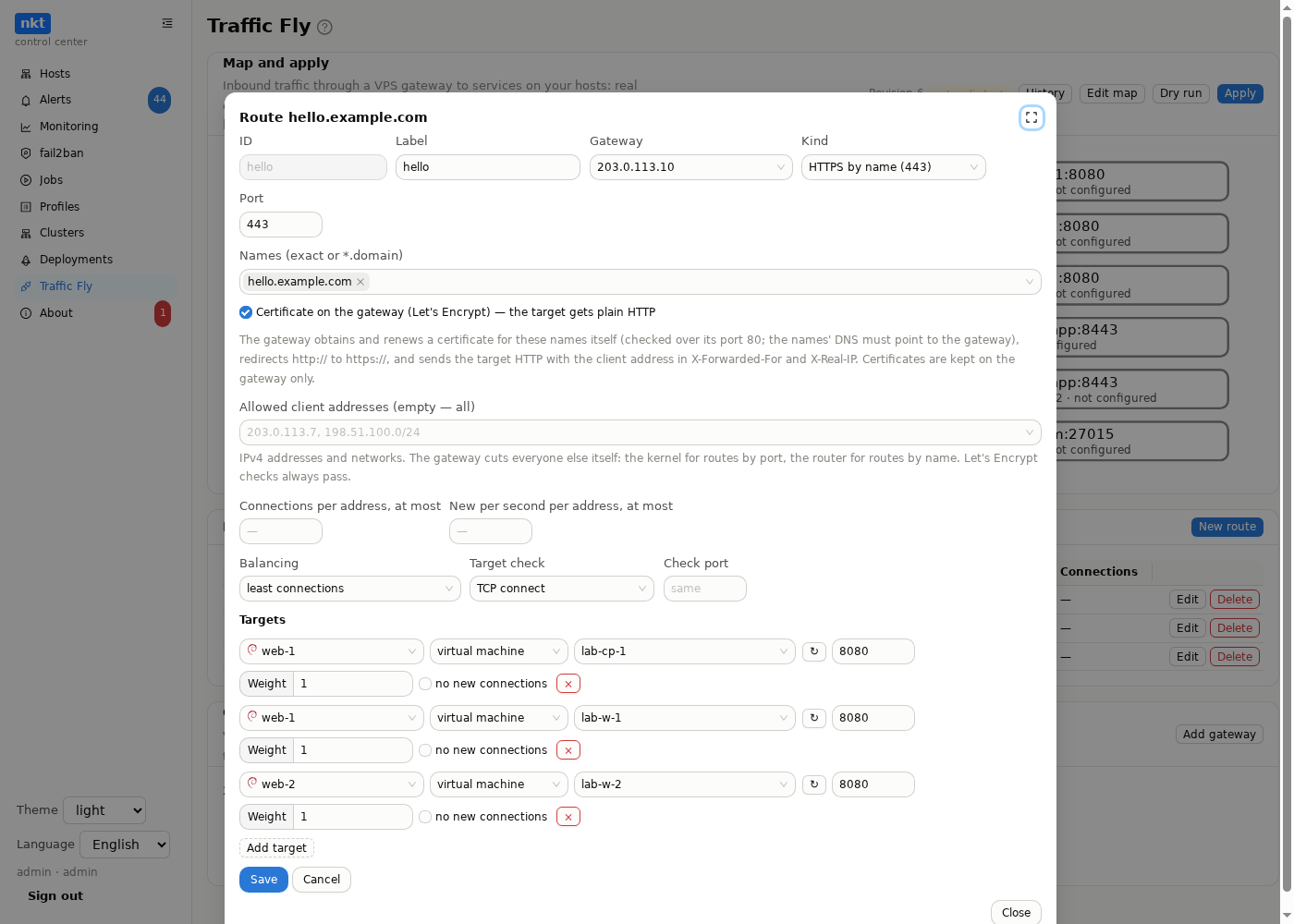
"Traffic Fly" → "New route":
| Field | Value |
|---|---|
| Kind | HTTPS by name (443) |
| Names | hello.example.com |
| Certificate on the gateway (Let's Encrypt) | on — the target gets plain HTTP |
| Target check | TCP connect |
| Targets | "Add target" ×3: host 1 · virtual machine · lab-cp-1, port 8080; host 1 · lab-w-1, 8080; host 2 · lab-w-2, 8080 |
The machine names are as in the cluster card (it also shows which host they are on). Save → "Apply": the hub brings up the Traffic Fly tunnels on both hosts (if they are not there yet), the gateway issues the certificate. Within a minute all three route targets are alive.
8. Check from outside
From any machine on the internet:
curl -s https://hello.example.com/
# Hostname: hello-5d…            ← the pod
# X-Forwarded-For: 203.0.113.55  ← your real address
# X-Forwarded-Proto: https
Several requests in a row are answered by different pods.
A node failure: shut down the lab-w-2 machine (or host 2). Within seconds the gateway marks its target "not alive" and takes it out of the route, Kubernetes restarts the pod on the remaining worker — curl keeps answering. Start the machine again — the target comes back by itself.
9. Clean up
kubectl delete ingress,service,deployment helloThe route — "Delete" in "Traffic Fly" and "Apply". The whole cluster — "delete cluster" in the card: the machines with their disks, the WireGuard tunnel and the machine network leave the hosts; host nodes (if any) stay.
Through the API and n8n
Steps 6–7 also work without the UI: a manifest into clusters with an API token (POST /api/hub/k8s/manifests/apply?job=1) or the n8n Cluster → Apply Manifest; applying Traffic Fly — POST /api/hub/fly/apply or Traffic Fly → Apply; the whole path — as a saved script (Script → Run). Creating a cluster and the kubeconfig are closed to tokens. Details — Hub API, n8n.
What next
- Helm to clusters — a release into chosen clusters as a hub job.
- Manifests — one YAML to several clusters with
kubectl diff. - Upgrade — the Kubernetes version node by node: cordon, drain, upgrade, uncordon.
- + worker — one more node in a ready cluster (the same Kubernetes branch); add one more target on its 8080 to the Traffic Fly route.
The same as a script
Everything from creating the cluster to an answer from https://hello.example.com — as one hub script "A Kubernetes cluster: from zero to the first pod" (also examples/scripts/k8s-first-pod.nkt, needs hub 1.13.68+).
How to run it: "Profiles" → the "Scripts" tab → "New script", in the editor window — "Ready-made scripts ▾" → "A Kubernetes cluster: from zero to the first pod"; enter a name → "Save" → "Check" → "Dry run" → "Run" (the parameters are asked at start, the progress is in the job log). The ready-made scripts are also on the scripts page's "Reference" tab ("Into editor" button).
At start it asks for two hosts and the site name. "Dry run" checks the hosts (like the cluster form's "Dry run"), the rest is "would": the cluster does not exist before it is created.
# Кластер Kubernetes: от нуля до первого пода
param HOST1 "хост с control plane и первым worker"
param HOST2 "хост со вторым worker"
param DOMAIN "имя тестового сайта — A-запись на адрес шлюза Traffic Fly"

# kubeadm: 1 control plane + 2 worker на двух хостах, WireGuard, Cilium без kube-proxy
on ${HOST1} k8s create lab flavor kubeadm nodes "${HOST1}: cp 1, w 1; ${HOST2}: w 1" network wireguard cni cilium no-kube-proxy image debian-13 expose http 0 https 0

# Ingress Cilium: порт 8080 на каждом узле
k8s lab ingress cilium port 8080

# Тестовый под, сервис и Ingress
k8s lab apply
apiVersion: apps/v1
kind: Deployment
metadata:
  name: hello
spec:
  replicas: 2
  selector:
    matchLabels: {app: hello}
  template:
    metadata:
      labels: {app: hello}
    spec:
      containers:
        - name: whoami
          image: traefik/whoami:v1.12.0
          ports: [{containerPort: 80}]
---
apiVersion: v1
kind: Service
metadata:
  name: hello
spec:
  selector: {app: hello}
  ports: [{port: 80, targetPort: 80}]
---
apiVersion: networking.k8s.io/v1
kind: Ingress
metadata:
  name: hello
spec:
  ingressClassName: cilium
  rules:
    - host: ${DOMAIN}
      http:
        paths:
          - path: /
            pathType: Prefix
            backend:
              service: {name: hello, port: {number: 80}}
end
k8s lab wait deployment hello 5m

# Вход снаружи: шлюз Traffic Fly на все узлы кластера
fly route hello https names ${DOMAIN} tls gateway check tcp targets cluster lab port 8080
wait url https://${DOMAIN}/ 200 10m
The script's comments are in Russian; the commands are the same in any language.
on … k8s create— steps 1–3: the cluster form as one line (kubeadm, placement on two hosts, WireGuard, Cilium without kube-proxy, only the API exposed).k8s lab ingress cilium port 8080— step 5: the samecilium upgradewith the running Cilium version, as a job on the control plane.k8s lab apply … endandk8s lab wait deployment hello— step 6.fly route … targets cluster lab port 8080— step 7: a route to all cluster nodes; applied right away.wait url— step 8: an answer from outside, from the hub to the real name.
If it doesn't work
| Symptom | Cause and what to do |
|---|---|
node NotReady | Cilium did not come up on the node: cilium status, kubectl -n kube-system get pods -o wide; the node cannot reach the control plane — the WireGuard tunnel (handshake in the creation log) |
pods Pending | not enough resources: kubectl describe pod; kubeadm does not schedule pods on the control plane (taint) — you need at least one worker |
ImagePullBackOff | the nodes cannot reach a registry: internet on the host or the hub package cache (the hub's registry mirror) |
kubectl get ingressclass is empty | Cilium without kube-proxy replacement or the upgrade did not apply — step 5, cilium status |
curl … :8080 from the node gives 404 | the Host: name does not match host: in the Ingress |
| a route target is "not alive" | nothing listens on 8080 on the node (step 5), the host's Traffic Fly tunnel is down — the hint under the gateway in "Traffic Fly" |
| no certificate | the hello.example.com A record does not point at the gateway, or its port 80 is closed |
kubeadm does not install on Debian 13 | an old branch (v1.31) was chosen: sqv rejects its signature — pick a current one |