
Your own services: YAML descriptions
nkt's built-in parsers understand nginx, HAProxy, Caddy, Docker, Podman, LXD, libvirt, Kubernetes and firewalls, and ready descriptions cover Traefik, RabbitMQ, Redis, PostgreSQL, Mosquitto and Envoy. Any other program — Tomcat, Kafka, your own service — can be described: where its configuration is, how to read it and what to take from it. A described service shows up where the built-in ones do:
- resource map — the addresses it accepts connections on and where it forwards;
- findings — your rules (“the dashboard is open without a password”) plus nkt's general checks: a declared port nobody listens on, a port open to the outside without a firewall rule;
- “Configs” — its files, with edit history and diffs;
- “Services” — its systemd unit with control buttons;
- sources in the host overview — what was read, the version, warnings.
Descriptions change nothing on the host: they only read.
Your own service in 5 minutes
Say a program myapp runs on the host and its addresses are in /etc/myapp/config.yml:
listeners:
  - name: public
    address: 0.0.0.0:8080
  - name: admin
    address: 127.0.0.1:9090
    auth: false
1. Describe it — the file /etc/netknownsthat/services.d/myapp.yaml:
name: myapp
title: My app
unit: myapp                       # systemd unit — into “Services”
sources:
  - id: config
    file: /etc/myapp/config.yml   # format by extension (yaml)
extract:
  endpoints:
    - from: config
      each: "$.listeners[*]"      # each list item is an address
      fields:
        address: "@.address | host"
        port: "@.address | port"
        label: "@.name | prefix('myapp ')"
rules:
  - id: admin-no-auth
    from: config
    each: "$.listeners[*]"
    when: "@.name == 'admin' && @.auth == false"
    severity: medium
    title:
      ru: "Админка myapp без авторизации ({{@.address}})"
      en: "myapp admin without auth ({{@.address}})"
    object: "@.address"
2. Check it: sudo nkt services test /etc/netknownsthat/services.d/myapp.yaml shows every step — what was found, how many items each path gave, which addresses and findings came out.
3. Rescan the host (the “Rescan” button, or wait for the next scan — every 5 minutes by default): the addresses myapp public and myapp admin are on the map, the finding is in “Findings”, the file /etc/myapp/config.yml is in “Configs”.
The same works from the hub: “Profiles” → “Services” → “New description”, pick paths in the “Path builder” on a sample from a host, check with the “Parse log” and “Deliver to hosts” (see below).
Quotes in YAML
Quote an expression that starts with @ or contains : : "@.address | port". Without quotes YAML can't parse the line, and nkt reports an error on check.
Where descriptions live
| From | Where | Precedence |
|---|---|---|
| host | /etc/netknownsthat/services.d/*.yaml | highest |
| hub profile | nkt data directory, services.d/profile/ — written by the hub (“Deliver to hosts”) | middle |
| built-in | inside nkt | lowest |
A description with the same name overrides the lower one entirely; disabled: true turns the name off:
name: rabbitmq
disabled: true
A broken description (a YAML error, a wrong path) doesn't break the scan: if it is a host or profile description that used to be good, its last good version is used, and the host sources show a warning with the error. A new description with an error simply doesn't work (and shows as an error in nkt services).
Changes are picked up on the next host scan.
Detection: detect
The service “is on the host” if any check from any and all from all match. Each check has one field:
| Check | Matches when |
|---|---|
file: /path | the file exists (glob allowed) |
unit: name | the systemd unit is loaded |
binary: name | the program is in PATH |
image: text | there is a Docker or Podman container from an image whose name contains the text |
process: name | a process with that name listens on a port |
port: 15672 | someone listens on this TCP port |
Without detect the service is looked up by its file sources, and without them — by unit; a description with only HTTP and commands requires detect. Until the service is found, its sources are not read.
The description's unit is the unit for “Services”. The first loaded one of unit and the unit checks in detect is shown — so one description works with redis-server on Debian and redis on RHEL.
Sources: sources
A source has an id and exactly one of:
file— a path or glob (/etc/app/conf.d/*.yml): each file is its own document. A file is re-read only when its modification time or size changes; over 8 MB it isn't read. Files go to “Configs” (editable: false— view only).http— the program's API address on this host:localhost, 127.0.0.0/8 or::1(an API in a container — through a port published on 127.0.0.1); the address is checked on connect too, redirects are not followed.interval— how long the answer lives (every scan by default),timeout— 5 s by default, at most a minute. No login and password in the address and noAuthorization/Cookieheaders:basic_auth: {user: …, password_file: /path}orbearer_file: /path— the secret is read from a file on the host and is not stored in the description (and so not on the hub); the secret file can't be a closed path.command— a command as an argument list:[consul, members, -format=json]. No shell:sh,bash,sudo,env, interpreters and anything that runs other commands are forbidden. The command runs as the nobody user (setpriv, no groups, no new privileges): even a wrong command changes nothing on the host. If the program needs root (or switches to its own user, likerabbitmq-diagnostics), setas_root: true: the hub marks such descriptions (“commands as root”) and writes them to the audit log.timeoutand an 8 MB output limit;intervalworks as for HTTP.
optional: true — a missing file or answer is not a warning.
Closed paths are never read: /etc/shadow, sudoers, private keys (.ssh, ssh_host_*, *.key, privkey), /root, /proc, nkt's settings and data. The real path is checked: a symlink to a closed file isn't read, just like the file itself.
Formats
A file's format defaults by extension (.yaml/.yml, .json, .toml, .ini/.cnf, .env, .properties, .xml, .conf → lines); for HTTP and commands — json. A file without an extension needs format.
| Format | For | The tree |
|---|---|---|
yaml, json, toml | Traefik, Envoy, Prometheus, API answers | as in the file (key order kept) |
ini | my.cnf, PHP, Gitea, supervisord | [section] → object; a key without a value is true |
env | .env, /etc/default/*, /etc/os-release | key → value |
properties | Kafka, ZooKeeper, Spring | flat keys: $['server.port'] |
lines | redis.conf, postgresql.conf, mosquitto.conf, sshd_config | “key value” or “key = value”; a repeated key is a list |
xml | Tomcat, Jenkins, ActiveMQ, Hadoop | attribute — @name, text — #text, repeated tag — a list |
regex | everything else | a list of matches: named groups and #match |
text | a rule over the whole text | a string |
Options (options): pattern — for regex; blocks: [listener] — for lines: such a key opens a block, its value goes to @value, and the settings after it belong to the block (mosquitto: listener 8883 and its certfile); lower_keys: true — lower-case keys (sshd_config).
Paths
Paths are JSONPath per RFC 9535: $ — the document, @ — the current item.
| Path | What |
|---|---|
$.entryPoints.* | all members of an object |
$.servers[0], $.servers[-1], $.servers[0:2] | index, from the end, slice |
$..port | port at any depth |
$['server.port'] | a name with a dot or a space |
$.users[?@.admin == true] | a filter |
$[?@.port > 1024 && !@.internal] | conditions, &&, ||, !; ?@.x — “the field exists” |
$[?match(@.name, 'web-.*')] | functions match (whole), search (part), length, count, value |
A deviation from the RFC for configs, where everything is a string: a number compares with a numeric string as a number ("6379" == 6379), a boolean — with the words true/false/yes/no/on/off/1/0.
each is the path to the items (the whole document by default). If the path gave one list, its elements are iterated. each may end with transforms: "$.listeners | split(,)" iterates the parts of a line (see the Kafka example below). when is a condition on the item, the same expression as in a [?…] filter, without ?.
Fields and transforms
A field value is a path (@.address — from the item, $.global.port — from the document), the special @key (the item's key: name or index), @file (the document's file), @source, or plain text (tcp, 'text | with a bar'). After | come transforms, left to right:
port, host, scheme | from 0.0.0.0:8080, :8080, [::]:443, :53/udp, a URL (port by scheme) |
lower, upper, trim, prefix(x), suffix(x), replace(a,b) | strings |
split(,), join(,), first, last, nth(i), count, keys | lists |
default(x), exists, bool, not, int | values |
contains(x), matches(re) | checks |
Addresses (extract.endpoints): port is required (an item without a port is skipped), address (empty — all addresses), protocol (tcp by default), tls, mode, names, label, kind, upstreams.
Pools (extract.upstreams): name is required, mode, algorithm, health and servers — their own each (from the pool item) and the fields url or host, port, weight, backup, down.
Version — version: {from: source, value: expression}.
Rules
rules:
  - id: no-password
    from: config
    each: "$"                # the whole document by default
    when: "!@.requirepass"
    severity: high           # critical | high | medium | low | info
    title: {ru: "Redis без пароля", en: "Redis without a password"}
    detail: "File {{@file}}" # a string or {ru, en}
    suggestion: "requirepass in redis.conf"
    object: "@.port"         # what the finding is about; @key or the file by default
A finding per each item for which when is true. Texts take . Texts come in two languages, the finding is shown in the reader's language. The finding rule is svc.<name>.<id>.
A full example
name: traefik
title: Traefik
unit: traefik
priority: 50
detect:
  any:
    - file: /etc/traefik/traefik.yml
    - image: traefik
sources:
  - id: static
    file: /etc/traefik/traefik.yml
  - id: dynamic
    file: /etc/traefik/dynamic/*.yml
    optional: true
  - id: version
    http: http://127.0.0.1:8080/api/version
    interval: 1h
    timeout: 3s
    optional: true
version:
  from: version
  value: "$.Version"
extract:
  endpoints:
    - from: static
      each: "$.entryPoints.*"
      fields:
        address: "@.address | host"
        port: "@.address | port"
        tls: "@.http.tls | exists"
  upstreams:
    - from: dynamic
      each: "$.http.services.*"
      fields:
        name: "@key"
      servers:
        each: "@.loadBalancer.servers[*]"
        fields:
          url: "@.url"
rules:
  - id: insecure-api
    from: static
    when: "@.api.insecure == true"
    severity: high
    title:
      ru: "Панель Traefik открыта без защиты"
      en: "Traefik dashboard is open without protection"
    suggestion: "api.insecure: false and access through an entryPoint with auth"
More examples
Every example below is checked by an nkt test on the same files: the description gives exactly what is written under it.
Tomcat — XML
/etc/tomcat10/server.xml:
<Server port="8005" shutdown="SHUTDOWN">
  <Service name="Catalina">
    <Connector port="8080" protocol="HTTP/1.1" connectionTimeout="20000" redirectPort="8443"/>
    <Connector port="8443" protocol="org.apache.coyote.http11.Http11NioProtocol" SSLEnabled="true"/>
    <Connector port="8009" protocol="AJP/1.3" address="0.0.0.0" secretRequired="false"/>
    <Engine name="Catalina" defaultHost="localhost"/>
  </Service>
</Server>name: tomcat
title: Tomcat
unit: tomcat10
sources:
- id: server
file: /etc/tomcat*/server.xml
extract:
endpoints:
- from: server
each: "$.Server.Service.Connector"
fields:
address: "@['@address']"
port: "@['@port']"
tls: "@['@SSLEnabled'] | bool"
label: "@['@protocol'] | prefix('Tomcat ')"
rules:
- id: ajp-no-secret
from: server
each: "$.Server.Service.Connector"
when: "search(@['@protocol'], 'AJP') && @['@secretRequired'] == false"
severity: high
title:
ru: "Tomcat: AJP без секрета на порту {{@['@port']}}"
en: "Tomcat: AJP without a secret on port {{@['@port']}}"
suggestion:
ru: "secretRequired=\"true\" и secret, или уберите коннектор AJP."
en: "secretRequired=\"true\" and a secret, or remove the AJP connector."
object: "@['@port']"An attribute is the key @name, so the path to it is @['@port']; three <Connector> elements are a list, each iterates it. Result: addresses 8080, 8443 (TLS) and 0.0.0.0:8009, the finding “AJP without a secret on port 8009” (Ghostcat).
Kafka — properties and several addresses in one line
/opt/kafka/config/server.properties:
broker.id=0
listeners=PLAINTEXT://:9092,SSL://:9093
advertised.listeners=PLAINTEXT://kafka1.example.com:9092
log.dirs=/var/lib/kafkaname: kafka
title: Kafka
unit: kafka
sources:
- id: server
file: /opt/kafka/config/server.properties
extract:
endpoints:
- from: server
each: "$.listeners | split(,)"
fields:
address: "@ | host"
port: "@ | port"
tls: "@ | scheme | contains(ssl)"
label: "@ | scheme | upper | prefix('Kafka ')"
rules:
- id: plaintext-all
from: server
each: "$.listeners | split(,)"
when: "match(@, 'PLAINTEXT://(0\\.0\\.0\\.0)?:[0-9]+')"
severity: medium
title:
ru: "Kafka: PLAINTEXT на всех адресах ({{@}})"
en: "Kafka: PLAINTEXT on all addresses ({{@}})"
object: "@"each with a transform: $.listeners | split(,) iterates the parts of the line, @ is the part itself (PLAINTEXT://:9092). Result: addresses 9092 and 9093 (TLS), the finding “PLAINTEXT on all addresses”.
MySQL — ini
/etc/mysql/mysql.conf.d/mysqld.cnf:
[mysqld]
user = mysql
port = 3306
bind-address = 0.0.0.0
skip-name-resolvename: mysql
title: MySQL
unit: mysql
sources:
- id: cnf
file: /etc/mysql/*.conf.d/*.cnf
extract:
endpoints:
- from: cnf
each: "$.mysqld"
fields:
address: "@['bind-address'] | default(127.0.0.1)"
port: "@.port | default(3306)"
rules:
- id: listen-all
from: cnf
each: "$.mysqld"
when: "@['bind-address'] == '0.0.0.0' || @['bind-address'] == '*'"
severity: medium
title:
ru: "MySQL слушает все адреса"
en: "MySQL listens on all addresses"
suggestion:
ru: "bind-address = 127.0.0.1 или адрес внутренней сети."
en: "bind-address = 127.0.0.1 or an internal network address."
- id: skip-grant-tables
from: cnf
each: "$.mysqld"
when: "@['skip-grant-tables']"
severity: critical
title:
ru: "MySQL без проверки паролей (skip-grant-tables)"
en: "MySQL without password checks (skip-grant-tables)"The [mysqld] section is an object; a key without a value (skip-name-resolve, skip-grant-tables) is true, so when: "@['skip-grant-tables']" means “the key is there”. Each file with [mysqld] gives its own address. Result: address 0.0.0.0:3306, the finding “MySQL listens on all addresses”.
RabbitMQ — HTTP API with a password from a file
name: rabbitmq-api
title: RabbitMQ API
detect:
  any:
    - port: 15672
sources:
  - id: overview
    http: http://127.0.0.1:15672/api/overview
    basic_auth:
      user: nkt-monitor
      password_file: /etc/rabbitmq/nkt-monitor.pass
    interval: 1m
    timeout: 5s
version:
  from: overview
  value: "$.rabbitmq_version"
rules:
  - id: many-queues
    from: overview
    when: "@.object_totals.queues > 1000"
    severity: low
    title:
      ru: "RabbitMQ: очередей {{@.object_totals.queues}}"
      en: "RabbitMQ: {{@.object_totals.queues}} queues"
The nkt-monitor user's password is in /etc/rabbitmq/nkt-monitor.pass on the host and never appears in the description. The /api/overview answer lives a minute (interval), the version comes from it. Result: version 3.13.7 in sources, the finding “1520 queues”.
Consul — a command
name: consul
title: Consul
unit: consul
detect:
  any:
    - binary: consul
    - unit: consul
sources:
  - id: members
    command: [consul, members, -format=json]
    interval: 2m
    timeout: 10s
  - id: version
    command: [consul, version, -format=json]
    interval: 1h
version:
  from: version
  value: "$.Version"
rules:
  - id: member-down
    from: members
    each: "$[?@.Status != 'alive']"
    when: "@.Status != 'alive'"
    severity: medium
    title:
      ru: "Consul: узел {{@.Name}} — {{@.Status}}"
      en: "Consul: node {{@.Name}} is {{@.Status}}"
    object: "@.Name"
The command is an argument list, no shell; its output is JSON. It runs as nobody: consul members asks the local agent over the network and needs no root, so as_root isn't set. Result: version 1.18.1, the finding “node node-2 is failed” for every node not alive.
memcached — regex for a config without a format
/etc/memcached.conf holds command-line flags:
# memcached default config
-d
logfile /var/log/memcached.log
-m 64
-p 11211
-u memcachename: memcached
title: memcached
unit: memcached
sources:
- id: conf
file: /etc/memcached.conf
format: regex
options:
pattern: '^-(?P<flag>[a-zA-Z])\s+(?P<value>\S+)'
extract:
endpoints:
- from: conf
each: "$[0]"
fields:
address: "$[?@.flag == 'l'].value | split(,) | first"
port: "$[?@.flag == 'p'].value | default(11211)"
label: memcached
rules:
- id: listen-all
from: conf
each: "$[0]"
when: "!$[?@.flag == 'l']"
severity: high
title:
ru: "memcached слушает все адреса (нет -l)"
en: "memcached listens on all addresses (no -l)"
suggestion:
ru: "-l 127.0.0.1 в /etc/memcached.conf; снаружи memcached используют для DDoS-усиления."
en: "-l 127.0.0.1 in /etc/memcached.conf; exposed memcached is used for DDoS amplification."
object: "$[?@.flag == 'p'].value | default(11211)"regex turns every -flag value line into a {flag, value} object; the fields take values from the root ($[?@.flag == 'p']). No -l — memcached listens on all addresses. Result: address 11211, the finding “listens on all addresses (no -l)”.
One file, two descriptions
If several descriptions (or a built-in parser) take a file, in “Configs” it belongs to one — the one with the higher priority (50 by default for descriptions, 100 for built-in parsers); on a tie — the built-in parser, then the higher place. The others get the finding “File is described by several services”.
Built-in descriptions
Ready descriptions are already inside nkt, nothing to install. Each can be overridden with your own with the same name or turned off (disabled: true).
| Service | What it reads | Findings |
|---|---|---|
| Traefik | /etc/traefik/traefik.yml or .toml — entryPoints (tcp/udp, TLS); /etc/traefik/dynamic/*.yml and, if the API is open on 127.0.0.1:8080, /api/rawdata — services of every provider (Docker too) with backend addresses; version — /api/version | dashboard and API without protection (api.insecure); backend certificates not verified (insecureSkipVerify) |
| RabbitMQ | rabbitmq-diagnostics listeners (as_root) — every listener (AMQP, TLS, management, MQTT, STOMP); version — server_version; rabbitmq.conf | guest can log in over the network; management over HTTP on all addresses |
| Redis | redis.conf (Debian and RHEL) — bind, port, tls-port | all addresses without a password; protected-mode off without a password |
| PostgreSQL | postgresql.conf and pg_hba.conf of every cluster (/etc/postgresql/*/*, /var/lib/pgsql) | network login without a password (trust) — critical; login from every address; cleartext password; all addresses without SSL |
| Mosquitto | mosquitto.conf and conf.d — listeners with their settings (TLS, websockets) | login without credentials (allow_anonymous true) — global and per listener |
| Envoy | /etc/envoy/envoy.yaml — listeners, admin, clusters with addresses | admin listens beyond localhost |
Built-in descriptions don't parse services running in containers (the configuration is inside the container); the exception is Traefik, whose API is read.
Built-in parsers
nginx, HAProxy, Caddy, Docker, Podman, LXD, libvirt, Kubernetes, the firewall (iptables, ufw, firewalld) and fail2ban are parsed by nkt's code, but they have descriptions too — engine: with the same name. Through them a parser can be turned off, its paths changed and its file priority set, without touching the service's environment:
# /etc/netknownsthat/services.d/nginx.yaml — nginx built into /opt
name: nginx
engine: nginx
options:
main_config: /opt/nginx/conf/nginx.conf# Docker isn't needed here — don't poll it
name: docker
disabled: true| Parser | Options (options) | Default |
|---|---|---|
nginx, haproxy, caddy | main_config — the main file | NKT_NGINX_MAIN_CONFIG etc. |
docker | compose_files — compose files, comma-separated | NKT_COMPOSE_FILES |
libvirt | uri | NKT_LIBVIRT_URI |
fail2ban | root — the directory | NKT_FAIL2BAN_ROOT |
podman, lxd, kubernetes, firewall | — |
An option not set comes from the environment, as before. Such a description takes only priority, disabled, options and detect — and only file, unit and binary checks: if it doesn't match, the parser doesn't run. A turned-off parser shows in the host sources with the description that turned it off.
On the hub
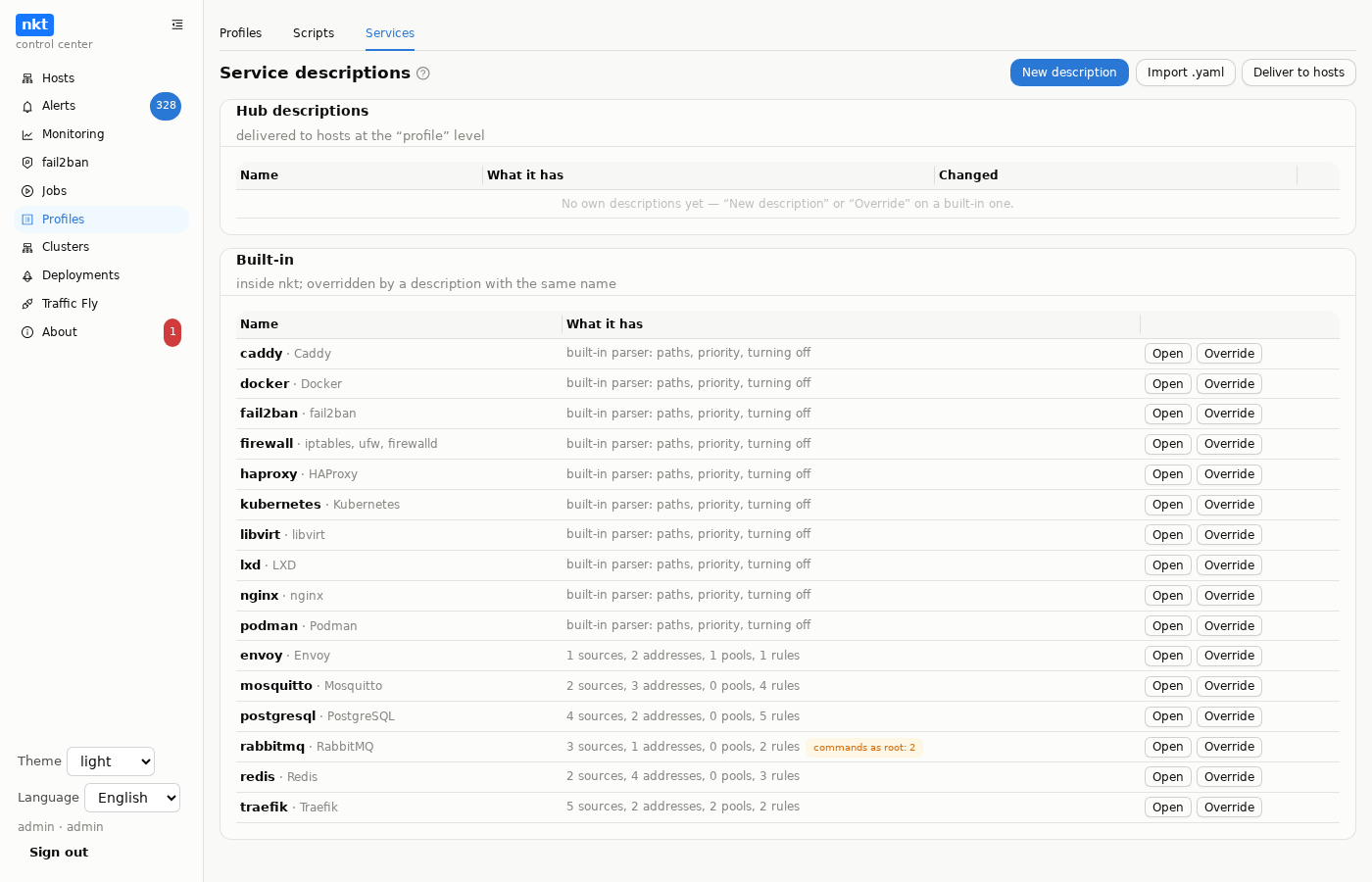
On the hub descriptions are kept as a library with edit history — the “Profiles” → “Services” tab:
- Hub descriptions — your own: “New description” (a template), “Import .yaml”, editing in a window with a diff before writing, “History” (the content and difference of any revision with the current or previous one, “Back to the editor”), “Download”, deleting. The name comes from
namein the description itself; saving runs the same parse as on the host — a broken one isn't saved. - Built-in — for viewing; “Override” creates a hub description with the same text: edit it and deliver. An overridden built-in is marked.
In the edit window:
- “Check” — parses the description without saving: an error naming the field, or a summary of sources, addresses, pools, rules.
- “Parse log” — the draft is parsed on the chosen host, like
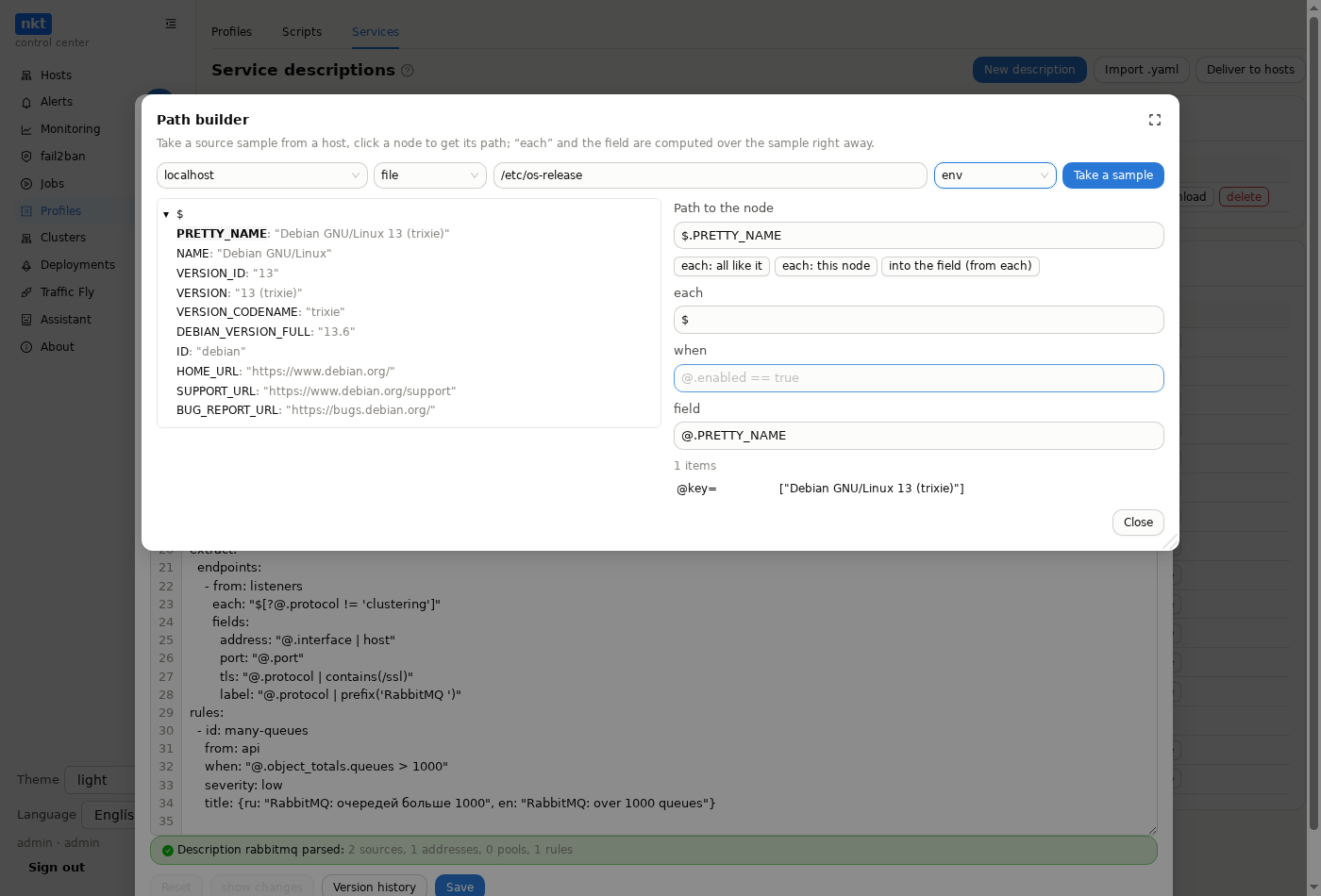
nkt services test: whichdetectchecks matched, what was read, how many nodes each path gave, what came out — addresses, pools, findings, the version. Nothing is saved on the hub or on the host. - “Path builder” — a source sample (a file, HTTP or a command) from the chosen host shown as a tree; clicking a node gives its path, “each: all like it” generalizes it to all siblings, “each: this node” takes it as is, “into the field (from each)” gives the path from the item;
each,whenand the field are computed over the sample right away. Copy the ready paths into the description. The sample obeys the same limits as descriptions.
“Deliver to hosts” is a hub job: each chosen host gets all hub descriptions as a whole, into the “profile” level, extra ones there are removed; the host rescans itself right away. A description on the host itself (/etc/netknownsthat/services.d) is still higher. Hub descriptions are part of the hub export and import (with history).
On a host, descriptions from /etc/netknownsthat/services.d show in “Configs” as the “service descriptions” category: editing with history and rollback; writing parses the description — a broken one isn't written.
Debugging
sudo nkt services                      # all descriptions: from where, state, what they gave
sudo nkt services test traefik.yaml    # the parse log of one description
nkt services lists every description — built-in, profile and host — with its state: found, not found, error, last good version, overridden, turned off, built-in parser (with its options) — and how many addresses, pools and findings each gave.
nkt services test shows every step: which detect checks matched, which files were read (or taken from the cache), how many nodes each path gave and how many were left after the condition, which addresses, pools and findings came out, which items were skipped for lack of a port.