
Plugins
A plugin is a separate program that adds its own sections, script commands and MCP tools to the hub. Usually it is a container deployed by an ordinary pipeline: updated and removed by the pipeline too, while the hub only connects to it. Without connected plugins the hub works as before.
Plugins: Technitium DNS — zones and records of your domains on your own name servers, delegation, DNSSEC; Cloudflare DNS — the same for zones at Cloudflare; mail — docker-mailserver mailboxes, aliases and DKIM, MX/SPF/DKIM records through the DNS plugin; LiteLLM — virtual model keys with budgets and limits, models, spend; MikroTik — routers as plugin hosts (devices without the nkt agent in the common host list); Yandex Cloud — VMs, disks and snapshots, security groups, buckets, Cloud DNS for the hub, databases, balance.
How it works
- The plugin listens for HTTP on 127.0.0.1 of its host (in compose —
127.0.0.1:9180:9180): it is not visible from outside. - The hub reaches it over the SSH connection to the host (a plugin on the hub machine — directly). A host connected only through a tunnel (no SSH) doesn't suit a plugin.
- Every call is signed with a shared secret:
NKT_PLUGIN_SECRETfrom the plugin pipeline's.env. The hub keeps it encrypted; it goes to the export together with the hub's other secrets. - The plugin describes itself with a manifest: sections, operations, script commands, MCP tools, what it does for the hub and which rights it asks of the hub.
Connect
- Deploy the plugin with a pipeline (an example is in its guide). In the pipeline's
.env—NKT_PLUGIN_SECRET: generate:hex32and, if the port isn't 9180,NKT_PLUGIN_PORT. - About → Plugins → Connect → From a pipeline, pick the pipeline. The hub takes the host, port and secret from it.
- Check — the hub shows what the plugin adds: sections, script commands, MCP tools, what it does for the hub and which rights it asks for. Clashes (a script word or a tool already exists) are shown there too.
- Connect. A Plugins section appears in the hub menu.
“By hand” — host, port and secret without a pipeline (a plugin installed outside nkt). Disconnect removes the sections, commands and tools from the hub and revokes the plugin's token; the plugin itself and its data stay on the host.
Plugin catalog
Plugins and pipeline examples are not built into nkt: they live in the repository's examples/, and CI builds a catalog from them and publishes it next to this site — https://piqab.github.io/nkt/catalog/. A new plugin or a fix to an old one reaches the hub without an nkt release.
About → Plugins → Catalog: each plugin's version, a “tests against fakes passed” mark, where it is already installed and whether a newer one exists, Guide (the plugin's README and screenshots) and Install on a host.
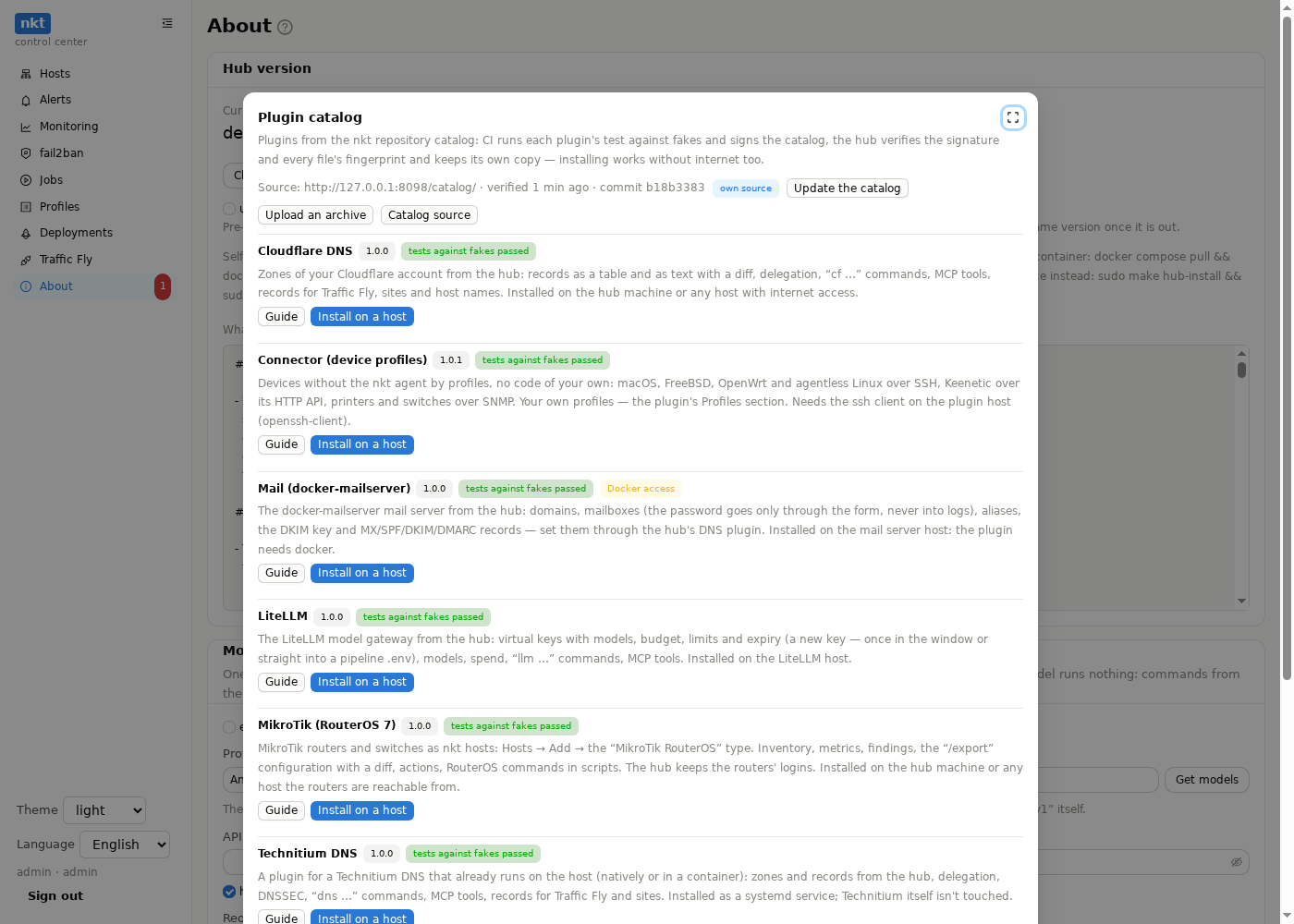
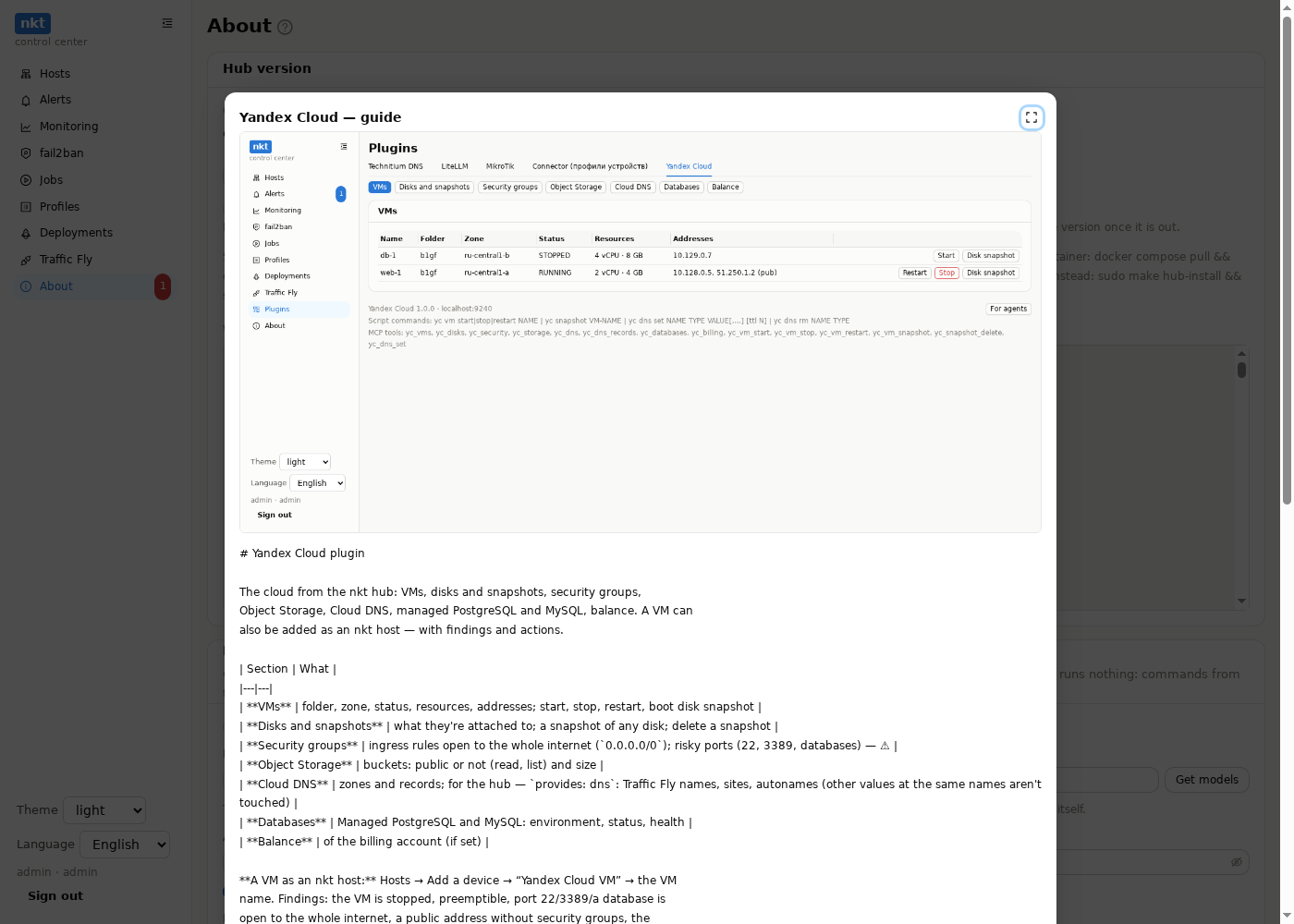
- Signature. The catalog is signed with an ed25519 key; the public key is built into nkt. The hub checks the signature and every file's SHA-256 — on download, on an archive upload and when reading its own copy from disk. A mismatch — the catalog is rejected and the previous copy stays. The signature can be checked without nkt too:
openssl pkeyutl -verify -pubin -inkey key.pub -rawin -in index.json -sigfile index.json.sig. - Tests. CI runs each plugin's test against fakes (
deploy/test_plugin.py); a failing plugin is left out of the catalog, the rest are published. - The hub's copy lives in
DataDir/catalog, refreshed every 6 hours and with Update the catalog (a job). Installing and updating plugins and Deployments → Examples work from the copy — without internet too. - Without internet: download
https://piqab.github.io/nkt/catalog.tar.gzon a machine with internet and upload it with Upload an archive — the same checks apply. - Compatibility. A plugin has
min_nkt: on an older hub Install is disabled with an explanation. - Your own catalog (Catalog source, with a diff and a history): a fork of the repository with its own key —
openssl genpkey -algorithm ed25519, the private key in the fork'sNKT_CATALOG_KEYsecret (the whole file with itsBEGIN/ENDlines; one glued into a single line works too), the public one (openssl pkey -pubout) in “Your own public keys”; or your own server with the same layout (index.json,index.json.sig, files). Your key is added to the built-in one. The source settings go into the hub export.
For a plugin author: a folder examples/<name>/ — deploy/nkt-plugin.json (with version, min_nkt, protocol), deploy/nkt-plugin.py (VERSION as in the JSON), deploy/test_plugin.py, README.md and README.en.md, screenshots in screens/ru/ and screens/en/. Changed the plugin's files — raise version, otherwise the catalog build stops: hubs would never learn about the update. A pipeline example — pipeline*.yaml and nkt-example.json (the template for Examples ▾).
Your own plugin
A plugin that is not in the catalog — for example, one written by the guide — the administrator uploads to the hub: About → Plugins → Catalog → Upload your own plugin.
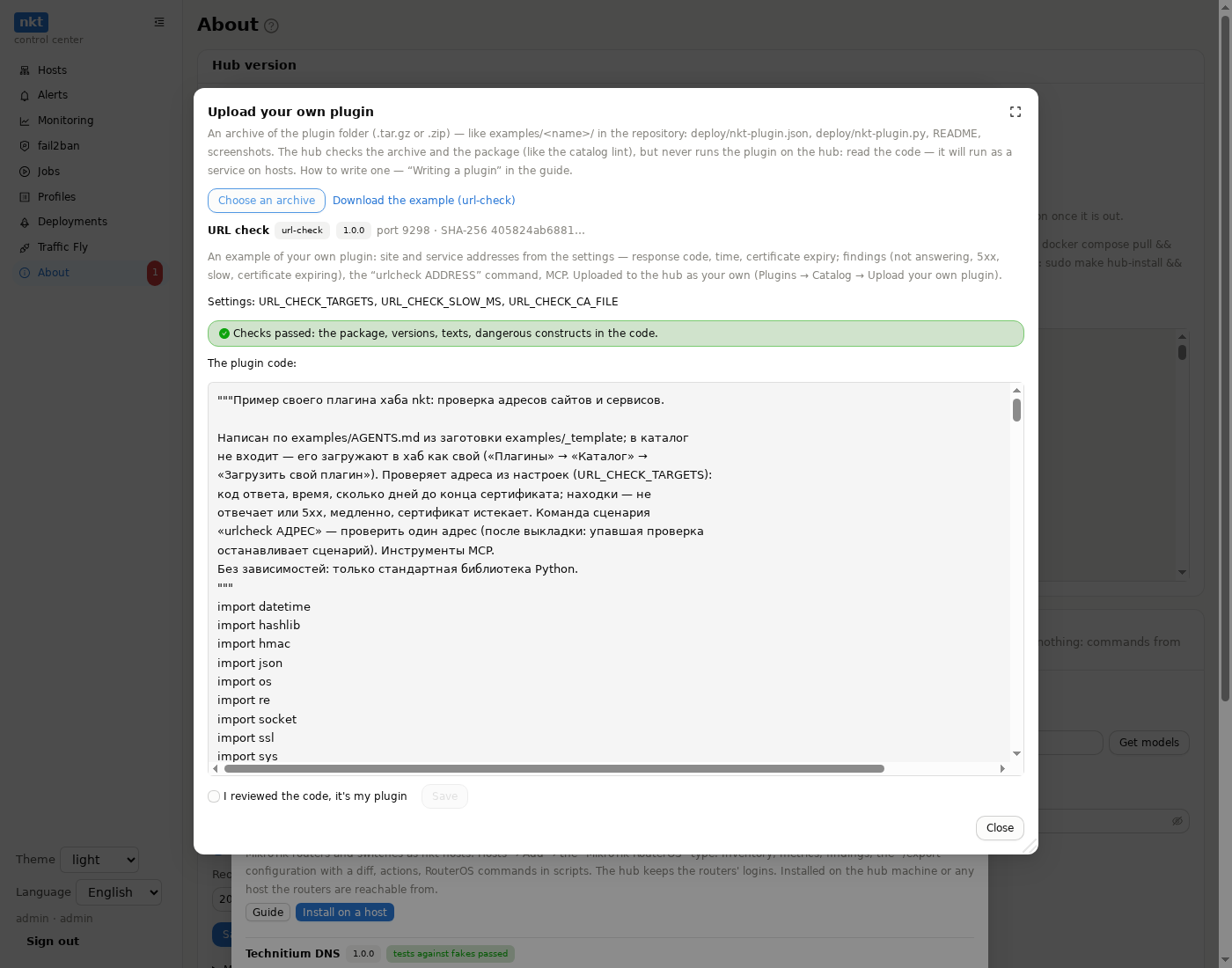
- An archive of the plugin folder (
.tar.gzor.zip) — likeexamples/<name>/in the repository:deploy/nkt-plugin.json,deploy/nkt-plugin.py, README,screens/. The test may stay — the hub neither stores nor runs it. - The hub's check — the same static one as the catalog's
nkt-catalog lint: the package, version =VERSIONin the code, ru/en texts, secret settings, forbidden code (shell=True,os.system,eval, a command string). Plus the archive paths (no.., links or absolute paths), sizes (a file up to 2 MB, all up to 10 MB), a name not taken by the catalog, a version above the uploaded one. The hub never runs the plugin. - The whole code (a new version — a diff with the previous one). Tick Code reviewed and Save: the plugin will run as a service on hosts, and whoever uploaded it answers for it. The audit log keeps who, the version, the SHA-256.
- In the hub catalog the plugin is marked own: Install on a host, Update on the host after uploading a new version — as with catalog plugins; the hub checks the manifest when connecting. Delete own removes it from the hub catalog (with a confirmation if it is installed; installations stay until removed from the host).
Only an administrator uploads, and only in the UI (not an API token or MCP). Own plugins and the history of the last 10 code versions go into the hub export.
Step by step — url-check (address checks: response code, time, certificate expiry, findings, the urlcheck ADDRESS command):
- Download the example in the upload window (
https://piqab.github.io/nkt/samples/url-check.tar.gz) or from the repository:tar czf url-check.tar.gz -C examples/_samples url-check. - Upload your own plugin → the archive → the code → Code reviewed → Save.
- “URL check” (own) → Install on a host → comma-separated addresses in the form → a job.
- The plugin's Addresses and Findings; in a script after a deploy —
urlcheck https://shop.example.com/health.
Install on a host (no Docker)
A plugin from the catalog can be installed as a service right on the host, without a container: About → Plugins → Install on a host → the plugin, the host and its settings (each plugin has its own form) → a job in the standard log window.
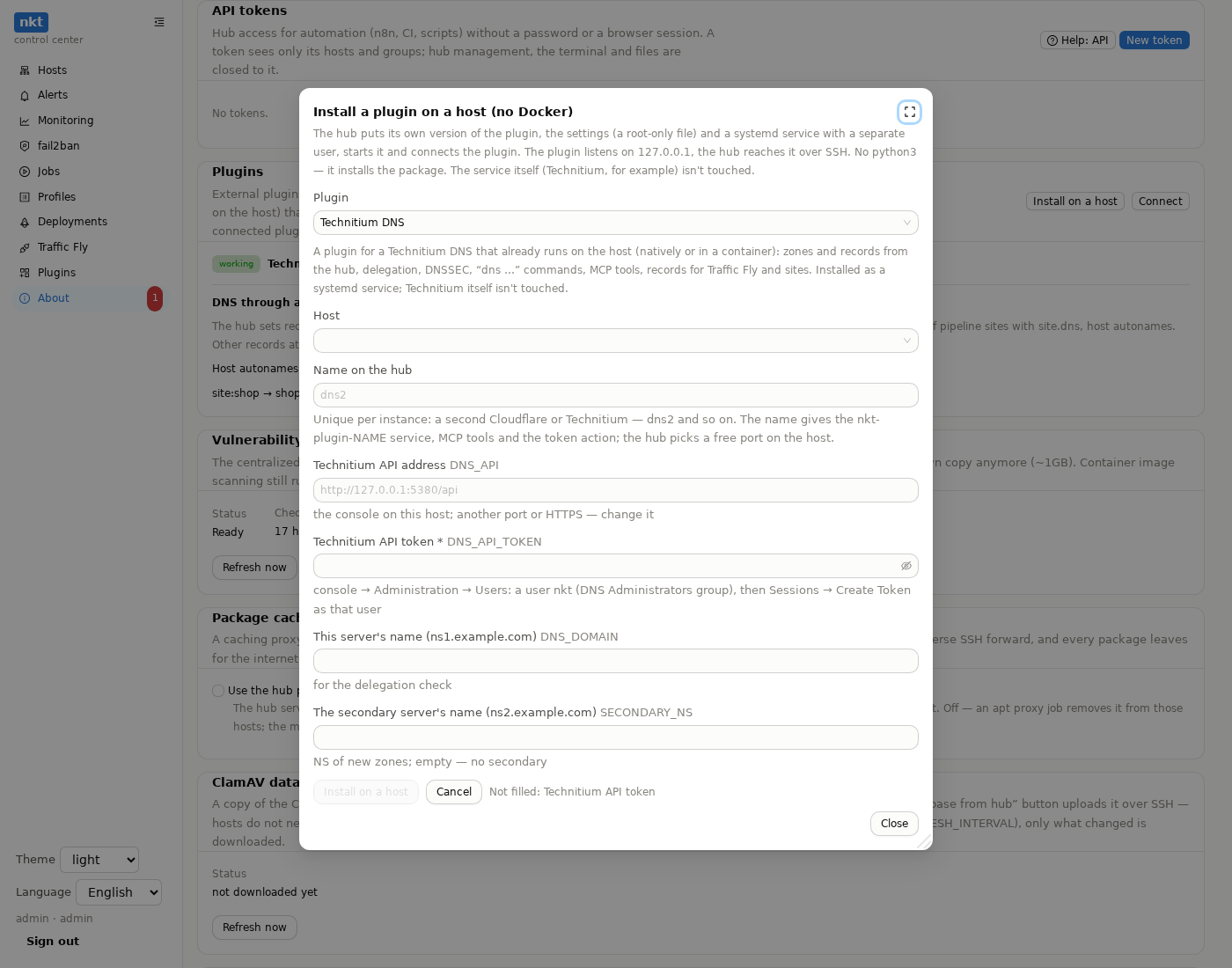
The hub puts the plugin file from the verified catalog copy into
/opt/nkt-plugins/<name>/, the settings into/etc/nkt-plugins/<name>.env(0600, root only, no config history), ankt-plugin-<name>.serviceunit: a separate user (DynamicUser),ProtectSystem=strict, listening on127.0.0.1only. If the host's/etc/nsswitch.conflacks thesystemdmodule (thelibnss-systemdpackage), a systemd dynamic user maps to no name, andsshinside the plugin (Windows, connector) fails with “No user exists for uid …”. The hub then creates a permanent system usernktp-<name>with no login and no home and removes it together with the plugin. An installed plugin switches to it on “Update on the host”.The agent creates and removes the plugin directories in
/opt/nkt-pluginsoutside its sandbox, the way it writes configs —/optis read-only for the nkt service.Secrets (tokens from the form and the signing secret the hub creates itself) don't go into the job parameters: a one-time in-memory store on the hub, 15 minutes.
No
python3— the job installs the package.The plugin connects to the hub by itself. Update on the host — the hub's version of the plugin file and a restart (settings stay); Remove from the host — the service, files and the connection.
Settings — plugins without settings of their own (Windows, MikroTik, connector: the hub keeps the device logins) have no such button. The rest — the same fields as at install (token, address, zones…), without reinstalling. The hub reads ordinary values from the host; secrets are shown to no one: “set” and a Replace field (empty keeps the current one). Check — a diff; Save — as a job: the settings file and a service restart; if the plugin doesn't answer, the previous settings come back by themselves, and the job log has the service's last log lines. The history of ordinary values (20 versions, no secrets) is kept on the hub, a version can be restored. For a DNS plugin the hub reconciles its records right after saving. A new plugin version added a required field — a “needs settings” mark. For a plugin deployed by a pipeline, the settings are the pipeline's
.env.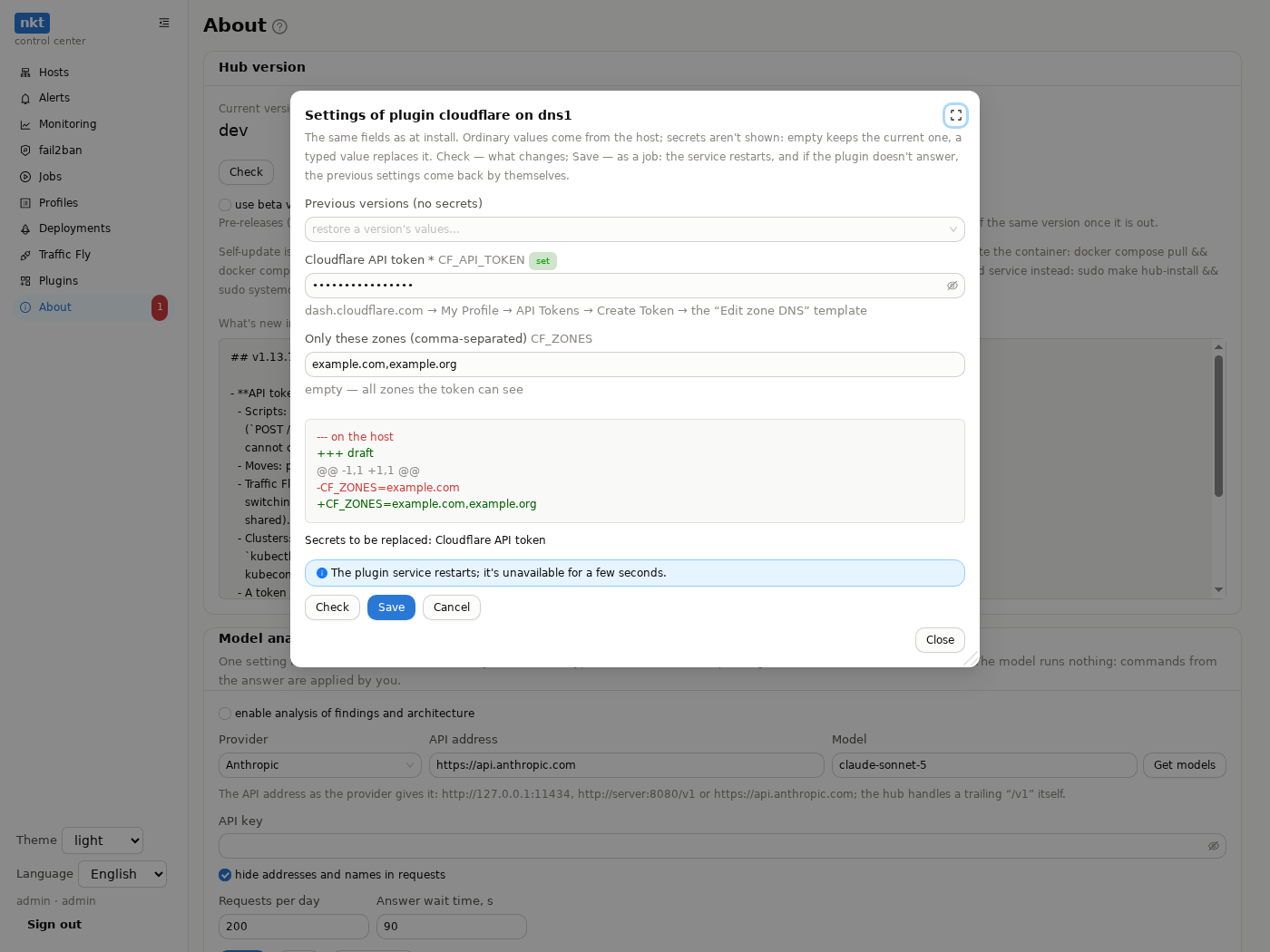
Needs nkt on the host of this version or newer (the agent's
/api/plugins/nativecall).Several instances of one plugin (two Cloudflare accounts, two Technitiums) — different names (
dns,dns2): the name gives thenkt-plugin-<name>service, MCP tools and the token action; the hub picks a free port on the host. The script word stays with the first, the second one isplugin dns2 dns ….A hub in Docker — a plugin can't be installed as a service on its machine (no systemd in the container): it isn't in the install window's host list.
Docker access (
"docker": truein the install description — say, for a mail server plugin managed by a command inside its container): the service joins thedockergroup, that's root rights on the host — the install window warns beforehand.After a hub update, plugins whose file in the hub's catalog is newer get a newer version available mark and an Update all button (one job; they don't update by themselves).
Where to put plugins
| Where | When |
|---|---|
| On the service's own host | the plugin manages a local service (Technitium, a mail server, Garage): its API is on 127.0.0.1, nothing is exposed |
| On the hub machine | the plugin calls an external API (Cloudflare, Proxmox in the hub's network): simplest; the external system's secrets live on the hub machine |
| On a separate “integrations” host | external APIs too, but the secrets don't belong next to the hub or the hub can't reach the needed network |
A plugin that is down shows an error in its sections, the DNS check retries by itself; the rest of the hub works.
The catalog is an install description next to the plugin file in the repository (examples/<example>/deploy/nkt-plugin.json):
{
  "name": "dns",
  "title": {"ru": "Technitium DNS", "en": "Technitium DNS"},
  "run": "python3",
  "file": "nkt-plugin.py",
  "port": 9180,
  "settings": [
    {"env": "DNS_API", "default": "http://127.0.0.1:5380/api", "title": {"ru": "…", "en": "…"}},
    {"env": "DNS_API_TOKEN", "secret": true, "required": true, "title": {"ru": "…", "en": "…"}}
  ]
}
Rights
| Who | What |
|---|---|
| Anyone signed in, a read token | the plugin's sections and read-only operations |
| An administrator | everything the plugin can do |
| A token by permission | operations that change things — with the “plugin NAME” action in the token window |
| The plugin itself | calls to the hub — with a token by permission holding only the actions it asked for (hub_actions) and you confirmed when connecting |
Every plugin action (an operation, a document edit, a script command) is in the hub's audit log: plugin.op, plugin.doc, plugin.command, the connection — plugin.connect.
Sections
A section is what the plugin shows: tables, text, buttons. Buttons call the plugin's operations (with a form and a confirmation), open another section (“open zone”) or edit a document — a text (a zone file, for example) in the same window as everything else in nkt: a diff before writing and a version history on the hub. If the document changed while you were editing it, the write is refused and the hub shows the new text.
Scripts
A plugin command is written as
plugin NAME WORD args…or as one word, unless another plugin took it (dns set …). Check asks the plugin whether it is written correctly; in a dry run the plugin only says what it would do. Help on the words is in the plugin's section and in script commands.
MCP
Operations the plugin marked for agents are tools <name>_<operation> (dns_zones, dns_record_set). A read token sees only read operations, others need the “plugin NAME” action. Disconnect the plugin and the tools are gone from tools/list.
Protocol (for your own plugins)
Version 1. A plugin is an HTTP server in any language.
Signature. Every hub request carries headers:
X-NKT-Timestamp— Unix time in seconds;X-NKT-Signature— hex HMAC-SHA256 of<timestamp>.<path>.<body>with the secret (<path>—/nkt/manifestor/nkt/call, a GET body is empty);X-NKT-Lang—ruoren: the plugin returns its texts in it.
A timestamp older than 5 minutes or a wrong signature — answer 401.
GET /nkt/manifest:
{
  "protocol": 1,
  "name": "dns",
  "title": "Technitium DNS",
  "version": "1.0.0",
  "description": "…",
  "ops": [
    {"name": "zones", "title": "Zones", "read_only": true, "mcp": true,
     "description": "List zones", "input": {"type": "object", "properties": {}}},
    {"name": "record_set", "mcp": true, "destructive": false,
     "input": {"type": "object", "properties": {"name": {"type": "string"}}, "required": ["name"]}}
  ],
  "pages": [{"id": "zones", "title": "Zones", "op": "zones"}],
  "commands": [{"word": "dns", "usage": "dns set NAME TYPE VALUE [ttl SEC]"}],
  "provides": ["dns"],
  "hub_actions": []
}name— Latin letters, digits, hyphen (2–32); operations and sections — Latin letters, digits,_. A section refers to a read-only operation;"hidden": true— not a button at the top, only reached from another section (openwith arguments).commands— script words; the language's own words (on,fly,deploy…) can't be taken.provides: ["dns"]— the plugin keeps DNS records for the hub (below).hub_actions— token-by-permission actions (pipeline.deploy,fly.manage…) the plugin asks of the hub.
POST /nkt/call — {"op": "…", "args": {…}, "user": "admin", "dry_run": false} → {"ok": true, "text": "…", "result": …, "view": …} or {"ok": false, "error": "a text for a person"}.
A section's view (view):
{"type": "table", "title": "Zones", "note": "…",
 "columns": [{"key": "zone", "title": "Zone"}],
 "rows": [{"cells": {"zone": "example.com"},
           "actions": [{"title": "Records", "open": "records", "args": {"zone": "example.com"}},
                       {"title": "Zone file", "args": {"zone": "example.com"},
                        "edit": {"get": "zone_text", "put": "zone_import", "doc": "example.com"}},
                       {"title": "Delete", "op": "zone_delete", "args": {"zone": "example.com"},
                        "confirm": "Delete zone example.com?", "danger": true}]}],
 "actions": [{"title": "Add zone", "op": "zone_add",
              "fields": [{"name": "zone", "title": "Zone", "required": true}]}]}
type — table, text (text) or sections (items — views one after another). Form fields: text, textarea, number, select (options), bool, password (masked input; the value isn't written to the action log). A document: the get operation returns result.text, put receives args.text; the hub keeps the version history.
A button with dns — records the plugin needs in DNS (mail: MX, SPF, DKIM): {"title": "…", "dns": {"owner": "domain:example.com", "records": [{"name": "example.com", "type": "MX", "values": ["10 mail.example.com."], "ttl": 3600}]}}. The hub sets them through the connected DNS plugin (owner plugin:<name>:<owner>, types A, AAAA, CNAME, TXT, MX) — a window with Check and Apply; rights are those of a data-changing operation.
Secrets from a plugin (a new API key):
"reveals": trueon an operation and"reveal": {"title", "value", "note"}in the answer — the secret is shown once to the browser window with a Copy button. The hub doesn't let a token (API, MCP) call such an operation unless the secret goes straight into a.env."store": {"pipeline", "env", "value"}in the answer — the hub writes the value into the pipeline's.envitself (with version history) and removes it from the answer. Where — only what the request said: theto_pipelineandenvarguments (an operation) or the wordsto-pipeline PIPELINE env NAME(a script command). The hub checks the rights (an admin or a token with “pipeline.create” within its limits) before calling the plugin.- The values reach neither the action log nor the job log.
Service operations (not in ops, the hub calls them itself):
| Operation | Arguments | When |
|---|---|---|
_connect | name, hub_url, token | on connecting (a token — if hub_actions were asked); not needed — answer with an error mentioning _connect |
_check | argv | Check of a script with a plugin command: an error as text |
_command | argv, the request's dry_run | running a script command; text — lines for the job log |
_dns_zones | — | provides: dns: {"result": {"zones": ["example.com"]}} |
_dns_sync | owner, records, previous | provides: dns: bring the owner's records (fly:<route>, site:<domain>) to records, removing whatever of previous isn't in records |
argv — the words of the script command starting with the command word: dns set app.example.com A 203.0.113.10 → ["dns", "set", "app.example.com", "A", "203.0.113.10"].
For agents and scripts
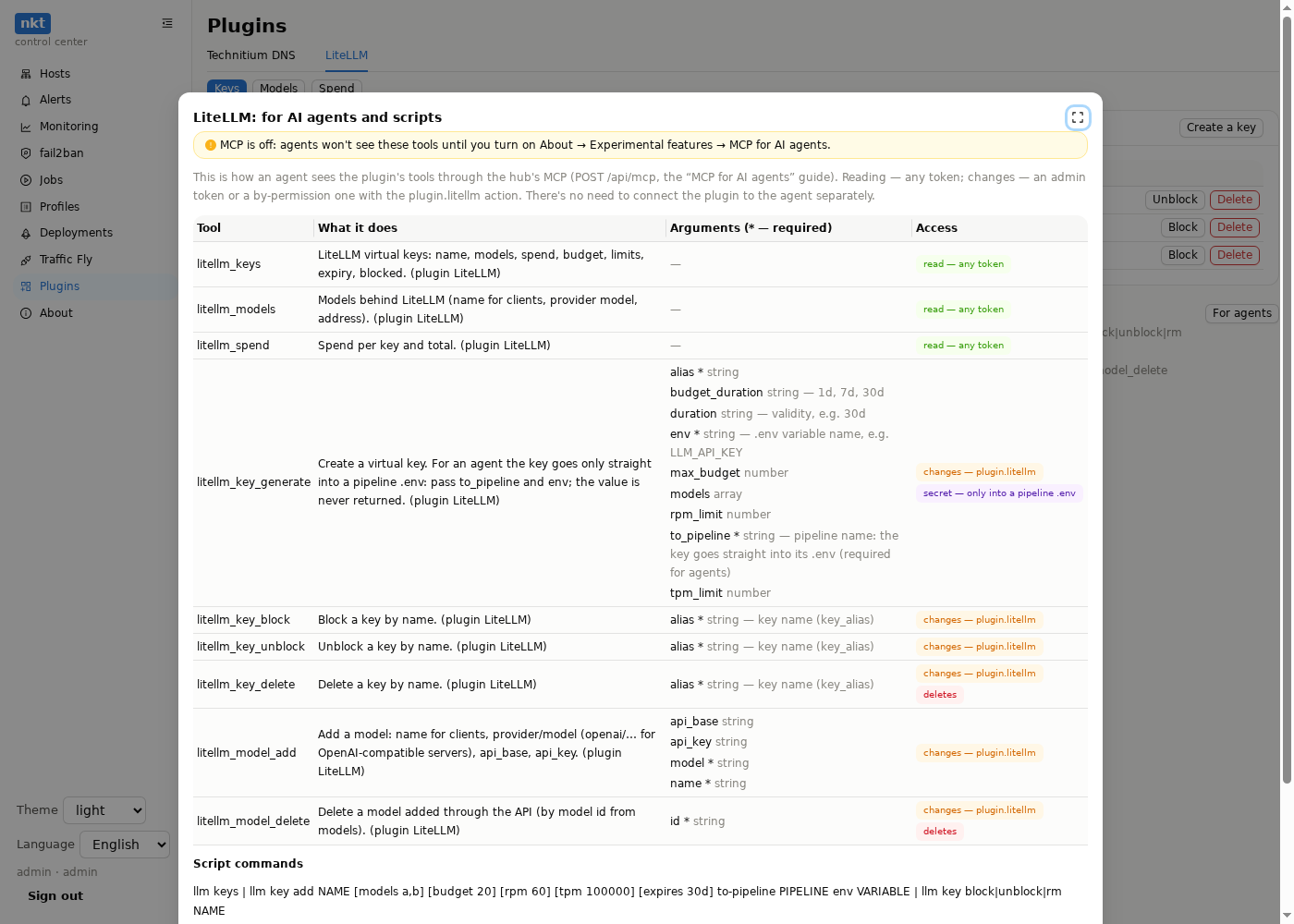
Plugins → the plugin → For agents: the plugin's MCP tools exactly as an agent gets them (name, description, arguments, required ones with an asterisk), who can use them (reading — any token, changes — a token with the “plugin NAME” action, what deletes, what returns a secret only into a pipeline .env), and the script commands with examples. Download JSON — the same format as the MCP tools/list answer, plus the commands: give it to an agent or keep it next to its instructions. If MCP is off, the window says so.
Your own plugin: the shortest one
The full guide is Writing a plugin (also examples/AGENTS.en.md for agents in the repository), a working template with a test — examples/_template, the check — go run ./cmd/nkt-catalog lint -dir examples/<name>.
Python without dependencies, one section and one command:
import hashlib, hmac, json, os, time
from http.server import BaseHTTPRequestHandler, ThreadingHTTPServer

SECRET = os.environ["NKT_PLUGIN_SECRET"].encode()

def signed(h, path, body):
    ts = h.headers.get("X-NKT-Timestamp", "0")
    want = hmac.new(SECRET, f"{ts}.{path}.".encode() + body, hashlib.sha256).hexdigest()
    return abs(time.time() - int(ts)) < 300 and hmac.compare_digest(want, h.headers.get("X-NKT-Signature", ""))

MANIFEST = {"protocol": 1, "name": "hello", "title": "Hello", "version": "0.1",
            "ops": [{"name": "info", "read_only": True, "mcp": True, "description": "Say hello"}],
            "pages": [{"id": "info", "title": "Hello", "op": "info"}],
            "commands": [{"word": "hello", "usage": "hello NAME"}]}

class H(BaseHTTPRequestHandler):
    def reply(self, obj, code=200):
        raw = json.dumps(obj).encode()
        self.send_response(code); self.send_header("Content-Type", "application/json")
        self.send_header("Content-Length", str(len(raw))); self.end_headers(); self.wfile.write(raw)
    def do_GET(self):
        if not signed(self, self.path, b""): return self.reply({"error": "signature"}, 401)
        self.reply(MANIFEST)
    def do_POST(self):
        body = self.rfile.read(int(self.headers.get("Content-Length", 0)))
        if not signed(self, self.path, body): return self.reply({"error": "signature"}, 401)
        req = json.loads(body)
        if req["op"] == "info":
            return self.reply({"ok": True, "view": {"type": "text", "text": "Hello from the plugin"}})
        if req["op"] in ("_check", "_command"):
            argv = req["args"]["argv"]
            if len(argv) != 2: return self.reply({"ok": False, "error": "hello NAME"})
            return self.reply({"ok": True, "text": f"hello, {argv[1]}" + (" (dry run)" if req.get("dry_run") else "")})
        self.reply({"ok": False, "error": f"no op {req['op']}"})

ThreadingHTTPServer(("0.0.0.0", 9180), H).serve_forever()
In compose — ports: ["127.0.0.1:9180:9180"] and the secret from .env. The full example is the Technitium DNS plugin in examples/technitium.